Connect the Pipeline to a Knowledge Base
Publish a pipeline version before applying a custom pipeline to a Dataset. Saving a draft alone does not make it selectable for document processing.
-
Open the target Dataset and select Configuration.
-
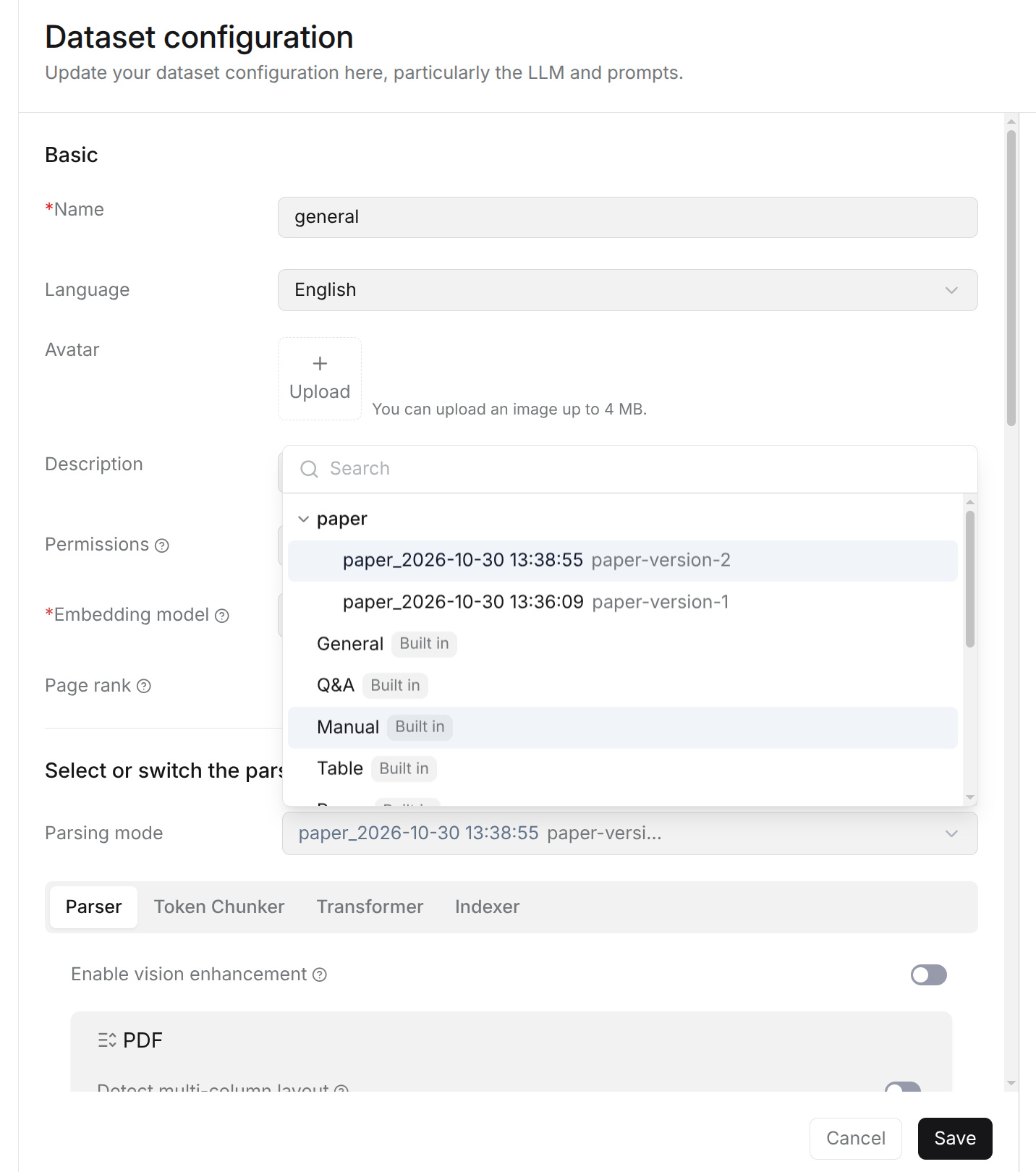
Find Parsing mode and open its dropdown. Search for the pipeline name if needed.
-
Expand the custom pipeline to view its published versions, then select the required version within the same dropdown. Use the version title and alias, when provided, to identify the intended configuration. The pipeline name itself is a group, not a selectable draft.
-
Click Save to apply the selection to the Dataset.
-
Parse a sample document and inspect the results before processing more files.
There is no separate Version dropdown. No published versions means the pipeline has no version available for selection: return to its canvas, check the configuration, and click Publish first. Entries marked Built in are built-in parsing modes and can be selected directly without expanding a custom pipeline.
The Dataset keeps its selected pipeline version when another version is published. To apply an update, reopen Configuration > Parsing mode, expand the pipeline, select the new version, and click Save. Reparse existing documents that need the updated processing; changing the selection does not regenerate their existing chunks.