Configure the Chunker Component
After Parser, choose Token Chunker or Title Chunker through the outgoing connection point. After the Chunker, add Transformer or Compiler to enrich the chunks, or Indexer to index them.
The custom pipeline's connection menu offers Token Chunker and Title Chunker. Built-in previews can display other names, such as Manual Chunker; those names are not additional choices in the custom pipeline's add menu. A canvas supports one chunking component, so the menu no longer offers another after one has been added.
Token Chunker
Use token-based chunking for text without reliable section structure. Click the node to open its panel, then choose Delimiters to configure splitting or One to keep the content together. The splitting controls below are shown in Delimiters mode; One hides them.
| Setting | Description |
|---|---|
| Delimiters / One | Choose delimiter-based splitting or keep the content as one chunk. |
| Recommended chunk size | Target chunk length in tokens. Defaults to 512; the control supports 1–2048. |
| Overlapped percent (%) | Adds overlapping text between adjacent chunks. Defaults to 0; the control supports 0–30. |
| Image & table context window | Number of tokens taken before and after an image or table as context. Defaults to 0; the slider ranges from 0 to 256. |
| Delimiters | Defaults to \n, !, ?, ;, 。, ;, !, and ?. Each entry is a separate delimiter. Edit or remove entries, or click Add for another delimiter; check the Splits at preview. |
| Child chunk are used for retrieval | Splits parent chunks into smaller retrieval chunks using Child delimiters, which appear after enabling the switch. Disabled by default. For line-based child chunks, enable it and add \n. |
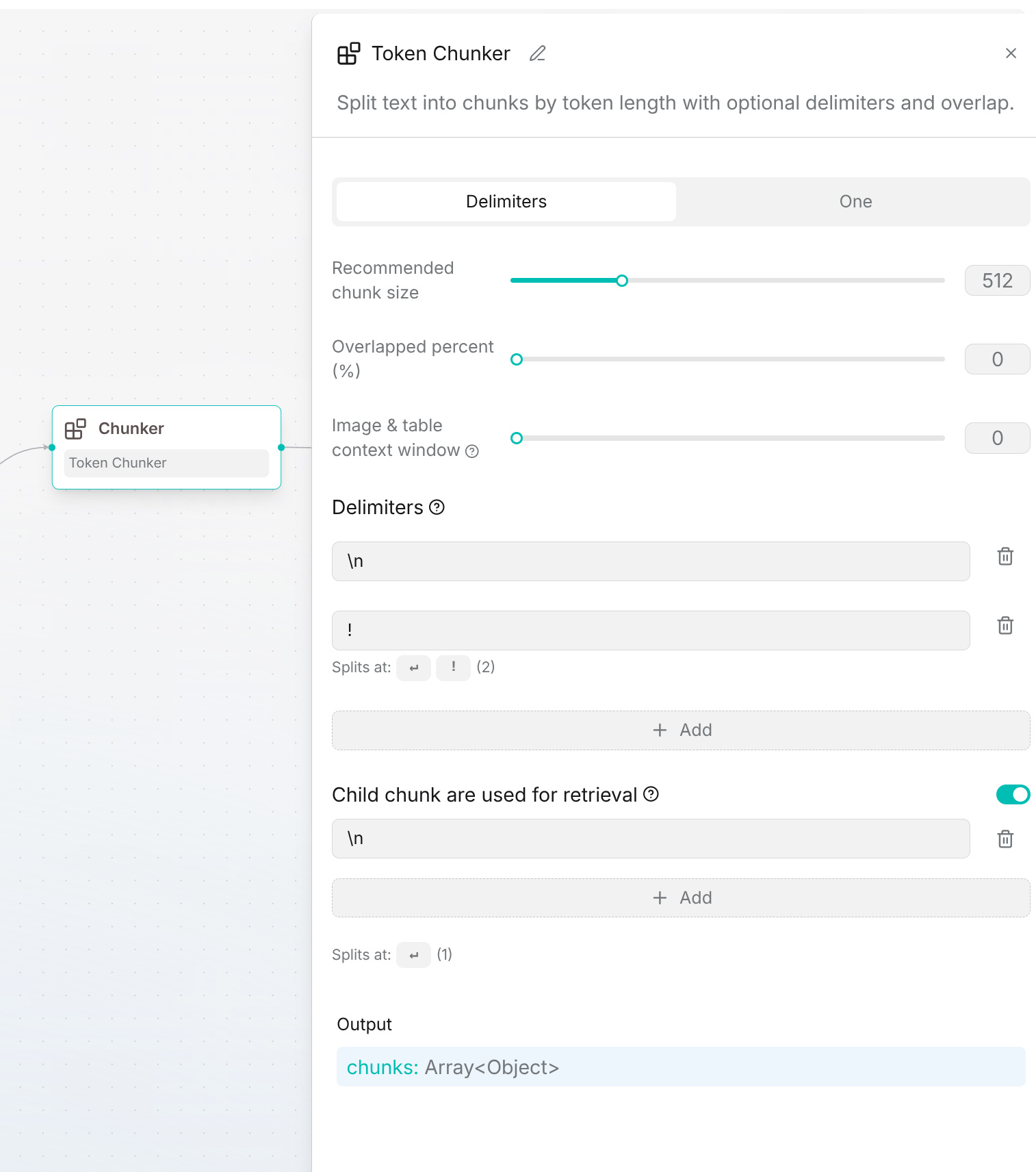
The output is chunks, an array of objects that downstream components can process.
Click Save draft after configuring the node. Publish and validate on a sample to check chunk boundaries, overlap, and child chunks.
Title Chunker
Use Title Chunker for documents with clear headings, such as manuals and papers. Check that the resulting chunks keep each heading with its content.
- Choose Hierarchy to retain the heading path in each chunk, or Group to split at a selected heading level and group adjacent sections.
- Select the heading level and configure the matching rules. Use Add Rule for another heading pattern and Add regular expressions for additional levels within a rule.
- Set Chunk token cap. It defaults to
512; the slider supports128–8000. Content exceeding the cap is split further at sentence boundaries. - In Hierarchy mode, adjust these options as needed:
| Setting | Description |
|---|---|
| Separate parent-heading content | Keeps content directly below a parent heading in a separate chunk. Disabled by default. |
| Set first chunk as global context | Uses the first section as shared context across the heading hierarchy. Disabled by default. |
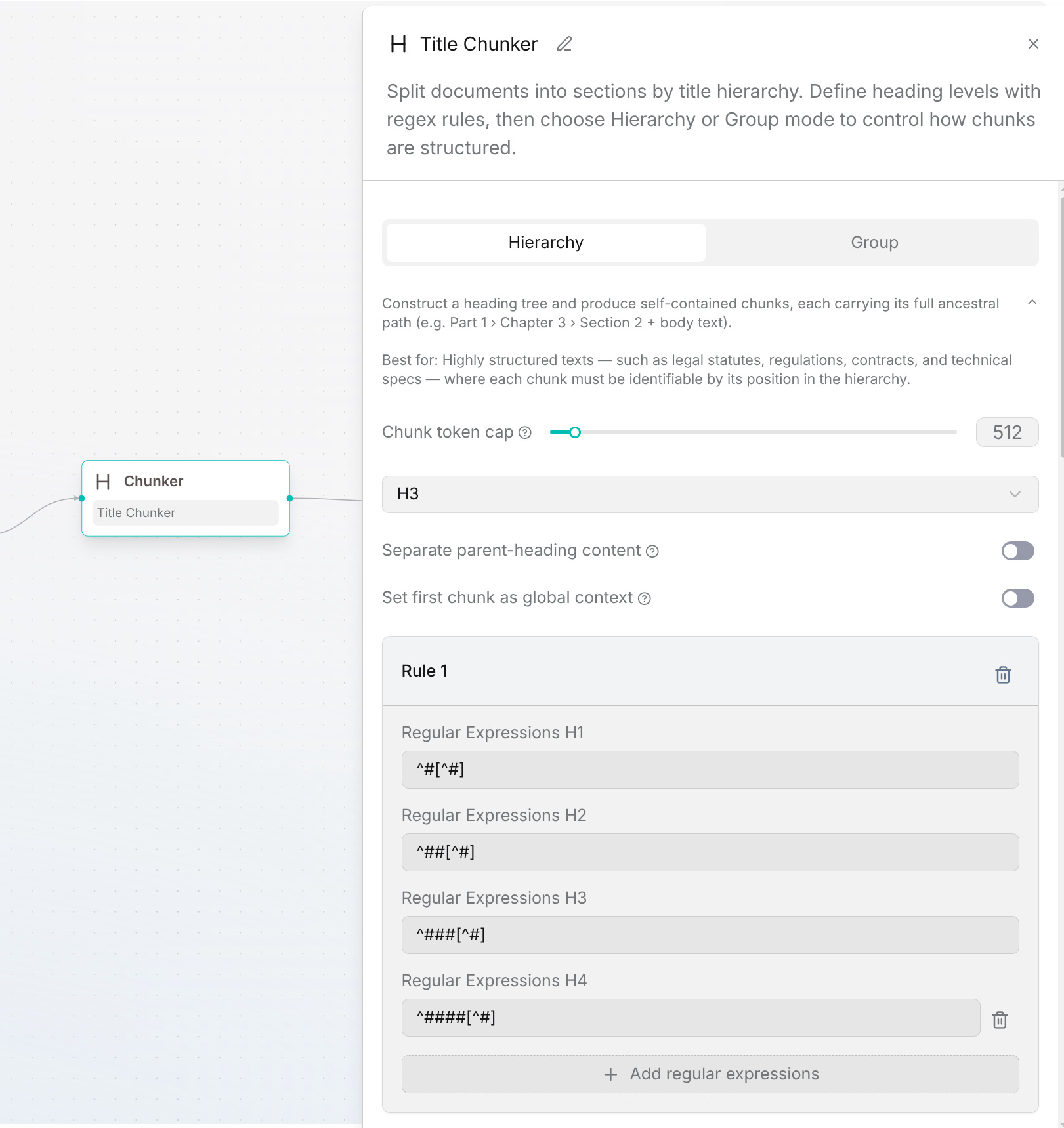
For Markdown headings, add ^# for level 1 and ^## for level 2, then select level 2. In Hierarchy mode, check that each subsection retains its parent heading. Use the output chunks in downstream components.