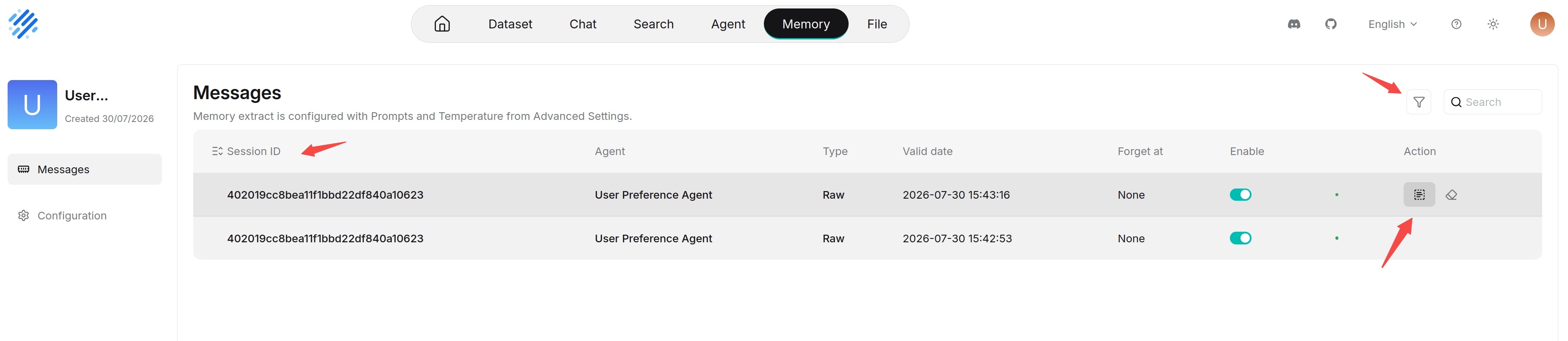
Message Page
The message page is used to view messages written to memory and control whether messages participate in subsequent retrieval. The left side provides Messages and Configurations entries, and the right side displays the message list, search, and filters.
Memory extraction uses the prompts and temperature in Advanced Settings on the configuration page. If the extraction result does not meet expectations, check these configurations first.
Users can search messages in the current memory's message list, or narrow the search scope through conditional filters.
The message list displays information such as sessions, source Agents, message types, valid time, forgotten status, and enabled status, and provides corresponding operation entries.
Message Fields
| Field | Description |
|---|---|
| Session ID | The session that the message belongs to. Multiple messages generated in the same session usually have the same session ID. |
| Agent | The name of the Agent that wrote the message, such as customer or deep search. |
| Type | The message type or extracted memory type. In the current example, this is displayed as Raw. |
| Valid date | The valid time of this memory, that is, the effective time. |
| Forgotten at | The time when this message was forgotten. If it has not been forgotten, this is usually displayed as None or left empty. |
| Enabled | Controls whether this message participates in subsequent retrieval. After it is disabled, the message is still retained, but it no longer affects Agent retrieval results. |
| Operation | Used to view, copy, view logs, or forget messages. The specific buttons depend on the current permissions and message status. |