Use memory
RAGFlow's Memory module is built to save everything, including conversation that happens while an Agent is working. It keeps the raw logs of conversations, like what a user says and what the AI says back. It also saves extra information created during the chat, like summaries or notes the AI makes about the interaction. Its main jobs are to make conversations flow smoothly from one to the next, to allow the AI to remember personal details about a user, and to let the AI learn from all its past talks.
This module does more than just store the raw data. It is smart enough to sort information into different useful types. It can pull out key facts and meanings (semantic memory), remember specific events and stories from past chats (episodic memory), and hold details needed for the current task (working memory). This turns a simple log into an organized library of past experiences.
Because of this, users can easily bring back any saved information into a new conversation. This past context helps the AI stay on topic and avoid repeating itself, making chats feel more connected and natural. More importantly, it gives the AI a reliable history to think from, which makes its answers more accurate and useful.
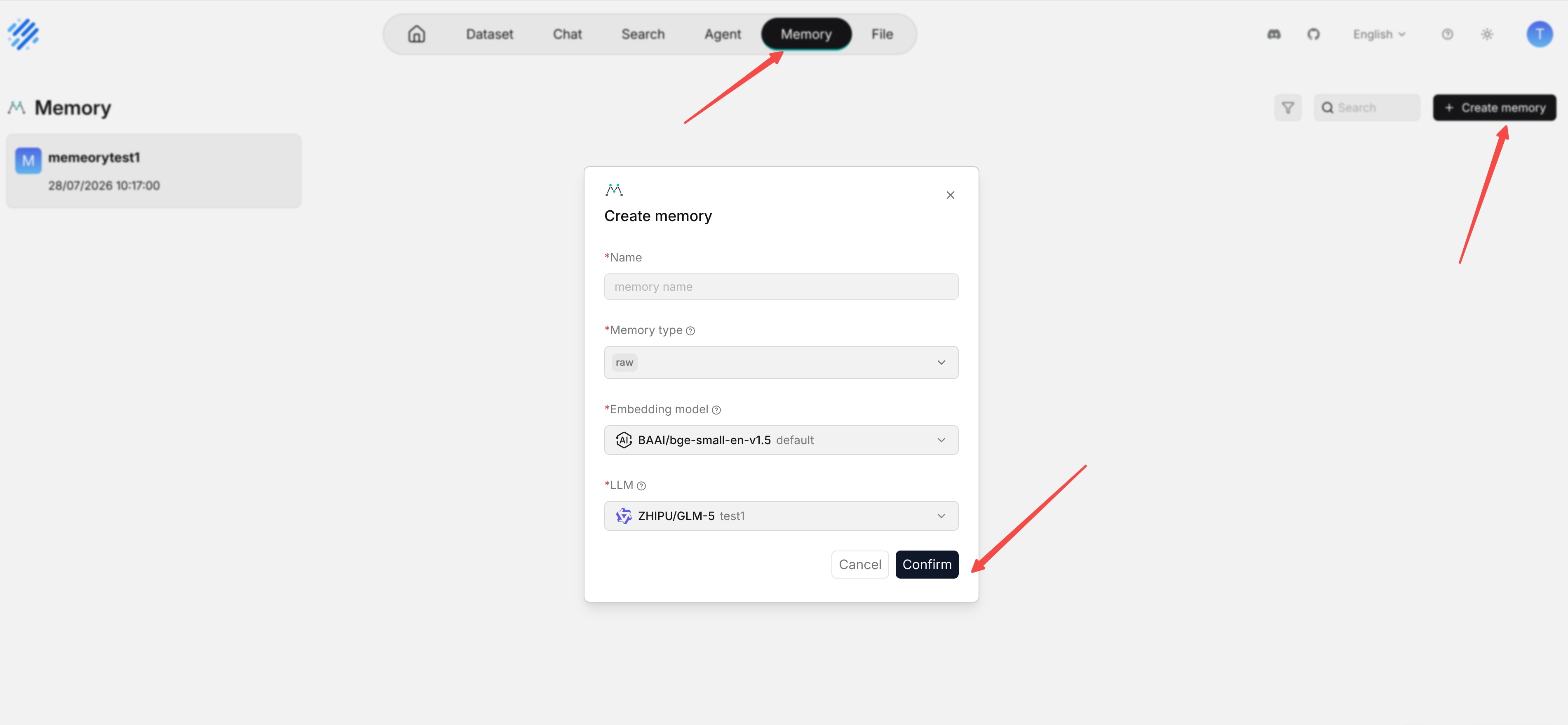
Create memory
The Memory module offers streamlined, centralized management of all memories.
When creating a Memory, users can precisely define which types of information to extract, helping ensure that only relevant data is captured and organized. From the navigation path Overview >> Memory, users can then perform key management actions, including renaming memories, organizing them, and sharing them with team members to support collaborative workflows.
Configure memory
On the Memory page, click the intended memory > Configuration to view and update its settings.
Name
The unique name of the memory created.
Embedding model
The embedding model for converting the memory into embeddings.
LLM
The chat model for extracting knowledge from the memory.
Memory type
What is stored in the memory:
Raw: The raw dialogue between the user and the Agent (Required by default).
Semantic Memory: General knowledge and facts about the user and world.
Episodic Memory: Time-stamped records of specific events and experiences.
Procedural Memory: Learned skills, habits, and automated procedures.
Memory size
The default capacity allocated to the memory and the corresponding embeddings in bytes. Defaults to 5242880 (5MB).
A 1KB message with a 1024-dimension embedding occupies approximately 9KB of memory (1KB + 1024 x 8Bytes = 9KB). With a default limit of 5 MB, the system can store roughly 500 such messages.
Permission
- Only me: Exclusive to the user.
- Team: Share this memory with the team members.
Manage memory
Within an individual Memory page, you can fine-tune how saved entries are used during Agent calls. Each entry can be selectively enabled or disabled, allowing you to control which pieces of information remain active without permanently removing anything.
When certain details are no longer relevant, you can also choose to forget specific memory entries entirely. This keeps the Memory clean, focused, and easier to maintain over time, ensuring that Agents rely only on up‑to‑date and useful information.
Manually forgotten memory entries are completely excluded from the results returned by Agent calls, ensuring they no longer influence downstream behavior. This helps keep responses focused on the most relevant and intentionally retained information.
When the Memory reaches its storage limit and the automatic forgetting policy is applied, entries that were previously forgotten manually are also prioritized for removal. This allows the system to reclaim capacity more intelligently while respecting earlier user curation decisions.
Enhance Agent context
Under Retrieval and Message component settings, a new Memory invocation capability is available. In the Message component, users can configure the Agent to write selected data into a designated Memory, while the Retrieval component can be set to read from that same Memory to answer future queries. This enables a simple Q&A bot Agent to accumulate context over time and respond with richer, memory-aware answers.
Retrieve from memory
For any Agent configuration that uses Memory, a Retrieval component is required to bring stored information back into the conversation. By including Retrieval alongside Memory-aware components, the Agent can consistently recall and apply relevant past data whenever it is needed.
Save to memory
At the same time you have finished Retrieval component settings, select the corresponding Memory in the Message component under Save to Memory:

Frequently asked questions
Can I share my memory?
Yes, you can. Your memory can be shared between Agents. See these topics:
If you wish to share your memory with your team members, please ensure you have configured its team permissions. See Share memory for details.