Chat Configuration
Dataset Configuration
dataset determine the data scope that Chat can retrieve and cite. Only dataset that contain successfully parsed, available chunks can serve as valid knowledge sources.
- Select dataset: Associate one or more dataset in the dataset field. New or empty dataset generally do not appear in the selection list.
- Unavailable dataset: If a dataset has been deleted or contains no available chunks, Chat indicates that the selected dataset is unavailable. Select another dataset.
For answers grounded in retrieved knowledge, consider retaining the {knowledge} placeholder in the system prompt.
Model
Select the large language model that understands questions and generates answers. Models differ in context length, reasoning capability, response speed, tool-calling capability, and cost.
Choose a model based on the use case. For routine dataset Q&A, prioritize response speed. For complex analysis or multi-document synthesis, select a model with stronger reasoning capabilities.
The available models depend on the models that have been added and configured in the current system.
Opening Greeting
The opening greeting is the initial content shown when a user enters the Chat. Use it to briefly introduce the Chat's purpose, capability scope, usage, or example questions and help users begin a conversation.
An opening greeting can explain:
- The types of questions the Chat can answer.
- The knowledge or business content on which its answers are based.
- How users should phrase their questions.
- Recommended examples or frequently asked questions.
The opening greeting primarily provides an introduction and guidance; it does not control subsequent answer behavior.
System Prompt
The system prompt defines the Chat's role, tasks, and answer rules, and affects model behavior throughout the conversation.
Use it to specify the role, answer scope, language and tone, dataset usage, answer format, and how the Chat should handle missing information. For knowledge-base Q&A, explicitly instruct the model to prioritize dataset content and avoid filling in gaps or guessing when reliable evidence is unavailable.
You can also require the Chat to:
- Answer in English, Chinese, or another specified language.
- Keep answers concise and professional, or use a specified format.
- State clearly when an answer cannot be confirmed from the available information.
- Decline questions outside the scope of the current Chat.
Clearer prompts produce more stable behavior. Refine the prompt continuously based on testing, and avoid conflicting settings or overly complex rules.
Retrieval Configuration
Retrieval configuration controls how Chat recalls, filters, and ranks chunks from dataset. Tune these settings to balance retrieval scope, relevance, and response efficiency.
- Similarity threshold: The minimum similarity score for retrieved content. A higher threshold is stricter and usually returns more relevant content, but may miss useful information. A lower threshold broadens recall but may introduce less relevant content.
- Vector similarity weight: Controls the relative weight of vector semantic similarity and full-text matching in hybrid search. A higher vector weight favors semantic similarity; a higher full-text weight favors keyword and text matching. Tune it according to the dataset content and question style.
- Top N: The number of candidate chunks returned by each retrieval. A larger value provides more context but increases context length, response time, and cost. Tune it according to document scale and retrieval results.
- Rerank model: Reranks retrieval results, calculates the relevance between candidate chunks and the question, and moves more relevant content forward for answer generation. Configure an available rerank model before using this option.
- Metadata: Uses document or chunk metadata to limit the retrieval scope, such as by document type, date, or source.
Empty Response
An empty response is preset content returned when the system cannot obtain enough information from a dataset, for example:
No relevant content was found in the dataset. Add more information and try again.
When retrieval returns no usable dataset content, Chat returns the preset response instead of continuing to generate an answer. This is useful when answers must be strictly grounded in a dataset and helps reduce unreliable output.
If no empty response is configured, the model may continue answering from its own knowledge when the dataset contains no relevant content.
Choose a configuration according to the scenario:
- Strictly use the dataset: Configure an empty response for internal policies, customer service, compliance, product documentation, and other scenarios that depend heavily on dataset content.
- Allow the model to answer freely: Leave it blank if answering from the model's own knowledge is acceptable.
- Guide the user's next action: Include a clear instruction, such as adding information, trying again, or contacting an administrator.
An empty response is triggered only when retrieval finds no usable content. If any usable result exists, the system normally continues model generation; it does not decide based on whether the final answer is complete.
The Thinking mode also affects this process. Agentic investigates the data with its own retrieval tools before answering, so it performs more retrieval and reasoning than Naive before returning an empty response. An empty response is returned only when the system ultimately determines that it cannot answer.
Select a Thinking Mode
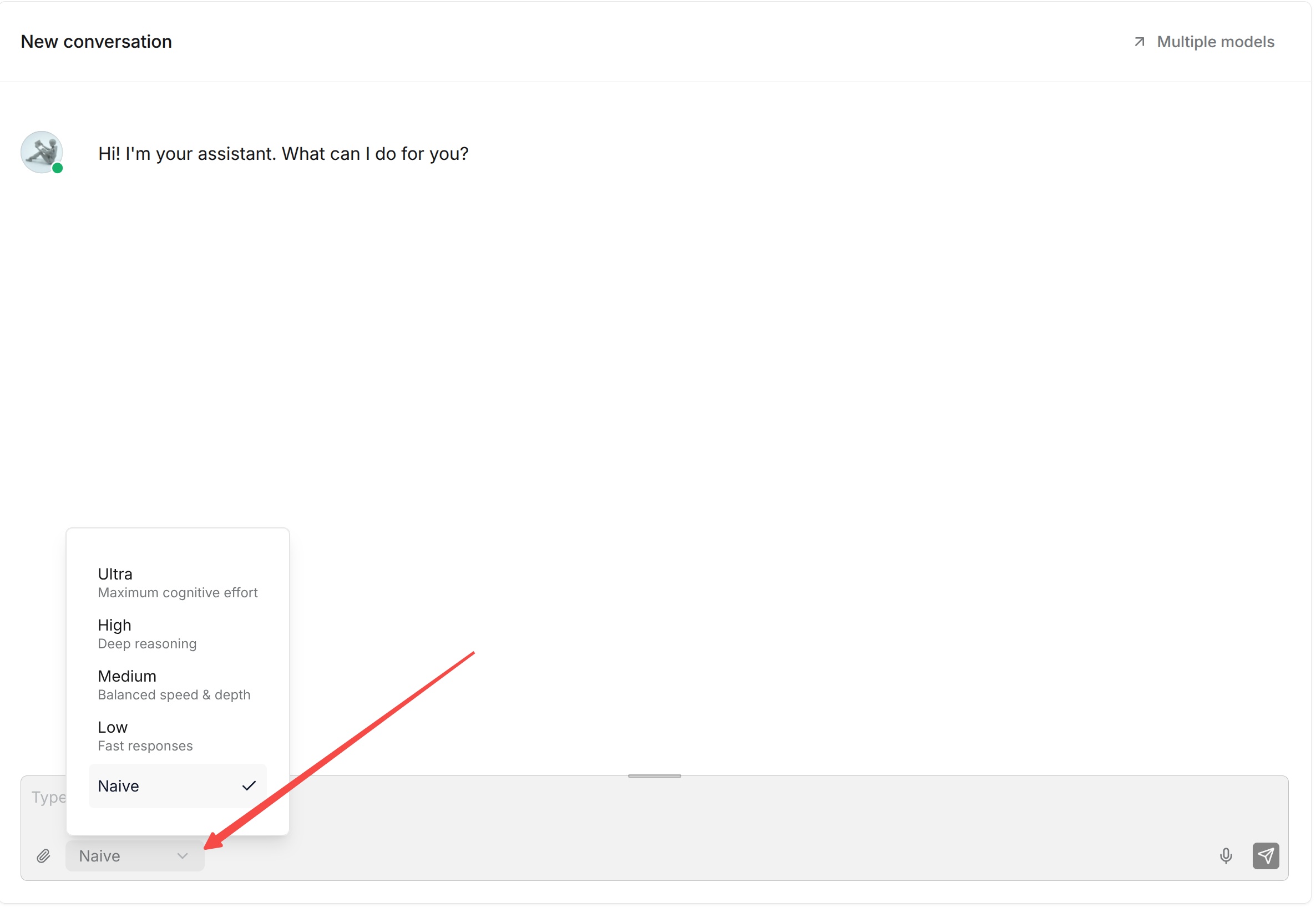
Thinking mode determines how Chat investigates available data before answering.
Before asking a question, select Naive or Agentic from the Thinking menu near the message box.
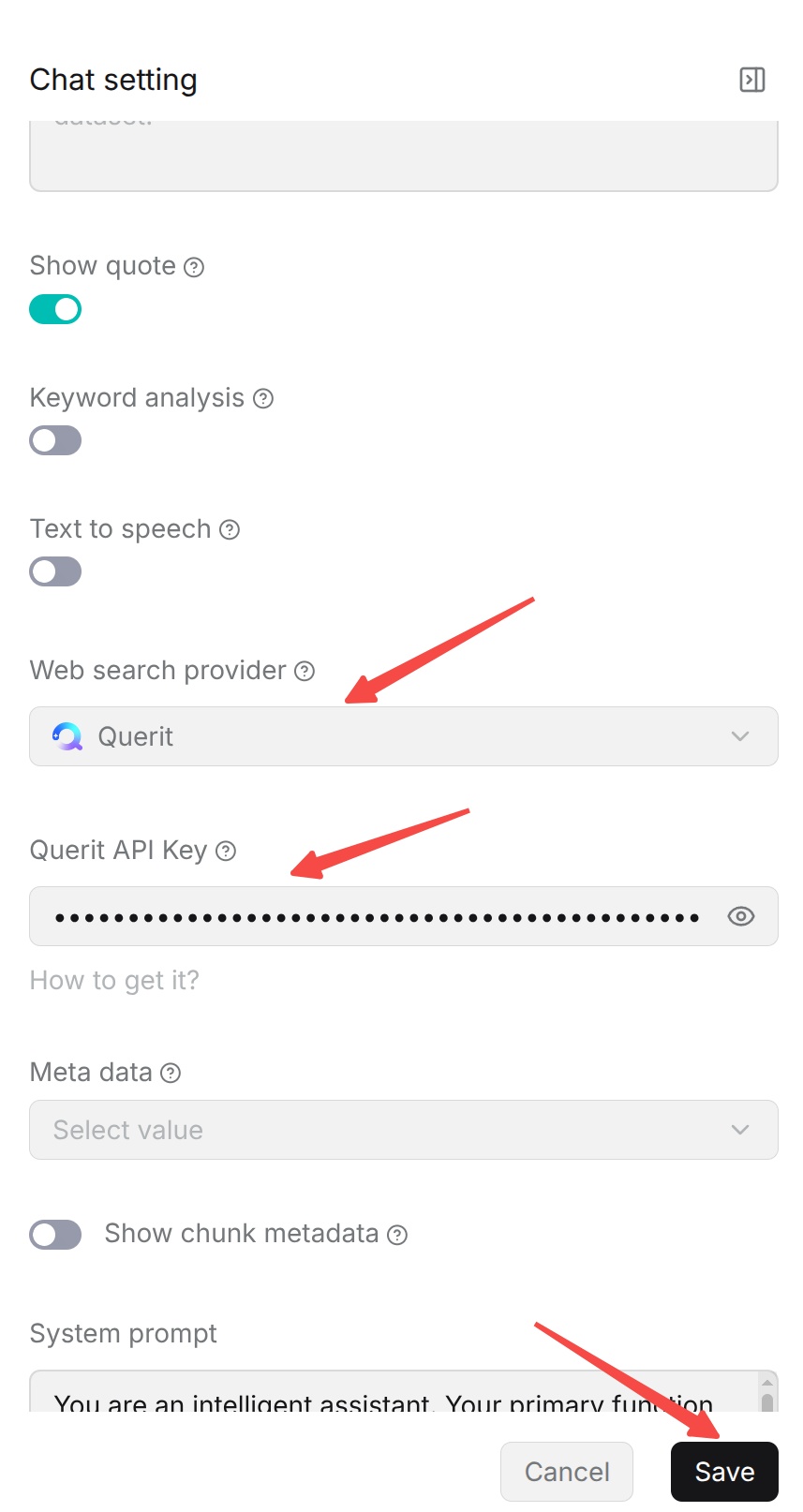
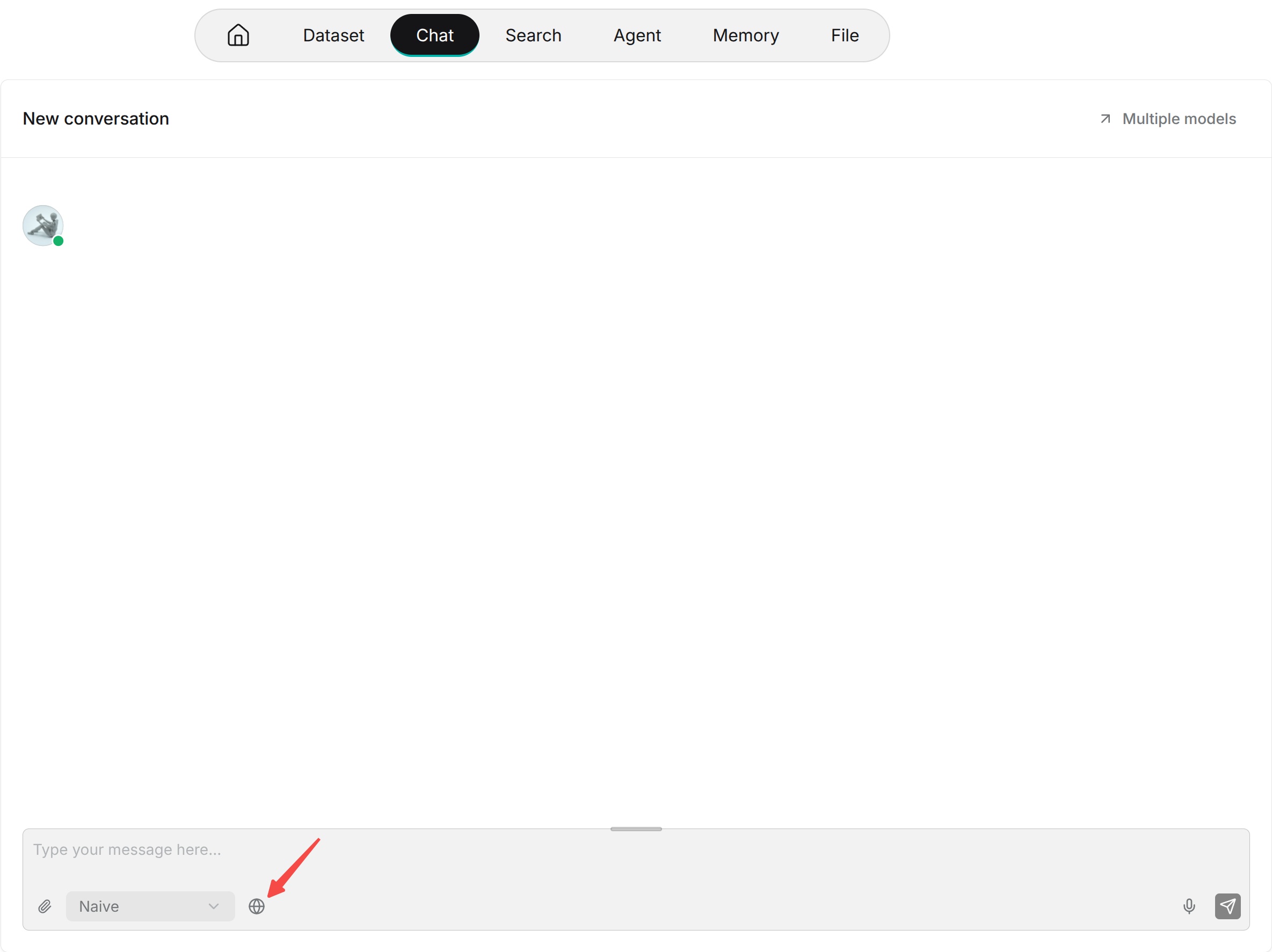
Retrieval means searching for evidence before answering. If a dataset is associated with the Chat, the system retrieves relevant chunks. If web search is enabled, or the current version provides PageIndex or Graph capabilities, those sources can also be used as supplemental evidence. The final answer should be based on the retrieved content.
- Naive: Performs retrieval without complex analysis. Use it for straightforward factual questions when identifiers, terms, or locations are clearly present in a document. It generally uses one query and responds fastest. It can be used together with empty responses and citations.
- Agentic: Hands the turn to a retrieval agent that searches the corpus itself — locating passages, reading documents in depth, and combining evidence across several of them — before answering. Use it for cross-document questions, comparisons, and multi-step research. It takes longer and invokes the model more often.
If you are unsure which mode to choose, use Naive for straightforward questions or when speed is critical, and Agentic when the answer is incomplete or requires cross-document comparison.
Retrieval Augmentation Options
Retrieval augmentation options further optimize queries or expand information retrieval beyond basic dataset retrieval. Enable them according to the actual question-answering scenario; you do not need to enable every option.
- Keyword analysis: Analyzes the user's question and uses the extracted keywords to assist retrieval. It is suitable for questions with distinctive keywords, such as product names, technical terms, and reference numbers.
- Multi-turn conversation optimization: Uses the conversation history to optimize the current retrieval query, helping the system understand context, references, and omitted information in a continuous conversation. It is suitable for multi-turn conversations about the same topic.
- Cross-language search: Improves retrieval across languages. When the question language differs from the language of the dataset documents, this option can improve the recall of cross-language content.
Answer and Display Settings
Answer and display settings control how generated content is presented and output. They generally do not change the dataset retrieval scope, but affect how citations, metadata, and voice content are presented to users.
- Show citations: When enabled, Chat displays the dataset content cited in the answer and its source, allowing users to inspect the evidence and trace it to the original document. When disabled, citation information is not shown.
- Show chunk metadata: When enabled, citations display metadata for the corresponding chunk, such as the source, author, and date fields configured for the document. This supplements citation context and helps users understand the source and attributes of the cited content.
- Text-to-speech: Select the model used to convert text answers to speech. Once configured, Chat can output generated text as speech. Leave it disabled if voice output is not needed. Before using this feature, configure an available text-to-speech (TTS) model.