Built-In Templates and Dedicated Configuration
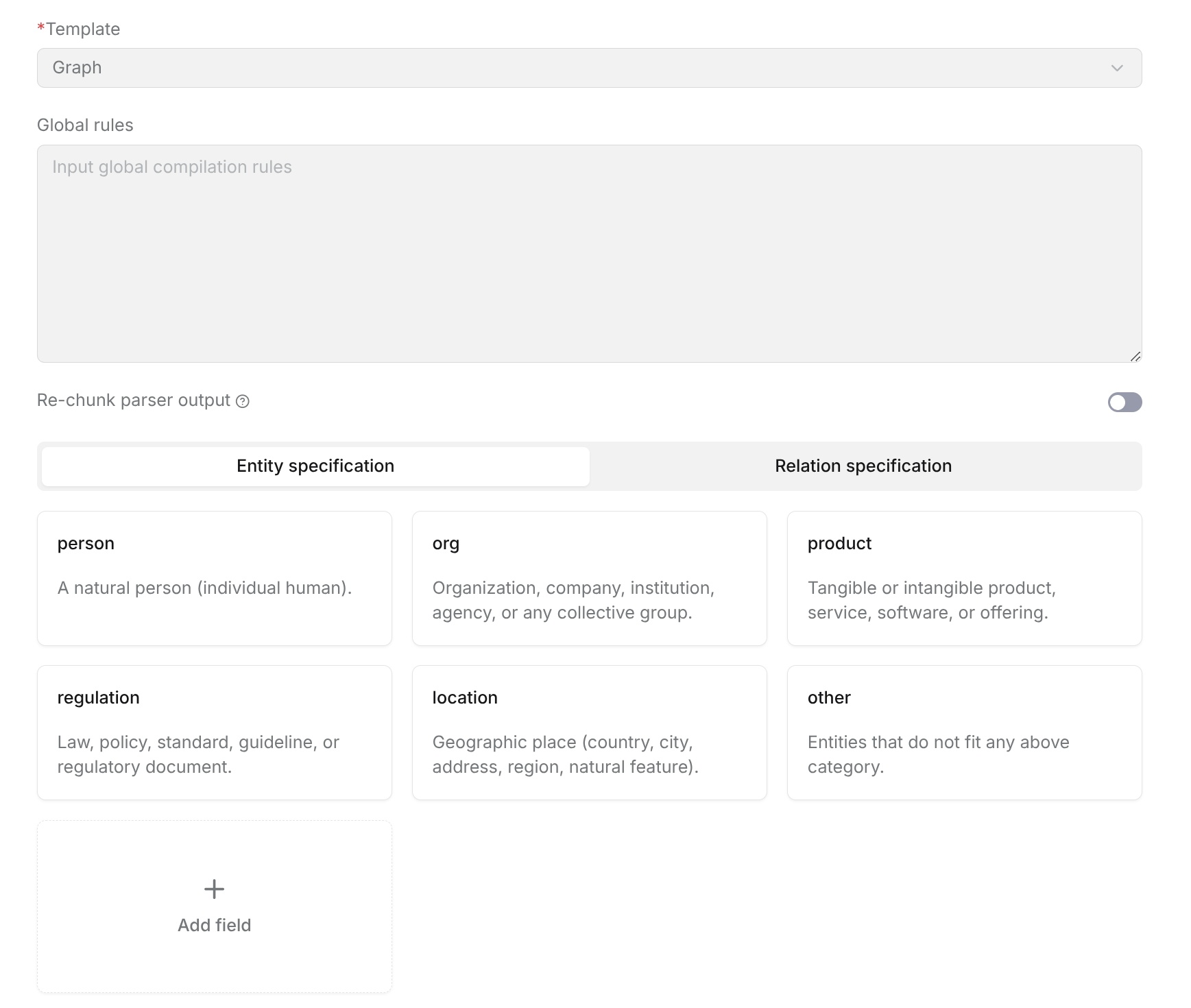
Graph
Graph extracts entities and relationships from documents, helping users build a knowledge network in the document. Users can configure the Graph template to define the entity types, relationship types, and extraction rules that need to be recognized. Based on the configuration, the system identifies and associates key information in documents to generate the corresponding knowledge graph.
Graph configuration mainly includes:
- Global rules
- EntitySpecification
- RelationSpecification
- Re-chunk parser output
Global Rules
Global rules set general requirements for the knowledge graph extraction process and apply to the current Graph template. Users can enter global rules to supplement the entity recognition scope, relationship extraction requirements, naming conventions, and other restrictions.
Configuration recommendations:
- Describe the entities and relationships that need focused attention based on the business scenario.
- Avoid overly broad rules to reduce invalid entity generation.
- For professional domain documents, supplement domain-specific constraints through rules.
Example: Extract only core people, organizations, products, and key events from the document. Keep entity names complete and do not generate entities that cannot be confirmed.
Re-chunk parser output
Enable Re-chunk parser output to group related source content before entity and relationship extraction. Turning it on displays Rechunking rules, where you can review or edit the instructions for regrouping adjacent source chunks.
The supplied rules preserve source order, use every source chunk exactly once, and keep self-contained tables, lists, figures, and code blocks intact. Adjust the rules for your documents while preserving the source evidence. When the switch is off, compilation uses the existing source chunks without this regrouping step.
Click Save to save the template, then reparse a sample with the pipeline that references it and check the Graph result. This setting affects compilation input and does not replace the pipeline's Chunker component.
EntitySpecification
EntitySpecification defines the entity types that need to be recognized in the knowledge graph. Click an entity type card to enter the entity configuration page.
Configuration items:
| Configuration Item | Description |
|---|---|
| Type | Entity type name, used to identify the current entity category. |
| Description | Describes the object scope corresponding to this entity type. |
| Rule | Defines entity extraction requirements, such as recognition scope, naming conventions, and restrictions. |
The system provides the following default node types:
| Entity Name | Description |
|---|---|
| person | Person entity, used to represent natural persons or specific individuals, such as authors, employees, customers, historical figures, and similar entities. |
| org | Organization entity, used to represent companies, institutions, departments, associations, or other organizational groups. |
| product | Product entity, used to represent specific products, services, software, solutions, or other business offerings. |
| regulation | Regulation entity, used to represent laws, policies, standards, specifications, guidance documents, or regulatory documents. |
| location | Location entity, used to represent geographic locations, including countries, cities, addresses, regions, or natural geographic entities. |
| other | Other entity, used to represent business-meaningful entity objects that do not belong to the categories above. |
RelationSpecification
RelationSpecification defines the entity relationship types that need to be recognized in the knowledge graph. The system provides some preset relationship types to cover common entity association scenarios. Users can adjust relationship types based on business requirements.
Users can:
- Edit existing relationship types.
- Delete unnecessary relationship types.
- Add custom relationship types.
Click a relationship type card to enter the relationship configuration page.
Configuration items:
| Configuration Item | Description |
|---|---|
| Type | Relationship type name, used to identify the current relationship category. |
| Description | Describes the entity association method represented by this relationship. |
| Rule | Supplements relationship extraction requirements, such as relationship direction, applicable scope, and restrictions. |
The system provides the following default relationship types:
| Relationship Name | Description |
|---|---|
| owns | Ownership relationship, used to indicate ownership or possession between entities, such as a person owning assets or an enterprise owning products. |
| part_of | Composition relationship, used to indicate composition or inclusion between entities, such as a component belonging to a product or a department belonging to an organization. |
| caused_by | Causal relationship, used to indicate that an event, action, or state is caused by other factors. |
| regulates | Regulatory relationship, used to indicate that laws, standards, or specifications constrain, manage, or guide entities. |
| located_in | Location relationship, used to indicate location associations between entities, such as a company located in a city or a building located in a region. |
| other | Other relationship, used to represent valuable entity relationships that cannot be classified into the categories above. |
Configuration Recommendations
To improve knowledge graph extraction results, follow these principles:
- Select entity types and relationship types that require attention based on business requirements.
- Delete default configurations that have no practical use to reduce invalid information extraction.
- Keep entity type names and descriptions clear, and avoid using multiple types to represent similar concepts.
- Relationship types should have clear meanings and avoid overly broad definitions.
- For complex business scenarios, add extra constraints through the rule field.
Tree
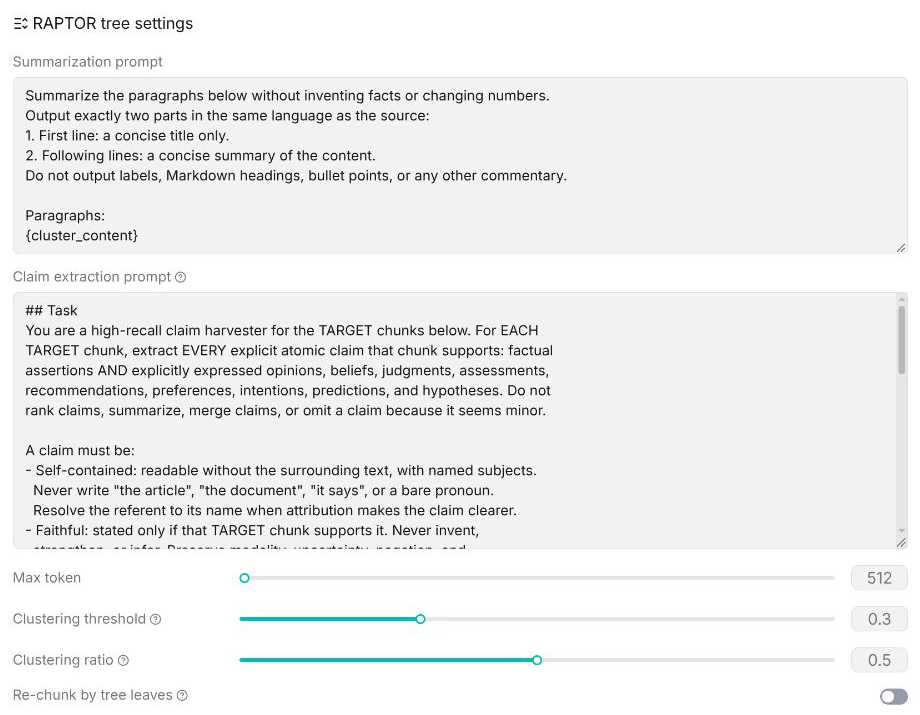
The Tree template controls the final knowledge tree generation result mainly through summary rules, summary length, content clustering, and tree structure parameters.
Global Rules
Global rules set the overall requirements that the Tree template should follow when generating structures and summaries. Users can use global rules to supplement the document processing direction, such as specifying information types to focus on, summary generation methods, or content organization requirements.
Configuration recommendations:
- Set content that requires focused attention based on document characteristics.
- For specific business scenarios, supplement additional content extraction requirements.
- Avoid overly broad or complex rules to ensure the generated results meet expectations.
Example: Summarize the main topics, key events, and important information in the document. Keep the content accurate and do not add information that does not appear in the document.
Summarization Prompt
Sets the generation rules for node summaries and controls the information and output format the system focuses on when summarizing each node. Users can adjust the summary direction based on actual requirements, such as emphasizing key content, core conclusions, or important information.
Claim Extraction Prompt
Defines the system prompt used to extract atomic claims from leaf chunks before clustering.
The extracted claims include supporting evidence from the source chunks and are used to represent the semantic information of the chunks during clustering. This helps reduce the influence of layout or other irrelevant text when grouping related content.
Leave this field empty to use the built-in claim extraction rules. Customize it only when you need domain-specific claim extraction requirements.
Maximum Tokens
Sets the maximum length for node summary generation. A larger value can preserve more summary information and is suitable for more complex documents. A smaller value can generate more concise summaries and is suitable for quickly viewing a document overview.
Clustering Threshold
Adjusts the matching degree during document content clustering and affects how related content is merged into the same topic node. Increasing this parameter makes content division stricter and usually generates more detailed topic nodes. Decreasing this parameter merges more related content together, making the structure more concentrated.
Clustering Ratio
Adjusts the content clustering ratio in the Tree structure and affects the number of final hierarchy levels and the structure detail. Increasing this parameter usually generates a richer hierarchy. Decreasing this parameter can reduce the number of nodes and make the overall structure more concise.
Re-chunk by Tree Leaves
Determines whether the source chunks belonging to each leaf cluster are merged into a new retrieval chunk.
When enabled, RAGFlow merges the source chunks of each leaf cluster into a single replacement chunk. The original chunks are retained but marked as unavailable for retrieval.
This allows the final retrieval chunks to follow the semantic boundaries identified by the generated Tree instead of the original chunk boundaries.
Only one Tree template in the same template group can enable this option.
PageIndex
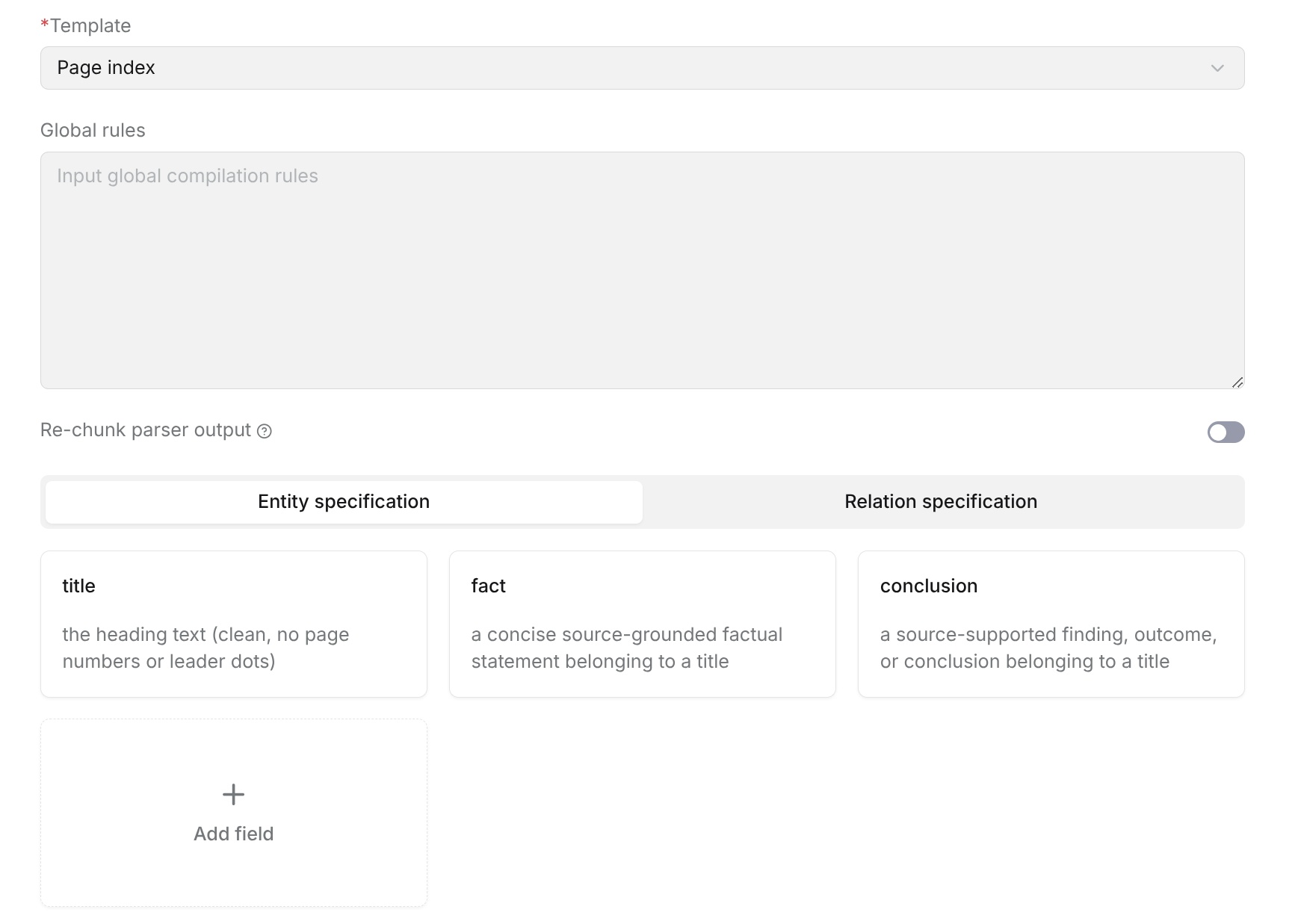
PageIndex generates a hierarchical index based on the chapter structure in a document, helping users quickly locate document content. This template is suitable for documents with clear title hierarchies, such as books, reports, and specification documents.
By configuring entity fields and relationship rules, PageIndex can extract chapter titles, key facts, and summary content from documents, and establish hierarchical relationships between chapters.
Global Rules
Global rules define general requirements that must be followed during PageIndex content extraction, such as chapter recognition scope, content extraction specifications, and index generation rules.
Configuration recommendations:
- Preserve the original chapter structure of the document and generate an index according to the title hierarchy in the document.
- Prefer the original chapter titles as index node names.
- Extract only key information related to each chapter topic and avoid generating irrelevant content.
- For content without clear titles, it is not recommended to force-generate chapter nodes.
Re-chunk parser output
When Re-chunk parser output is enabled, RAGFlow reorganizes the chunks generated by the parser before running PageIndex knowledge compilation according to the configured Rechunking rules.
The rechunking process attempts to preserve the original content order, heading hierarchy, and section boundaries while keeping structures such as tables, lists, and code blocks intact. This helps produce input that is better suited for building the hierarchical structure used by PageIndex.
Rechunking rules define how parser-generated chunks are reorganized, such as whether adjacent chunks can be merged, how headings should remain associated with their content, and how section boundaries should be preserved.
When this option is disabled, PageIndex uses the original chunks generated by the parser directly for knowledge compilation.
EntitySpecification
EntitySpecification defines the content fields that PageIndex needs to extract. Different fields record different types of information in chapters. Users can adjust the default fields provided by the system based on requirements, or add new fields.
Field configuration parameters:
| Parameter Name | Description |
|---|---|
| Type | Field type, used to specify the information type to extract for the current field, such as title, fact, or conclusion. |
| Description | Field description, used to explain the specific content that needs to be extracted for this field, helping the system understand the field meaning and extraction scope. |
| Rule | Field rule, used to further constrain how content is extracted, including content format, length, extraction scope, and other requirements. |
The system provides the following default fields:
| Field Name | Description |
|---|---|
| title | Title field, used to extract titles or chapter names from the document. The title content should preserve the original text and should not include page numbers, numbering, or other irrelevant symbols. |
| fact | Fact field, used to extract key facts, rules, definitions, or explanatory content related to the current chapter, reflecting the core information of the chapter. |
| conclusion | Conclusion field, used to extract summaries, analysis results, or important conclusions from the chapter, supplementing the chapter's core viewpoints. |
RelationSpecification
RelationSpecification defines relationships between different chapter nodes. PageIndex uses the include relationship by default to represent inclusion between chapters, for example:
- A document contains chapters.
- A chapter contains subchapters.
Through this relationship, the system can generate a hierarchical index based on the original document structure.
Configuration parameters:
| Parameter | Description |
|---|---|
| Type | Relationship type, used to define the association method between entities. The current supported type is include, which indicates an inclusion relationship. |
| Description | Describes the meaning of the relationship and helps the model understand the association rules between two entities. |
| Rule | Further constrains relationship extraction logic, including relationship direction, applicable scope, and entity connection requirements. |
The system provides the following default relationship type:
| Relationship Name | Description |
|---|---|
| conclusion | Conclusion relationship, used to represent findings, results, or conclusion information extracted based on document content. |
Configuration recommendations:
- Keep the hierarchical relationships between chapters consistent with the original structure.
- Avoid adding associations without clear hierarchical evidence.
- For documents with simple structures, you can directly use the default relationship configuration.
Configuration Description
The PageIndex template is already configured with basic fields and relationship rules by default. Users can adjust them based on actual business requirements.
Supported operations:
- Edit field descriptions to optimize the content extraction scope.
- Add new entity fields to extend index information.
- Delete unnecessary fields to reduce invalid content generation.
- Modify relationship rules to adjust associations between chapters.
Mindmap
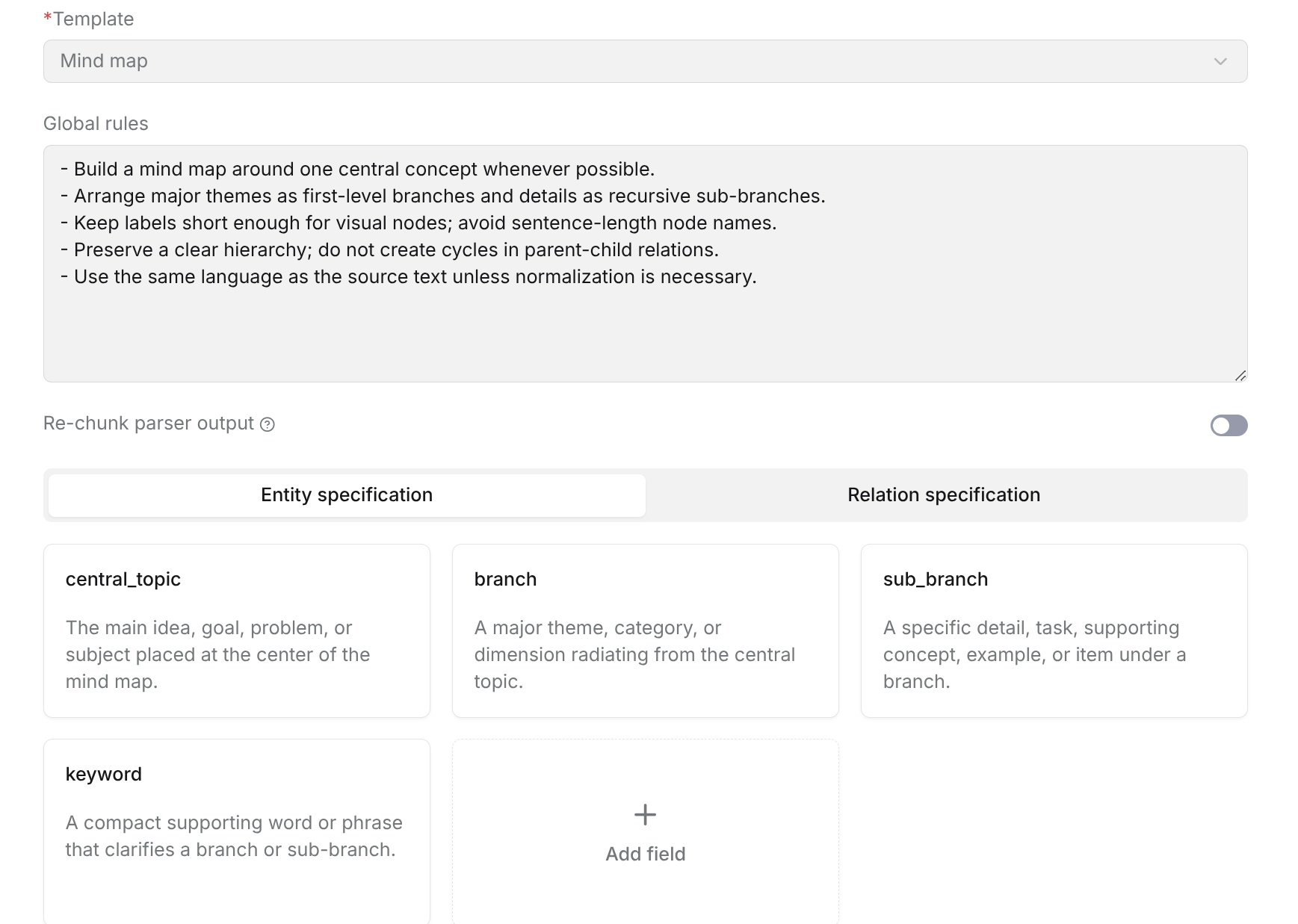
Mindmap generates a hierarchical structure around the core topic of a document, displaying content relationships through a central topic, branches, and keywords. It helps users quickly understand the main content, knowledge structure, and concept relationships of a document.
Global Rules
Global rules define the overall requirements for mind map generation, including topic extraction, hierarchical organization, and node naming conventions.
Configuration recommendations:
- Generate a mind map around the core content of the document and prioritize extracting main topics.
- Use important topics as first-level branches and expand related details as lower-level branches.
- Keep node names concise and avoid using complete sentences as nodes.
- Maintain clear hierarchical relationships and avoid duplicate or circular references.
- Keep node language consistent with the original text.
Re-chunk parser output
Enable Re-chunk parser output to group related source content before extracting topics and branches. Turning it on displays Rechunking rules, where you can review or edit the instructions for regrouping adjacent source chunks.
The supplied rules preserve source order, use every source chunk exactly once, and keep self-contained tables, lists, figures, and code blocks intact. Adjust the rules for your documents while preserving the source evidence. When the switch is off, compilation uses the existing source chunks without this regrouping step.
Click Save to save the template, then reparse a sample with the pipeline that references it and check the Mindmap result. This setting affects compilation input and does not replace the pipeline's Chunker component.
EntitySpecification
EntitySpecification defines the node types in the mind map. Different node types correspond to information content at different levels. Users can adjust the default nodes provided by the system based on business requirements, including deleting existing nodes or adding custom nodes.
When configuring nodes, the main parameters are as follows. The system provides the following default node types:
| Node Name | Description |
|---|---|
| CentralTopic | Core topic node, used to represent the main topic of the document or content as the center node of the mind map. |
| Branch | First-level branch node, used to represent the main directions, categories, or knowledge domains expanded around the core topic. |
| Sub-branch | Second-level branch node, used to represent specific concepts, tasks, cases, or detailed content under Branch. |
| Keyword | Keyword node, used to supplement other nodes with key concepts or core information. |
RelationSpecification
RelationSpecification defines the relationships between different nodes in the mind map and describes the hierarchy and content associations between nodes. The system uses relationship definitions to determine how nodes are connected, such as inclusion between the core topic and branches, or support relationships between branches and keywords.
| Parameter Name | Description |
|---|---|
| Type | Node type name, used to identify the role of the current node in the mind map. |
| Description | Describes the information content that this node needs to extract, helping the system understand the node definition and scope. |
| Rule | Further constrains node generation methods, including content selection, naming requirements, length limits, and other generation requirements. |
The system provides common relationship types. Users can adjust them based on business requirements, including adding, modifying, or deleting relationship types.
Relationship configuration parameters:
| Parameter Name | Description |
|---|---|
| Type | Relationship type name, used to identify the association method between nodes. |
| Description | Describes the connection meaning represented by this relationship, helping the system understand relationships between nodes. |
| Rule | Further restricts relationship generation conditions, such as applicable node types, connection direction, and relationship usage scenarios. |
The system provides the following default relationship types:
| Relationship Name | Description |
|---|---|
| has_branch | Indicates that the core topic contains major branches and is used to connect CentralTopic and Branch. |
| has_sub_branch | Indicates that a branch contains more specific sub-branches and is used to connect Branch and Sub-branch. |
| supports | Indicates that keywords, cases, or details provide supplementary explanation for an upper-level concept. |
| related_to | Indicates an association between two concepts that does not belong to a clear parent-child structure. |
Users can adjust relationship definitions based on document content characteristics:
- For content with a clear hierarchy, use inclusion relationships such as topic → branch → sub-branch.
- For content with associations but no parent-child relationship, use association relationships.
- Relationship names should be concise and clear, and should reflect the connection meaning between nodes.
- Avoid configuring too many meaningless relationships to prevent generating a complex or hard-to-understand mind map structure.
Node Configuration Description
In the node configuration area, users can view the currently configured node types and adjust them as needed.
Supported operations:
- Add node: Add a new node type to meet specific business scenarios.
- Delete node: Remove a node type that does not need to participate in generation.
- Modify node description: Adjust the node definition, affecting how the system extracts content.
Recommendations:
- Preserve a clear hierarchy and avoid configuring too many node types, which can make the structure complex.
- Node names should be short and clear for final display.
- Adjust node definitions based on document type. For example, technical documents can add types such as "module" and "function", while business documents can add types such as "process" and "role".
Timeline
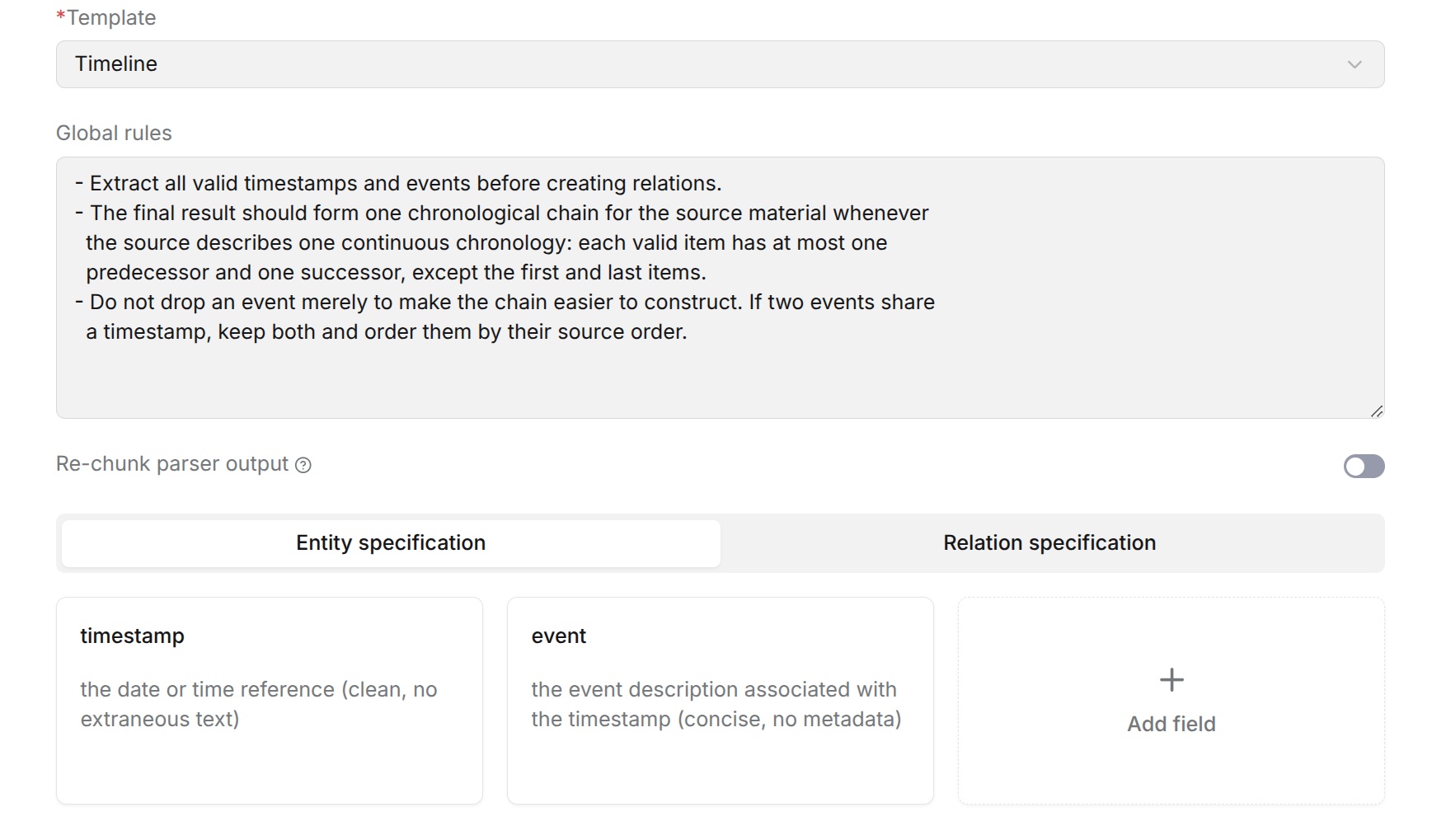
Timeline identifies key time information and related events in documents, then organizes event relationships in chronological order, helping users quickly understand the development process of events in the document.
This template is suitable for documents that contain timelines, event records, historical processes, project progress, personal experiences, and similar content. It extracts time points (Timestamp) and corresponding events (Event) to generate a continuous time relationship chain.
Global Rules
Global rules define general requirements for Timeline extraction, including the scope of time information recognition, event extraction rules, and time relationship organization methods.
The system provides the following default rules:
- Extract valid time information and corresponding events from the document.
- Organize event relationships in chronological order to form a continuous time chain.
- Preserve events with clear time evidence and do not delete events because they are difficult to sort.
- When multiple events have the same time information, arrange them in the order they appear in the document.
Users can adjust rules based on actual business requirements, such as specifying event types to focus on, limiting the time range, or supplementing domain-specific requirements.
Re-chunk parser output
Enable Re-chunk parser output to group related source content before extracting dates and events. Turning it on displays Rechunking rules, where you can review or edit the instructions for regrouping adjacent source chunks.
The supplied rules preserve source order, use every source chunk exactly once, and keep self-contained tables, lists, figures, and code blocks intact. Adjust the rules for your documents while preserving the source evidence. When the switch is off, compilation uses the existing source chunks without this regrouping step.
Click Save to save the template, then reparse a sample with the pipeline that references it and check the Timeline result. This setting affects compilation input and does not replace the pipeline's Chunker component.
EntitySpecification
Entity configuration defines the information types that need to be recognized and extracted in Timeline.
Each entity contains the following configuration items:
| Configuration Item | Description |
|---|---|
| Type | Entity type name, used to identify the information category to extract. |
| Description | Describes the content scope that the entity needs to extract, helping the model accurately recognize target information. |
| Rule | Further constrains entity extraction methods, such as format requirements, content restrictions, and special processing logic. |
The system provides the following default entity types:
| Entity Name | Description |
|---|---|
| timestamp | Indicates the time information when an event occurs. It can be a specific date, time point, or valid time range. |
| event | Indicates the event content corresponding to the time information and describes the main occurrence. |
Users can add entity types based on actual requirements to supplement time-related information that needs attention.
RelationSpecification
Relationship configuration defines associations between entities and describes chronological order or other relationships between events.
Each relationship contains the following configuration items:
| Configuration Item | Description |
|---|---|
| Type | Relationship type name, used to define the connection method between entities. |
| Description | Describes the meaning and applicable scenarios of the relationship. |
| Rule | Restricts relationship generation methods, such as sorting rules and connection conditions. |
The system provides the following default relationship type:
| Relationship Name | Description | Rule Description |
|---|---|---|
| ordered | Indicates that events are arranged in chronological order and is used to build a continuous time chain. | Sort events by occurrence time to form relationships from earliest to latest. When multiple events have the same time, arrange them in the order they appear in the document. |
Users can add relationship types based on actual requirements to describe more complex event relationships.
Configuration Recommendations
Entity descriptions should clearly specify the scope of information to extract and avoid overly broad descriptions.
Rule configuration is used to supplement special extraction requirements, such as time format, sorting method, or content restrictions.
For timeline documents, it is recommended to keep the default timestamp, event, and ordered configurations to ensure the basic time relationship generation effect.
When adding entities or relationships, make sure they can form clear associations with the document content and avoid producing invalid information.
Wiki
Wiki compiles document content into structured and associated knowledge pages. The system identifies entities, relationships, facts, and concepts in documents, then generates content similar to encyclopedia knowledge pages according to page organization rules.
Wiki is suitable for enterprise knowledge accumulation, product documentation, domain knowledge bases, and similar scenarios. It helps users convert scattered document content into clearly structured knowledge pages that are easy to browse and retrieve.
Global Rules
Global rules define general requirements for Wiki knowledge extraction, including entity recognition, relationship establishment, and content organization.
System default rules include:
- Each relationship must connect two extracted entities and define a clear relationship type.
- Relationship direction is determined according to the actual semantics between entities.
- When multiple relationships exist, preserve them in the order they appear in the document.
- Keep relationship type names in a unified format.
Users can adjust rules based on business requirements, such as limiting the entity scope to focus on, supplementing domain knowledge, or adjusting page generation requirements.
Wiki mode
Specifies how Wiki pages are organized.
-
Entity mode: Generates Wiki pages by entity or concept. Each identified entity or concept is organized into a separate Wiki page. This mode is suitable for exploring information about individual entities or concepts.
-
Topic mode: Organizes Wiki pages by topic. The LLM groups related entities or concepts into the same Wiki page based on their relationships and context. This mode is suitable for organizing and exploring knowledge at the topic level.
EntitySpecification
EntitySpecification defines the entity types that need to be recognized and extracted in Wiki.
Each entity contains the following configuration items:
| Configuration Item | Description |
|---|---|
| Type | Entity type name, used to identify the information category to extract. |
| Description | Describes the entity definition and recognition scope. |
| Rule | Supplements entity extraction requirements, such as format restrictions and content scope. |
The system provides the following default entity types:
| Entity Name | Description |
|---|---|
| person | People, including individuals or natural persons. |
| org | Organizations, companies, institutions, or other collective organizations. |
| product | Products, services, software, or other offerings. |
| regulation | Laws, policies, standards, specifications, and other rule documents. |
| location | Geographic locations, including countries, cities, regions, and similar entities. |
| system | Technical systems, platforms, frameworks, or infrastructure. |
| equipment | Devices, machines, hardware, and similar entities. |
| other | Other entities that do not belong to the categories above. |
Users can add, modify, or delete entity types based on business scenarios.
RelationSpecification
RelationSpecification defines relationship types between entities and is used to build knowledge associations in Wiki pages.
Each relationship contains the following configuration items:
| Configuration Item | Description |
|---|---|
| Type | Relationship type name, used to indicate the association method between entities. |
| Description | Describes the relationship meaning and applicable scope. |
| Rule | Restricts relationship extraction methods, such as relationship direction and connection conditions. |
The system provides the following default relationship types:
| Relationship Name | Description |
|---|---|
| owns | Indicates ownership or affiliation. |
| part_of | Indicates a composition relationship, such as a component belonging to a whole. |
| caused_by | Indicates a causal relationship. |
| regulates | Indicates a regulatory, management, or constraint relationship. |
| uses | Indicates a usage relationship. |
| located_in | Indicates a location inclusion relationship. |
| other | Indicates another valid relationship not covered above. |
Users can add relationship types based on business requirements to describe domain-specific associations.
ClaimSpecification
ClaimSpecification defines factual descriptions that need to be extracted.
Each Claim field contains:
| Configuration Item | Description |
|---|---|
| Description | Defines the factual content to extract, usually as a complete factual statement. |
System default requirements:
- Claim content should be a complete factual description.
- Entities or concepts associated with a Claim should come from extracted information.
- Avoid generating speculative content that cannot be verified from the document.
ConceptSpecification
ConceptSpecification defines professional concepts, topics, or core terms that need to be extracted.
Each Concept field contains:
| Configuration Item | Description |
|---|---|
| Description | Defines the concept name or topic content to extract. |
By default, the system identifies:
- Professional terms.
- Core concepts.
- Important topics in the document.
Blueprint
Blueprint defines the structure template used when generating Wiki pages. The system provides multiple preset blueprints. Users can select an appropriate blueprint based on document content and usage scenarios, or select Custom to define page generation rules.
Configuration items:
The system provides the following blueprints:
- Brand: Suitable for brand-related content.
- Engineering: Suitable for technical, R&D, and engineering content.
- General: A general blueprint suitable for documents without specific content structure requirements.
- Market: Suitable for market, industry analysis, and related content.
- Product: Suitable for product introductions, product planning, and product-related documents.
- Interview: Suitable for user interviews, research records, and similar content.
- Custom: A custom blueprint that can configure Wiki page generation rules based on actual requirements.
| Configuration Item | Description |
|---|---|
| Blueprint | Specifies the template for Wiki page generation. |
| Instruction | Supplements page generation rules, such as chapter structure, content format, and display requirements. |
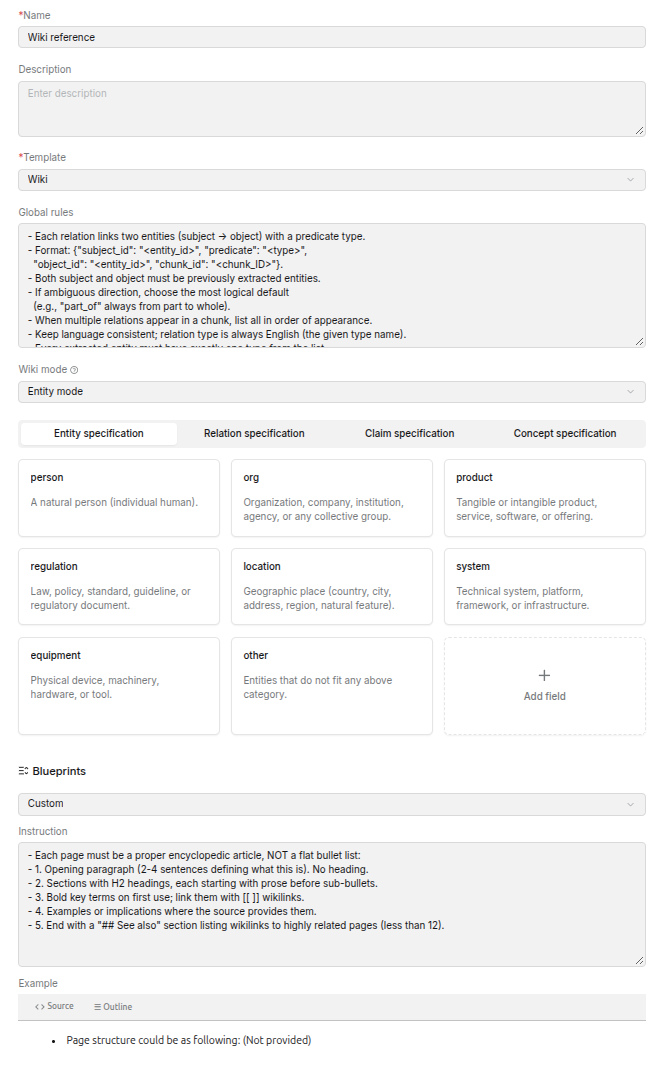
After a blueprint is selected, the system generates Wiki content according to the preset page structure and rules of the corresponding blueprint. When Custom is selected, you can customize page generation requirements through Instruction, such as chapter structure, content format, and display method.
Example Preview
After configuring a blueprint, you can preview the Wiki page structure corresponding to the current blueprint in the Example area below. The preview content displays the page title, chapter hierarchy, and content requirements of each chapter, helping users understand the page organization method of the selected blueprint before generating the Wiki.
Configuration Recommendations
Entity types should be adjusted based on the business domain to avoid configuring too many irrelevant entities.
Relationship types should remain clear and avoid defining relationships with duplicate meanings.
Claim is used to supplement factual information and is suitable for scenarios that require knowledge verification.
Concept is suitable for professional domain knowledge organization and can help improve the association capability of Wiki pages.
Blueprint controls the final page display effect. It is recommended to adjust it based on the purpose of the knowledge base.