RAGFlow 0.23.0 — Advancing Memory, RAG, and Agent Performance
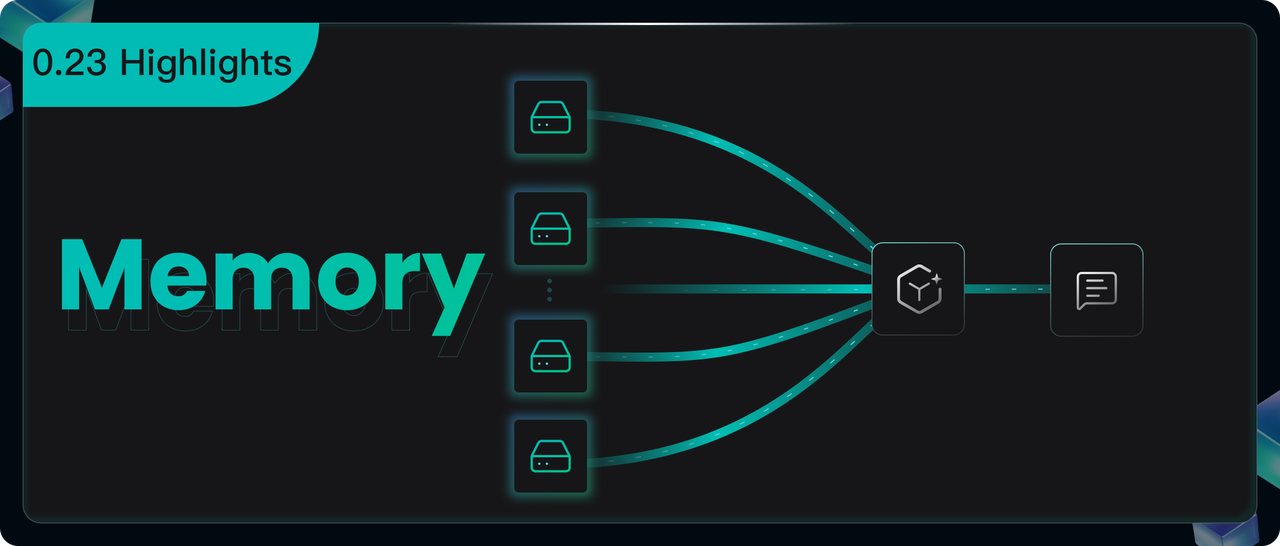
The hallmark of this release is the introduction of a new Memory module, empowering AI Agents with lasting memory. This core advancement not only enables real‑time retrieval of the most task‑relevant historical experiences, but also supports the continuous, structured accumulation and optimization of knowledge assets—laying the foundation for an intelligent core capable of autonomous evolution. This version also brings significant enhancements across multiple fronts:
- Enhanced Agent Capabilities:
Refactored underlying architecture for faster performance; added support for Webhook‑triggered automation; and opened voice input/output interfaces. - Upgraded RAG Performance:
Introduced batch metadata generation during document parsing; added contextual text around extracted images and tables within slices for richer semantics; and implemented a new Parent‑Child slicing strategy. - Improved APIs:
The Agent API now returns detailed execution logs, enabling developers to display reasoning processes on the front end. The Chat API offers enhanced metadata filtering for more precise answer control.
We will now delve into each of these features and improvements.
Memory management and usage
Memory is designed to preserve dynamically generated interaction logs and derived data during Agent operation (such as user inputs, LLM outputs, potential interaction states, and summaries or reflections generated by the LLM). Its purpose is to maintain conversational continuity, enable personalization, and facilitate learning from historical experience.
Beyond simply storing raw interaction data, this module is capable of extracting semantic memory, episodic memory, and working memory. Once stored, users can effortlessly reintroduce this information as part of the context in subsequent conversations, thereby enhancing both dialogue coherence and reasoning accuracy.
Manage memory
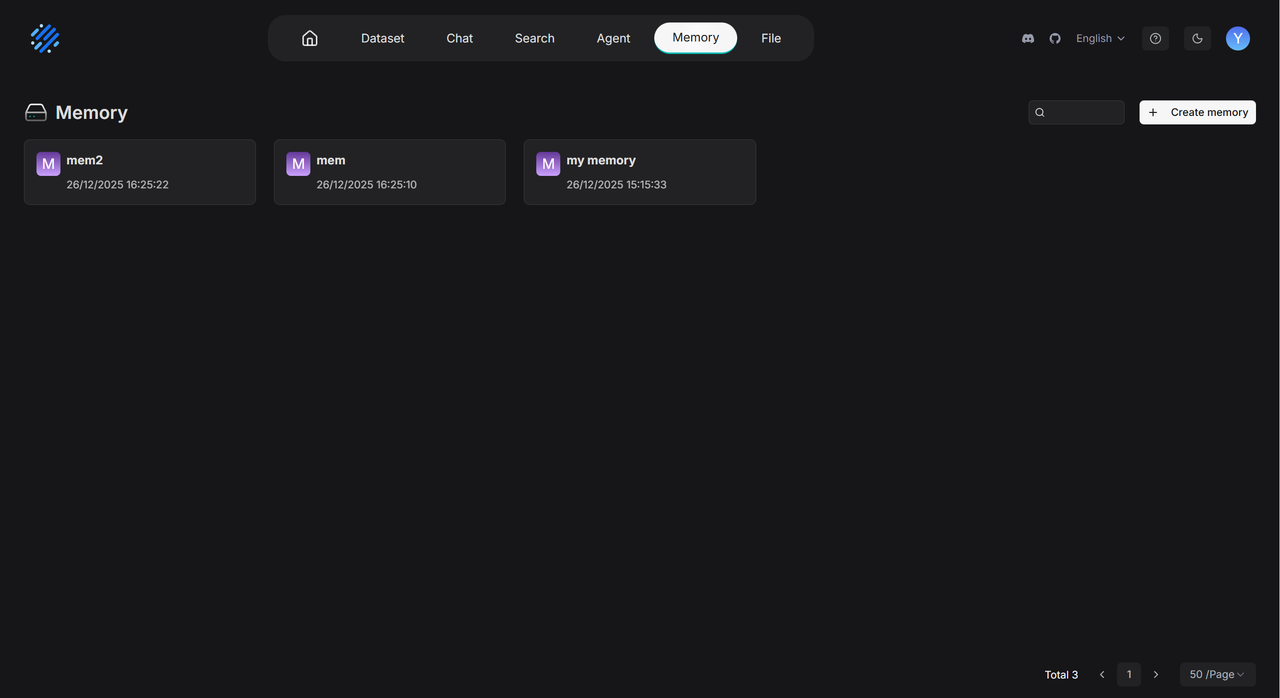
The Memory module supports convenient centralized management. Users can specify the types of memories to extract when creating a Memory and perform operations such as renaming and team sharing on the navigation page at Overview >> Memory. The image below illustrates the process of creating a Memory:
Within an individual Memory page, you can manage saved memory entries by enabling or disabling them during Agent calls, or by forgetting memory entries that are no longer needed.
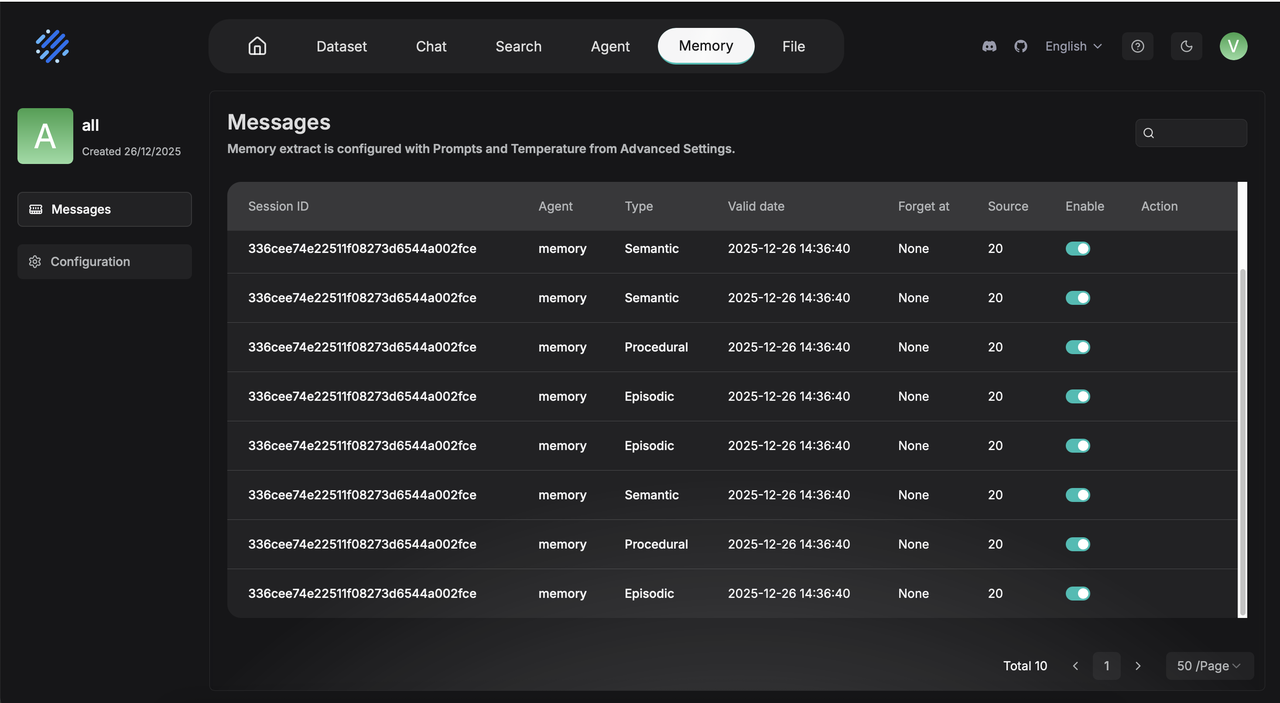
Memory entries that have been actively forgotten will no longer appear in the results of Agent calls. When the storage capacity of the Memory reaches its limit and triggers the forgetting policy, those manually forgotten entries will also be prioritized for removal.
Enhanced Agent context
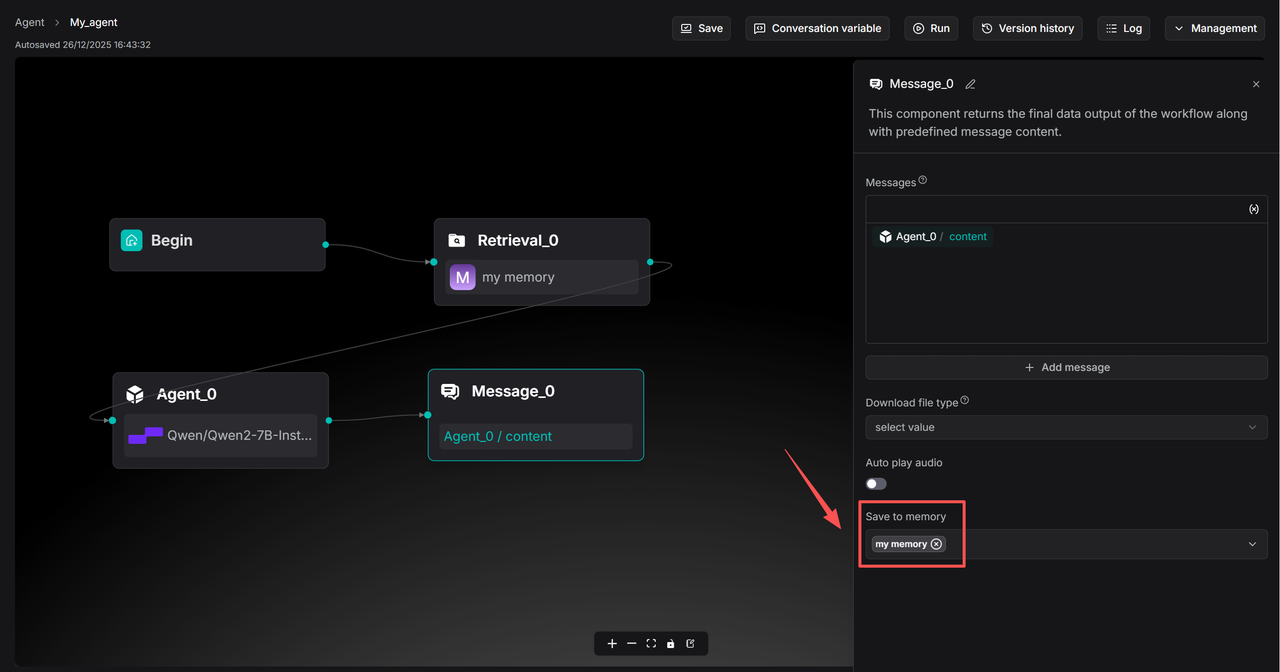
Under Agent >> Retrieval and Agent >> Message components, a new Memory invocation feature has been added. Users can configure the Message component to store data into a specified Memory and set up the Retrieval component to query from Memory. The diagram below illustrates how a simple Q&A bot Agent can utilize Memory.
In Agent components where Memory is configured, a Retrieval component must be included to recall information from Memory.
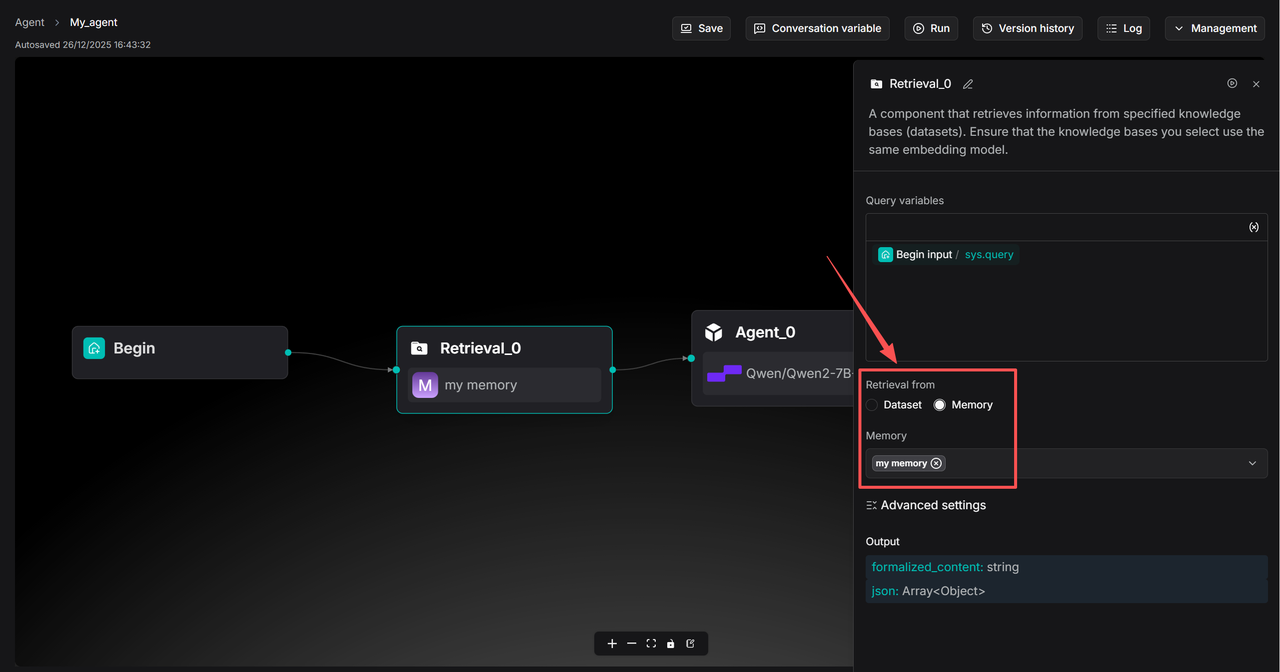
Select the corresponding Memory in the Message component under Save to Memory.
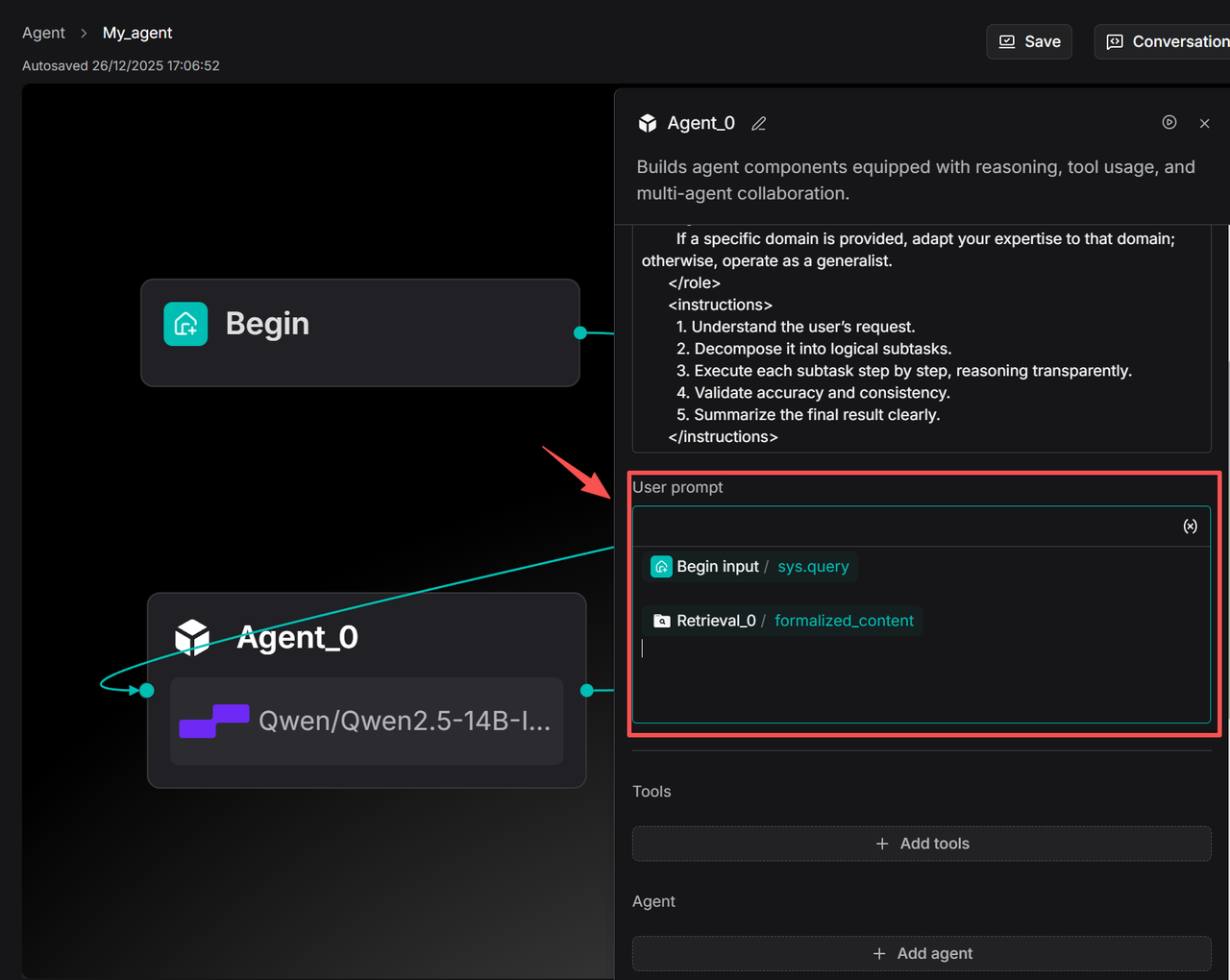
The Agent component must be configured with a User prompt to enable the Agent component to access information from the Retrieval component.
Memory lets Agent know you better
When a concept exists across multiple fields, the Agent may sometimes deviate from the user's actual intent and provide a response that is out of context.
For example, if a user asks, "What is Reflexion?" the Agent might default to explaining it from the perspective of cognitive science or neuropsychology, rather than addressing the Reflexion concept within the Agent/LLM reasoning framework that the user is actually interested in.
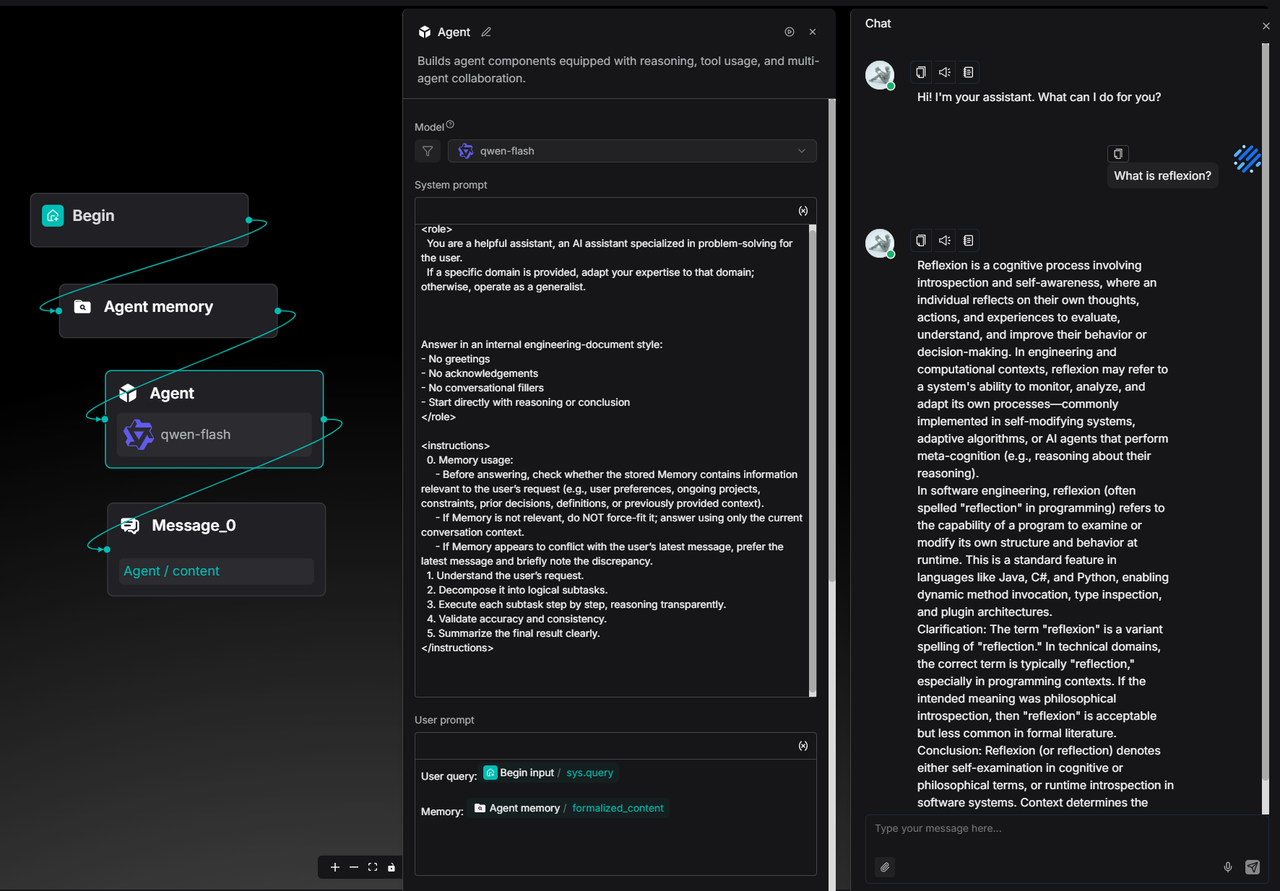
In such cases, the user can clarify and correct the Agent's understanding by explicitly indicating that this is a term from the field of Agent systems. This clarification will be recorded in the Memory as part of the user's long-term preferences and semantic context.
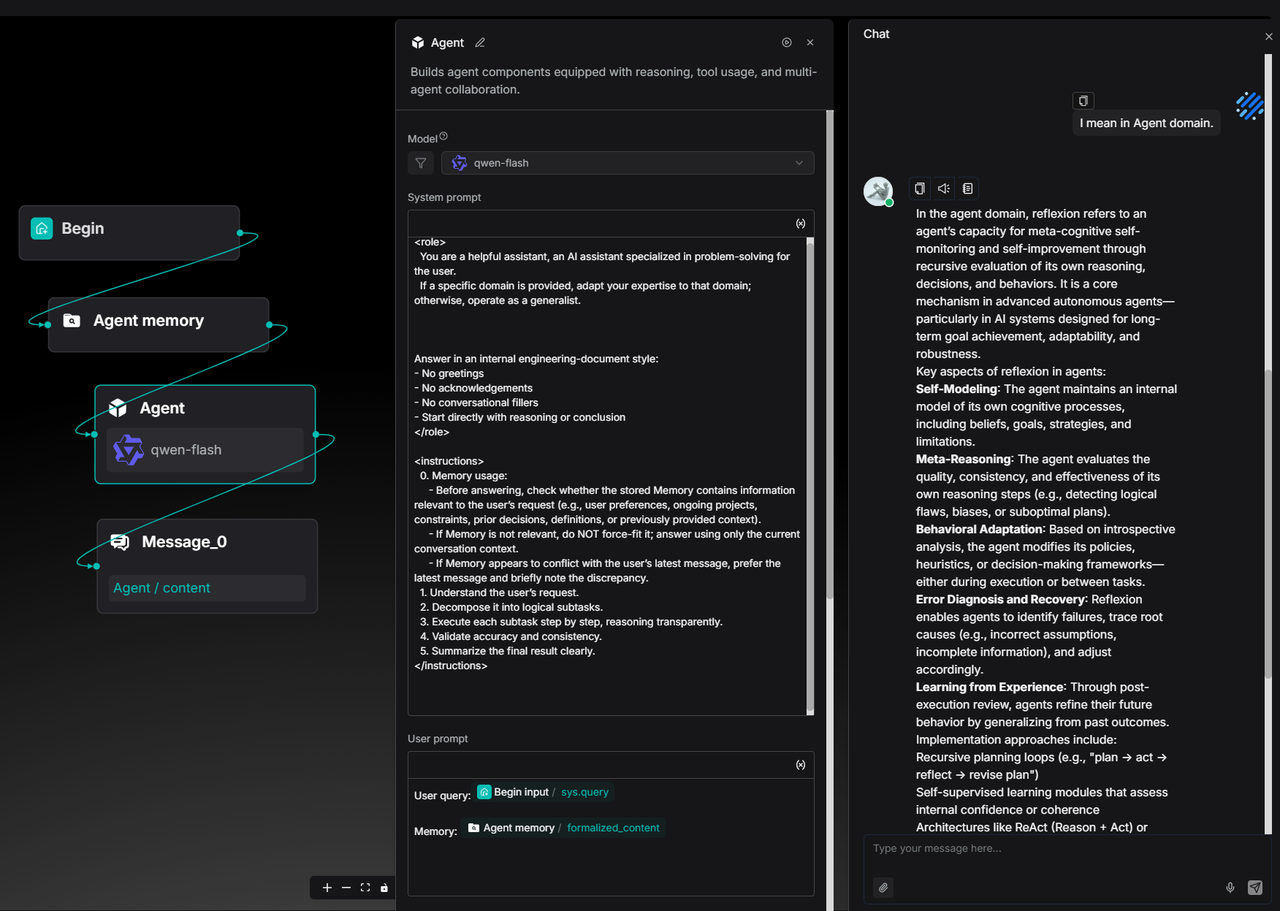
Afterward, when the user inquires about the same concept again, the Agent will automatically align with the user’s domain preference based on past interaction history, providing the definition and explanation of Reflexion directly from the Agent perspective—without requiring repeated clarification.
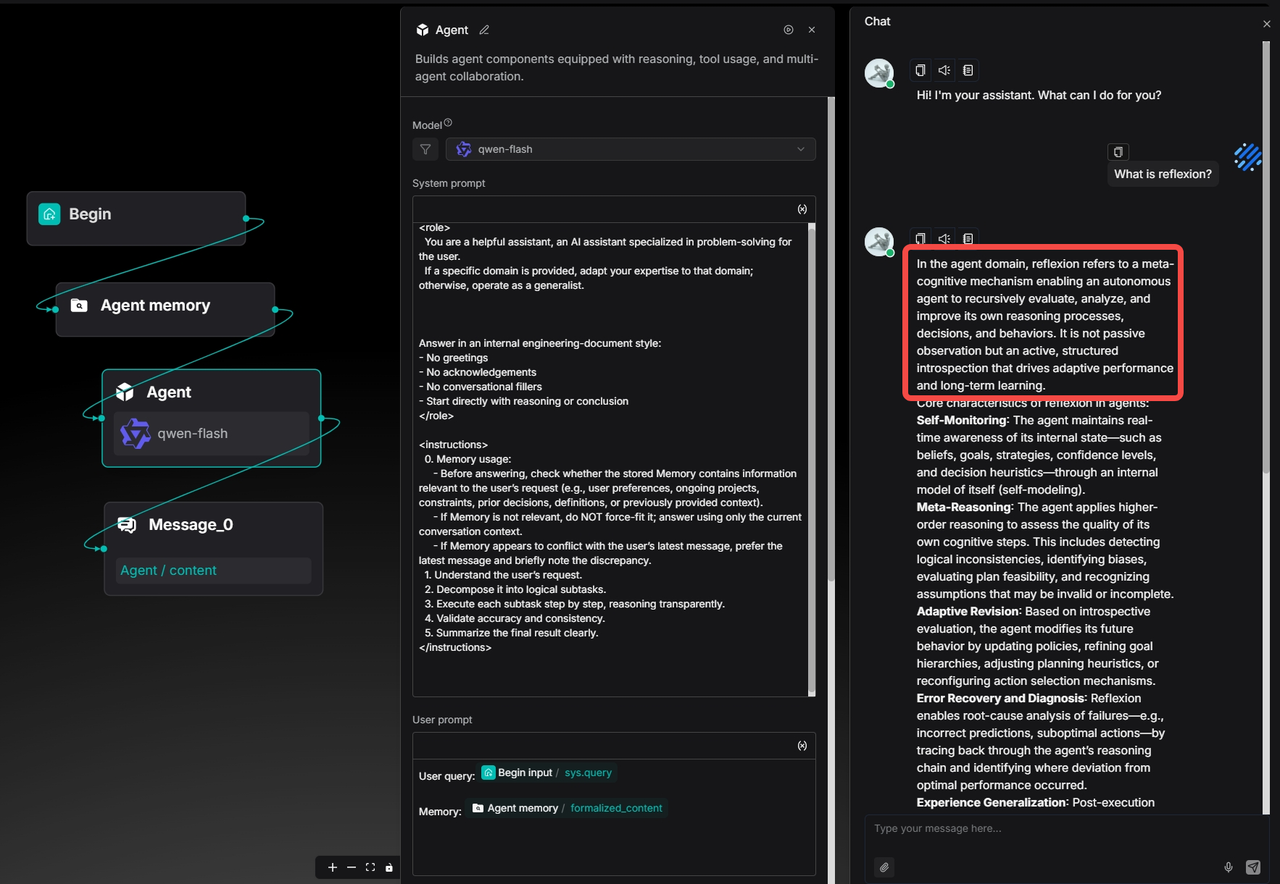
This example illustrates how Memory transforms the Agent from a one-time answering tool into an intelligent assistant that continuously calibrates its understanding and evolves alongside the user's interactions.
Enhanced Agent
Enhanced Agent performance
In previous versions, community feedback highlighted that while RAGFlow’s Agent demonstrated strong execution accuracy and generalization capabilities for complex tasks when configured with tools, its processing speed was slower and token consumption was higher for routine, less complex business scenarios.
This is because, in earlier versions, the Agent's underlying architecture was designed with a layered structure for handling more complex tasks, incorporating LLM-based planning and reflection.
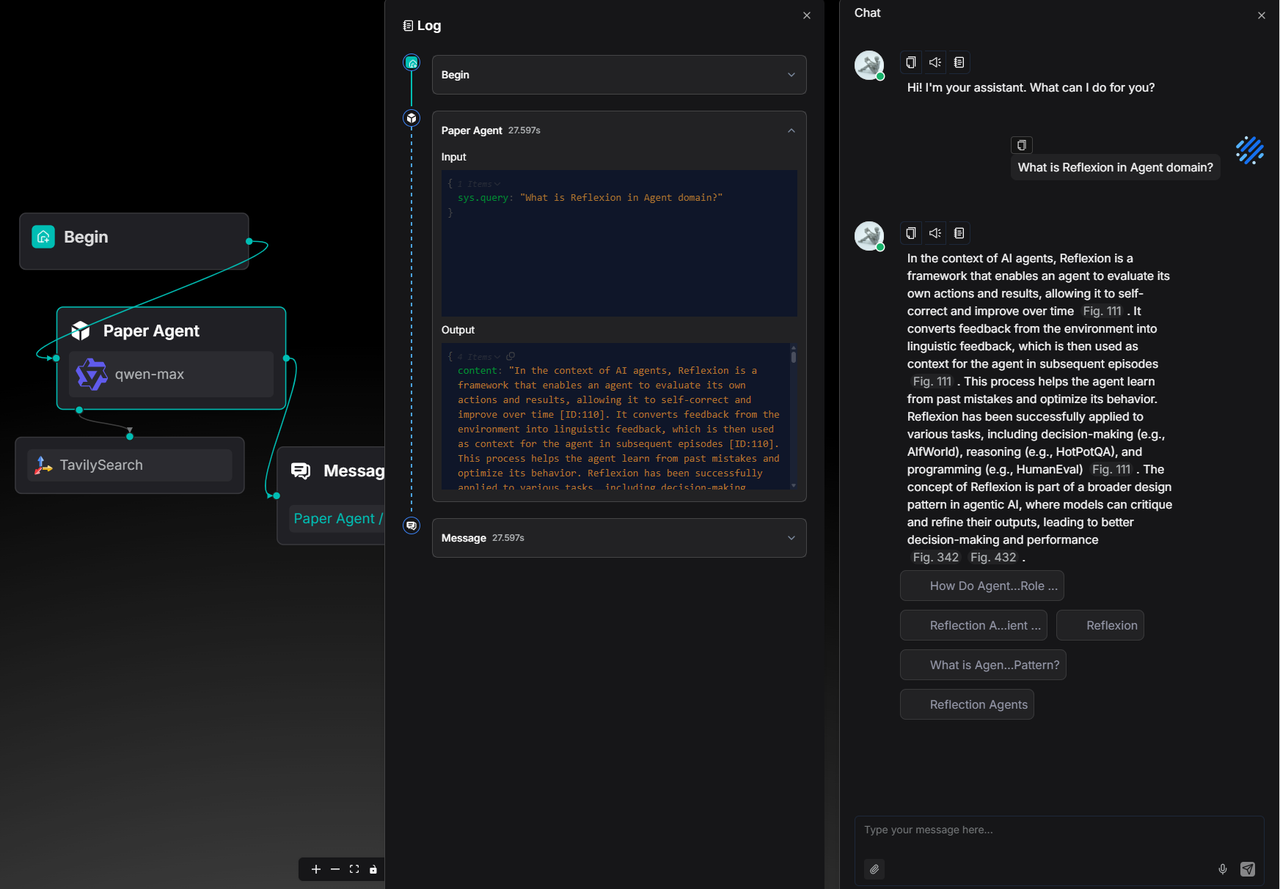
In version 0.23.0, the Agent has been further optimized for simpler tasks, reducing the processing time by approximately 50% compared to the initially released Agent in version 0.20.0. These optimizations were primarily implemented at the architectural level, refining the execution flow of Agent components and the LLM invocation pipeline.
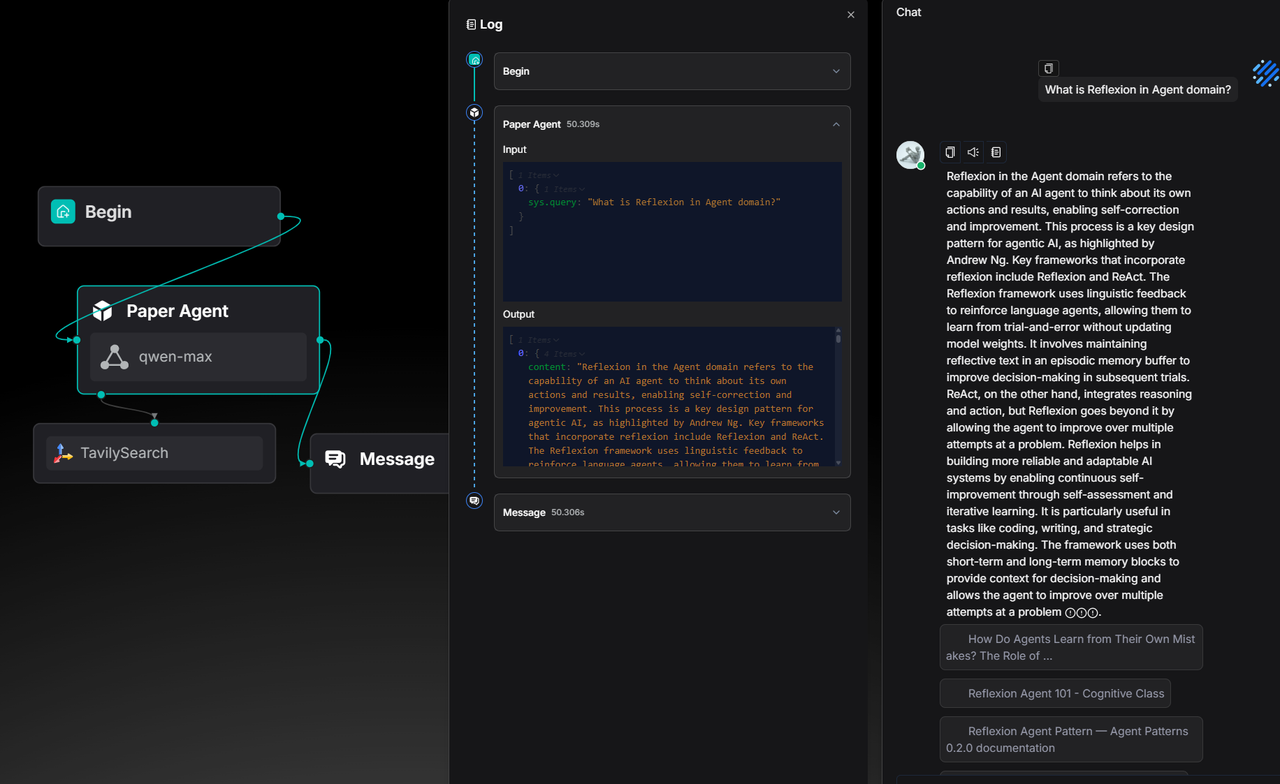
The following example demonstrates the construction of an Agent designed to search academic content.
In versions prior to 0.23.0, answering a conceptual question such as "What is Reflexion in the Agent domain?" took about 50 seconds:
In version 0.23.0, the time required to generate a response of similar length has been reduced to 27 seconds:
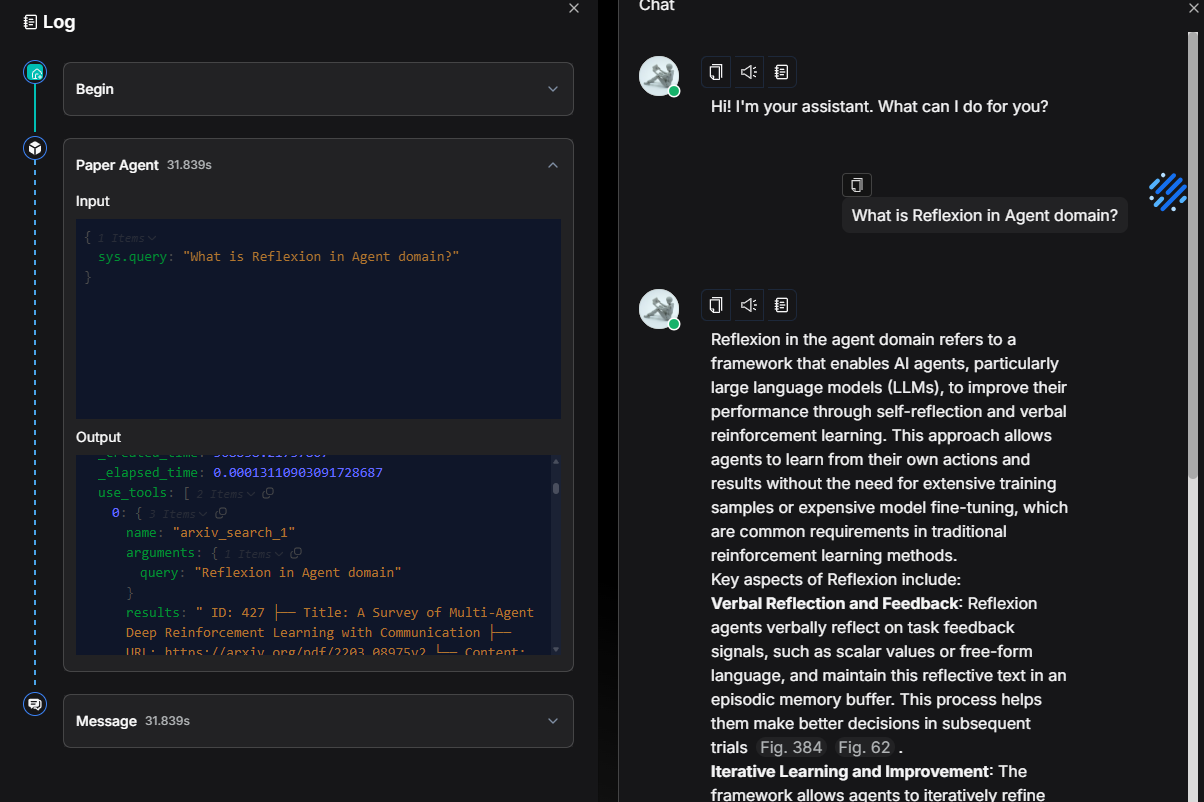
Developers can also customize the Agent's workflow according to their specific business processes, such as strictly defining the sequence of tool calls, as shown in the diagram below.
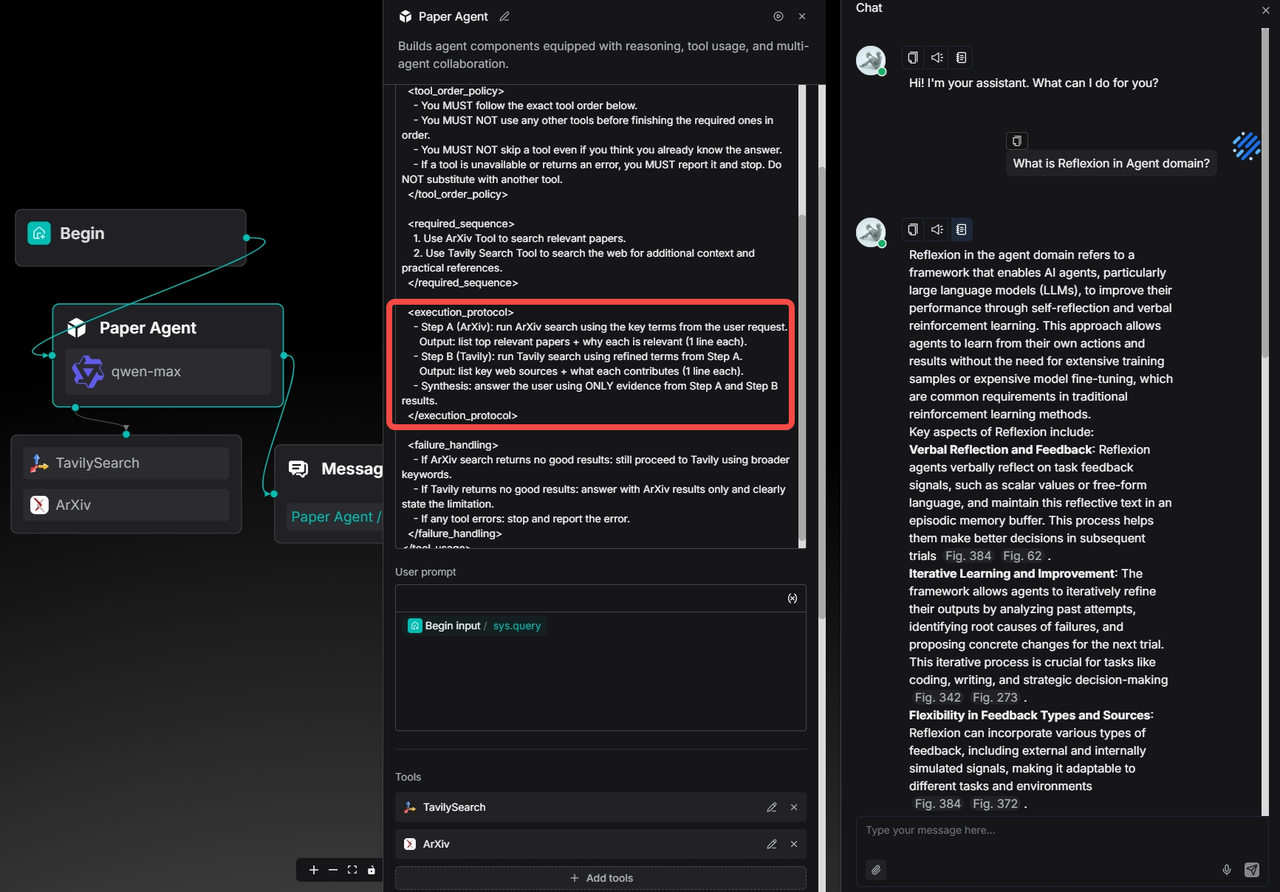
The logs confirm that ArXiv was indeed invoked first:
Then followed by Tavily Search:
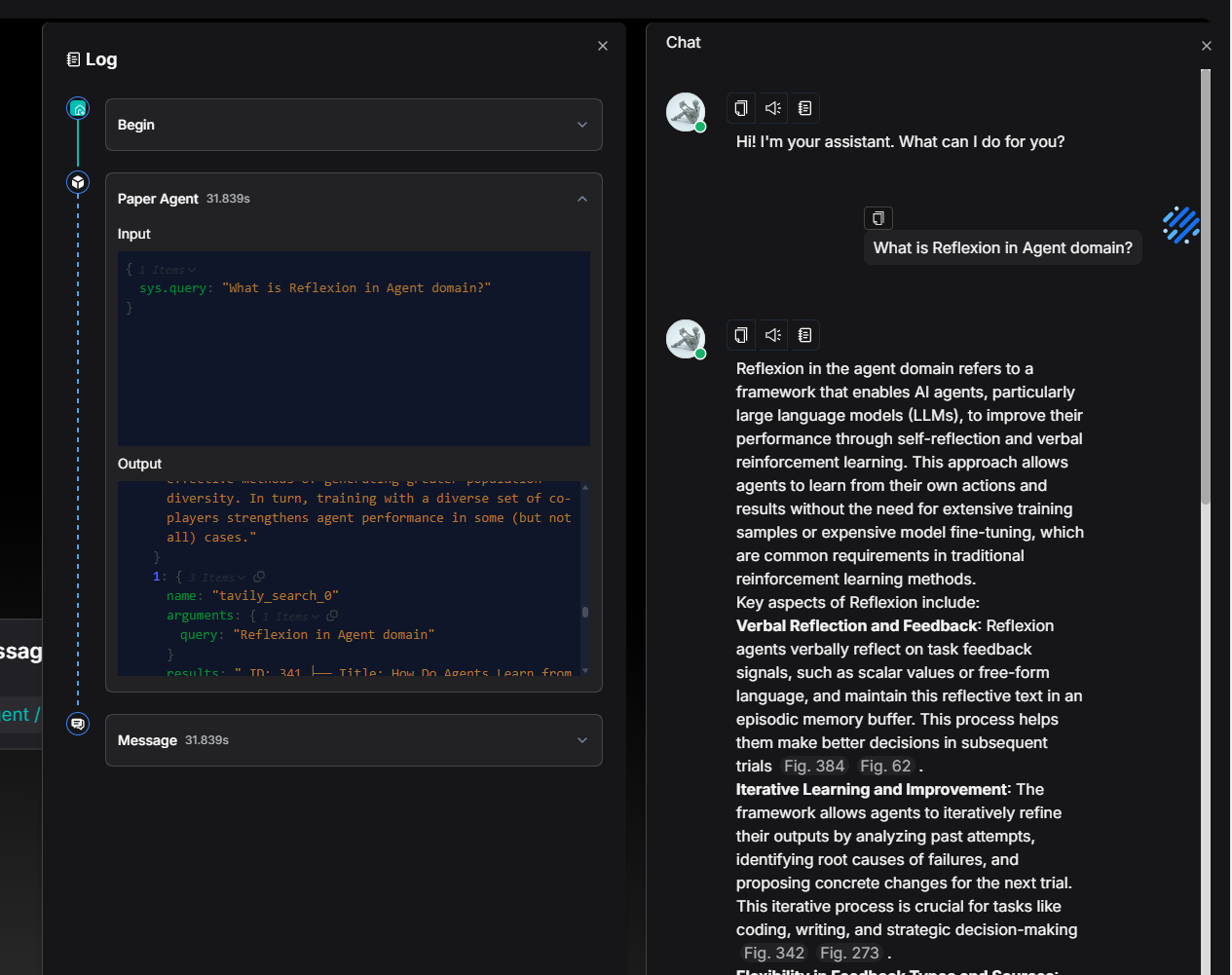
The total runtime of the Agent remains within the range of 30 seconds.
Workflows triggered using Webhook
In real‑world business scenarios and development needs, it is common to rely on external systems triggering operations via HTTP requests—typical use cases include user form submissions, chatbot message pushes, and similar events.
In version 0.23.0, RAGFlow’s Agent now supports receiving external HTTP requests through Webhooks, enabling automated triggering and the initiation of workflows. This enhancement significantly improves the system's flexibility and extensibility.
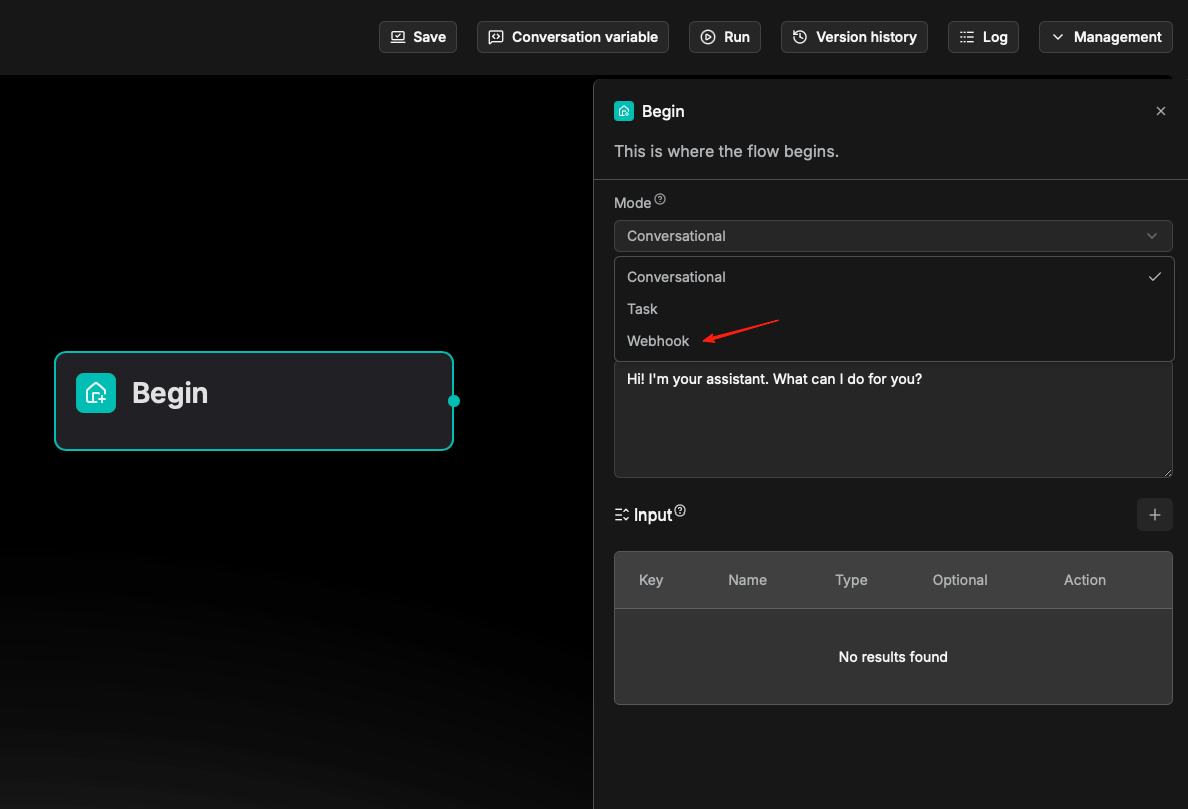
As shown below, the system automatically generates a unique Webhook URL for each workflow. Users can simply use this URL to seamlessly integrate external systems and achieve automated connectivity.
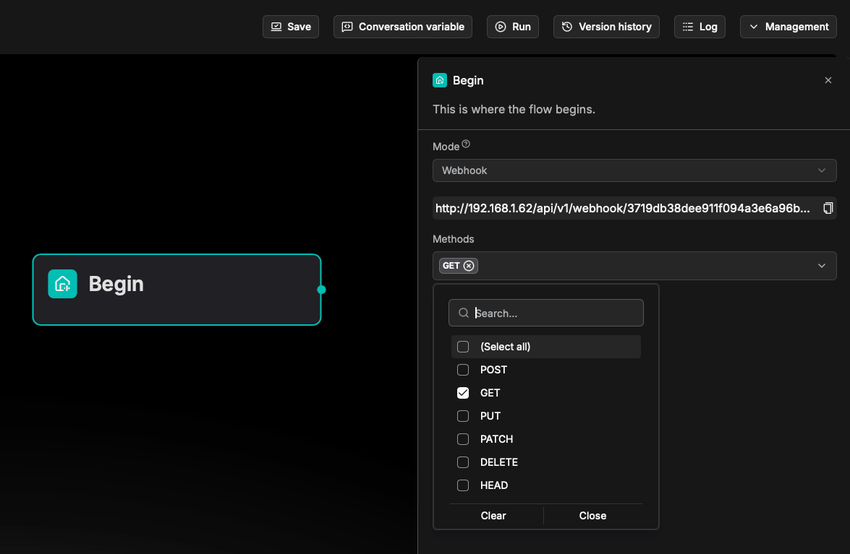
On the Webhook configuration page, users can directly copy the generated Webhook URL to configure third‑party systems or API calls, and select the desired HTTP request method to receive the trigger.
Security configuration
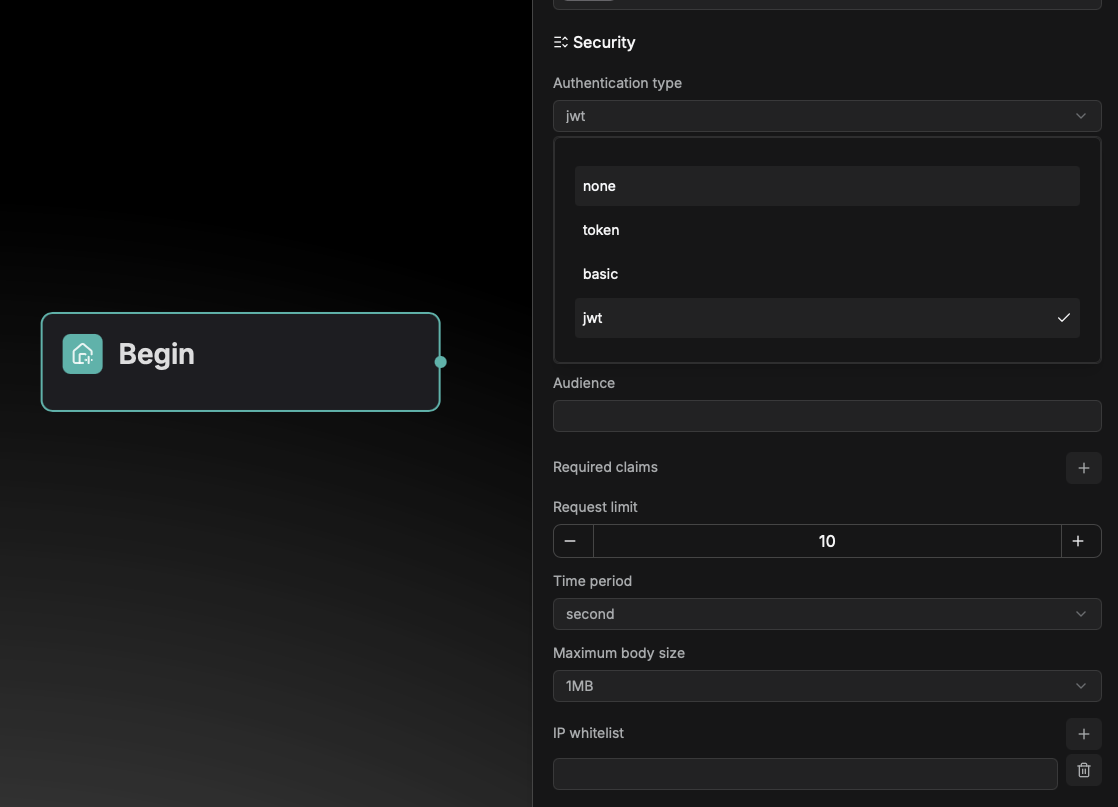
Webhook provides multi‑level security authentication and traffic control mechanisms to ensure data transmission security and system stability.
It supports three authentication methods to meet different security requirements: Token-based authentication, Basic auth, and JWT authentication.
Additionally, it includes request rate limiting, maximum request body size restrictions, and IP whitelist configuration, effectively preventing malicious access and traffic overload to maintain reliable and stable service operation.
Schema configuration
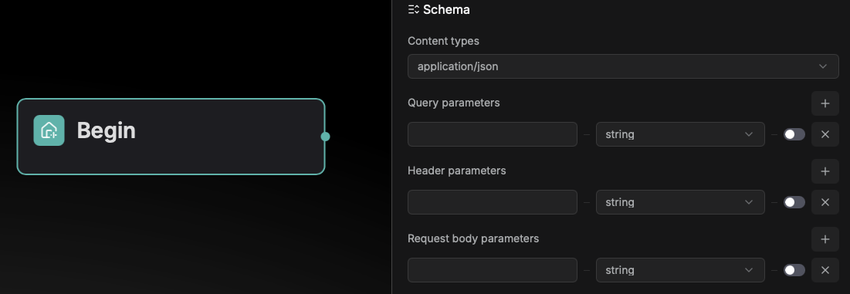
Schema is used to specify the data format of the HTTP requests that the Webhook will receive, allowing RAGFlow to parse the requests accordingly. Schema configuration includes the Content types and query parameters of the HTTP request. Currently supported content types are as follows:
Response configuration
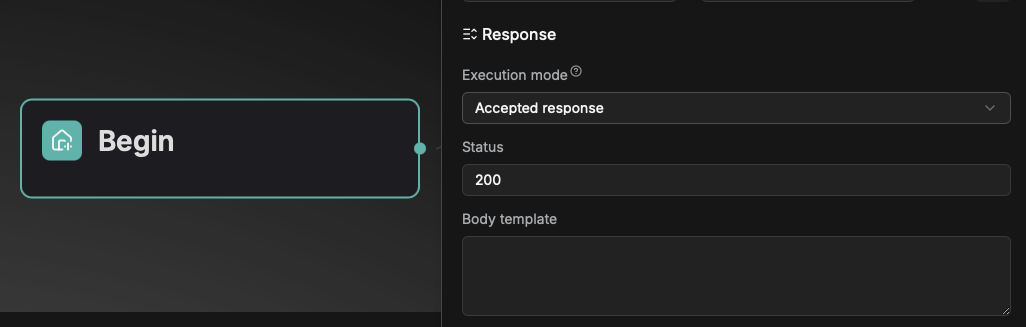
Two execution models are provided: Accepted response and Final response:
- Accepted response: Once the request passes validation, a success acknowledgment is returned immediately, and the workflow executes asynchronously in the background.
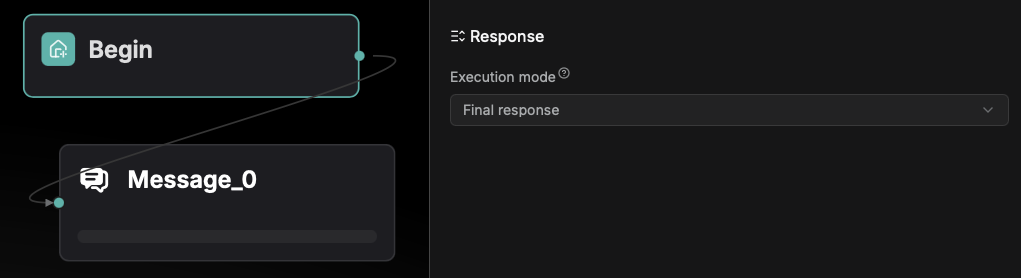
- Final response: The system returns the final processing result only after the workflow execution is completed.
Accepted response is configured via the Begin component: users can customize the success response status code (within the range of 200–399) and the response body content.
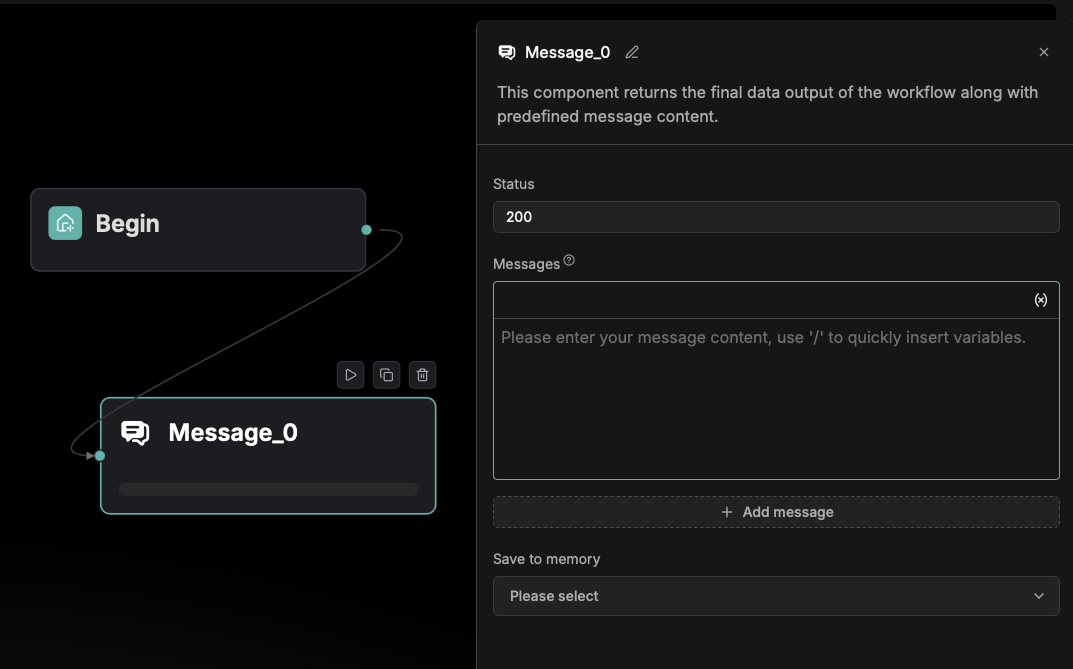
Final response is configured through the Message component, allowing users to customize the success response status code within the 200–399 range.
Test run and check the log
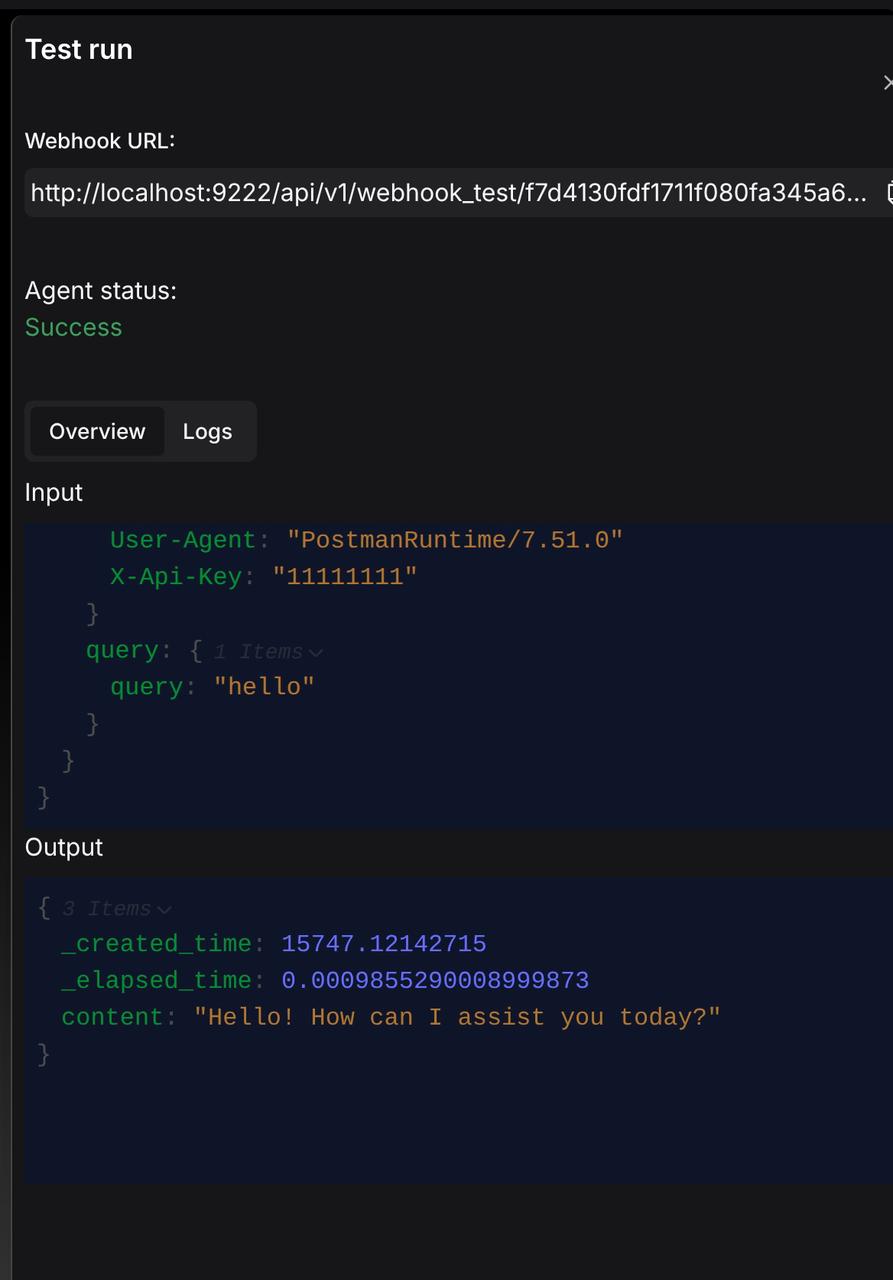
During the test run phase, the system uses a dedicated test URL for triggering.
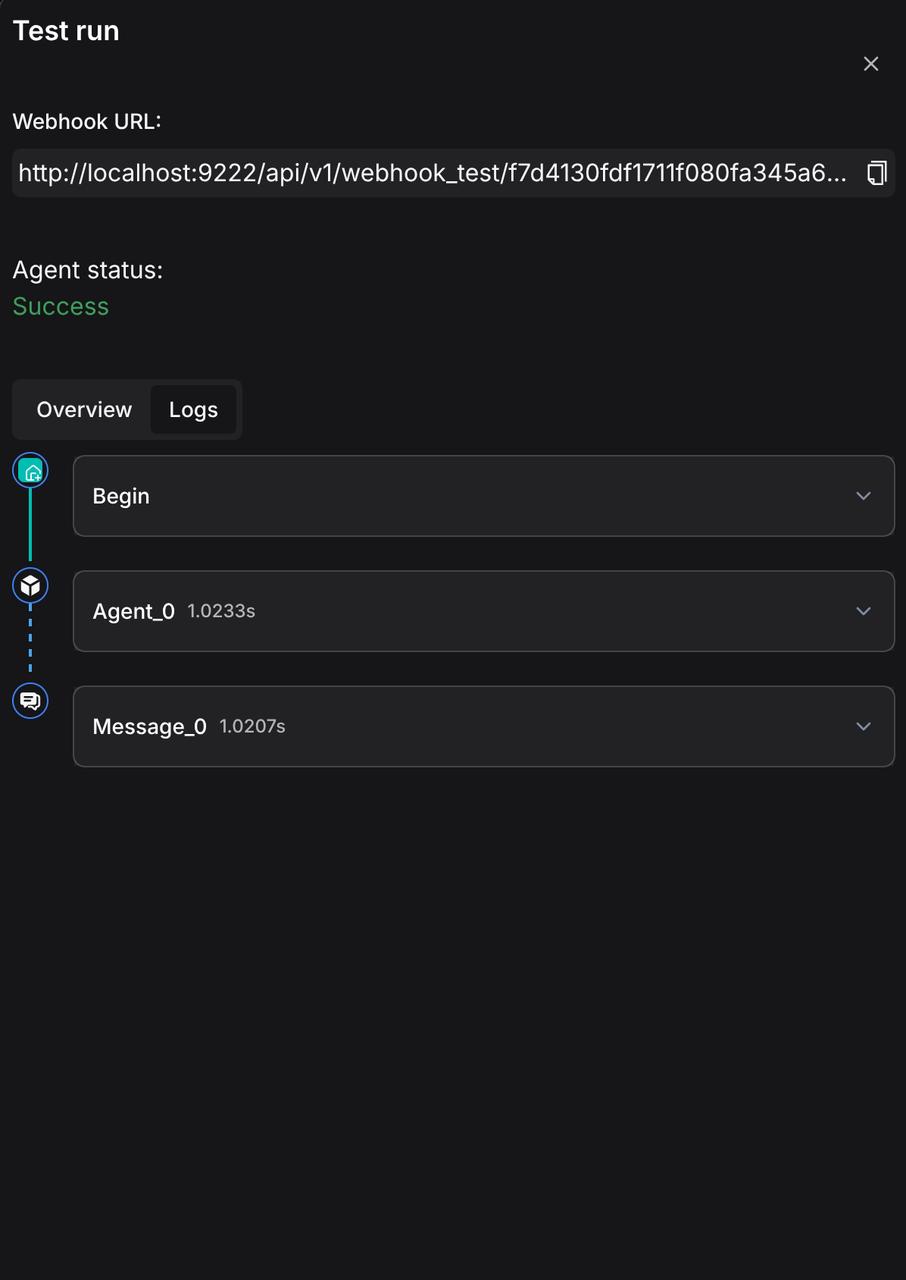
Users can monitor the real‑time execution status of the entire workflow and overview the overall inputs and outputs on the Test run page.
Simultaneously, the Logs module records detailed execution processes and log information for each component, facilitating troubleshooting and debugging.
Global conversation variables
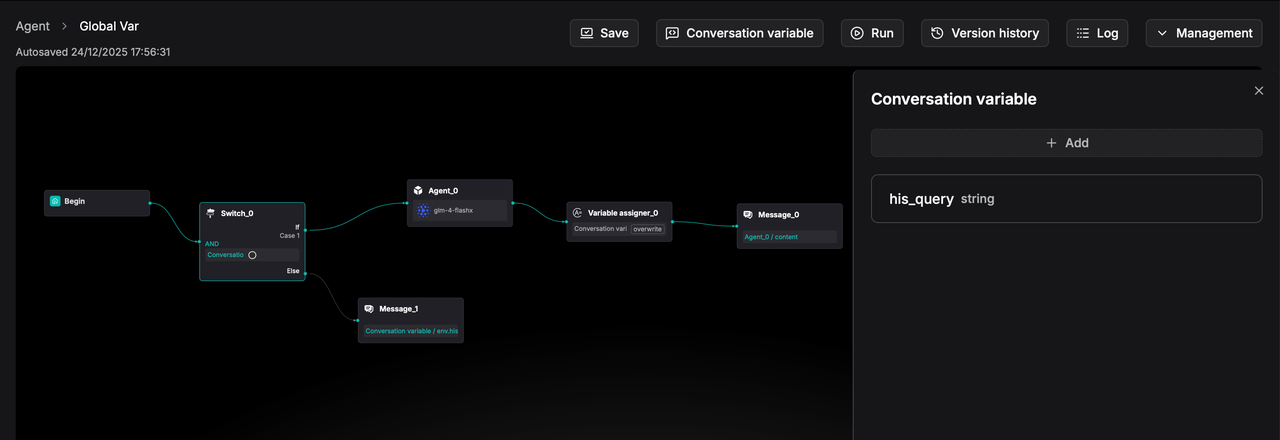
In real development scenarios, there is often a need to reuse intermediate variables within an Agent process. For example, during a conversation, determining whether the user’s current question has already appeared in a previous round requires saving the result of the earlier query into a variable and reusing or comparing it later in the workflow.
In RAGFlow, a Conversation variable can be defined as a global variable to store an Agent’s intermediate output, making it available for reuse throughout the conversation.
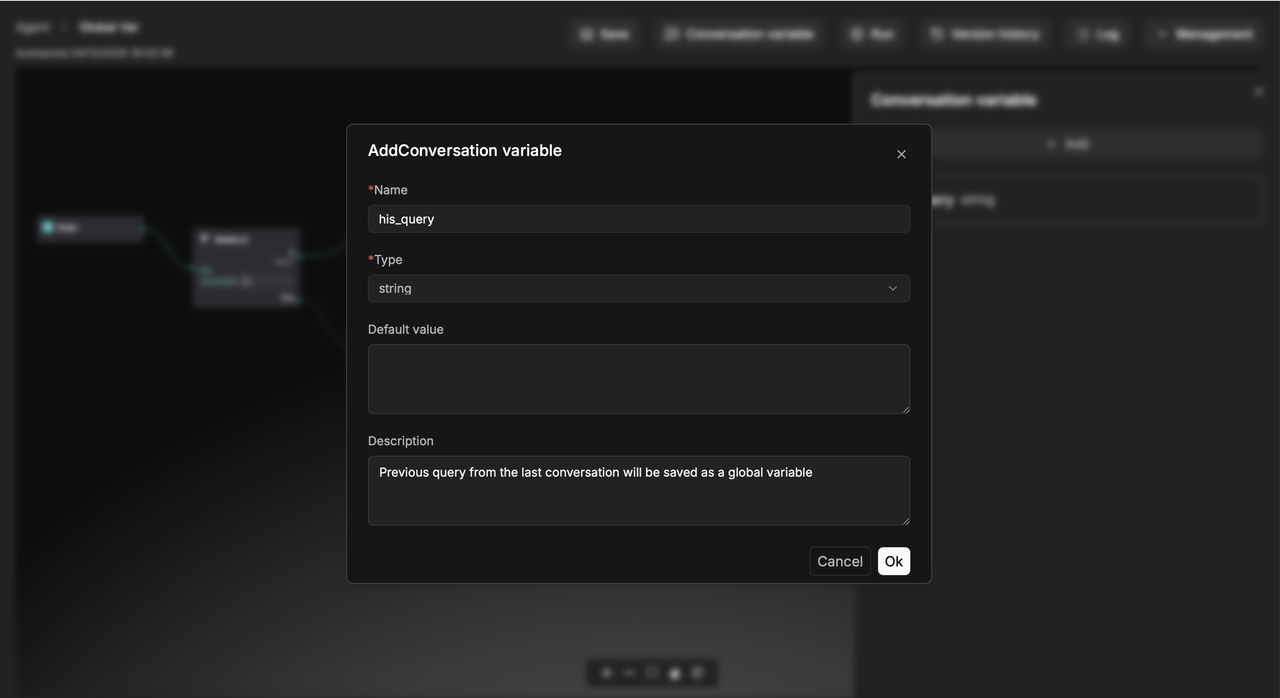
For example, you can define a global variable named his_query to store the user's previous question.
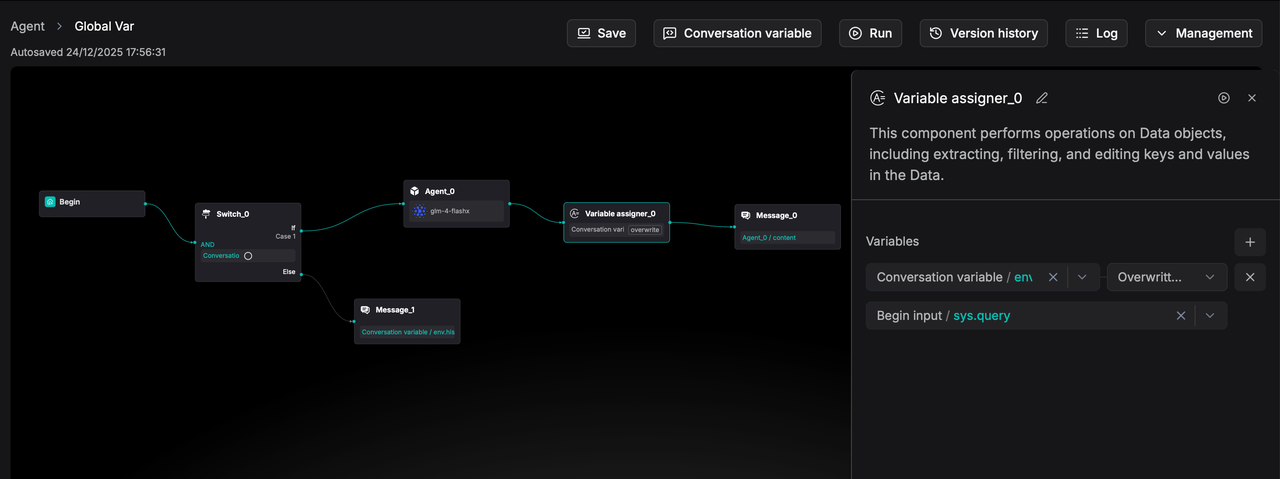
And assign a value to the global variable using the Variable assigner component.
Structured Agent component output
In earlier versions of RAGFlow, component outputs were limited to simple text or unstructured data, which constrained the precise parsing and utilization of information by subsequent components.
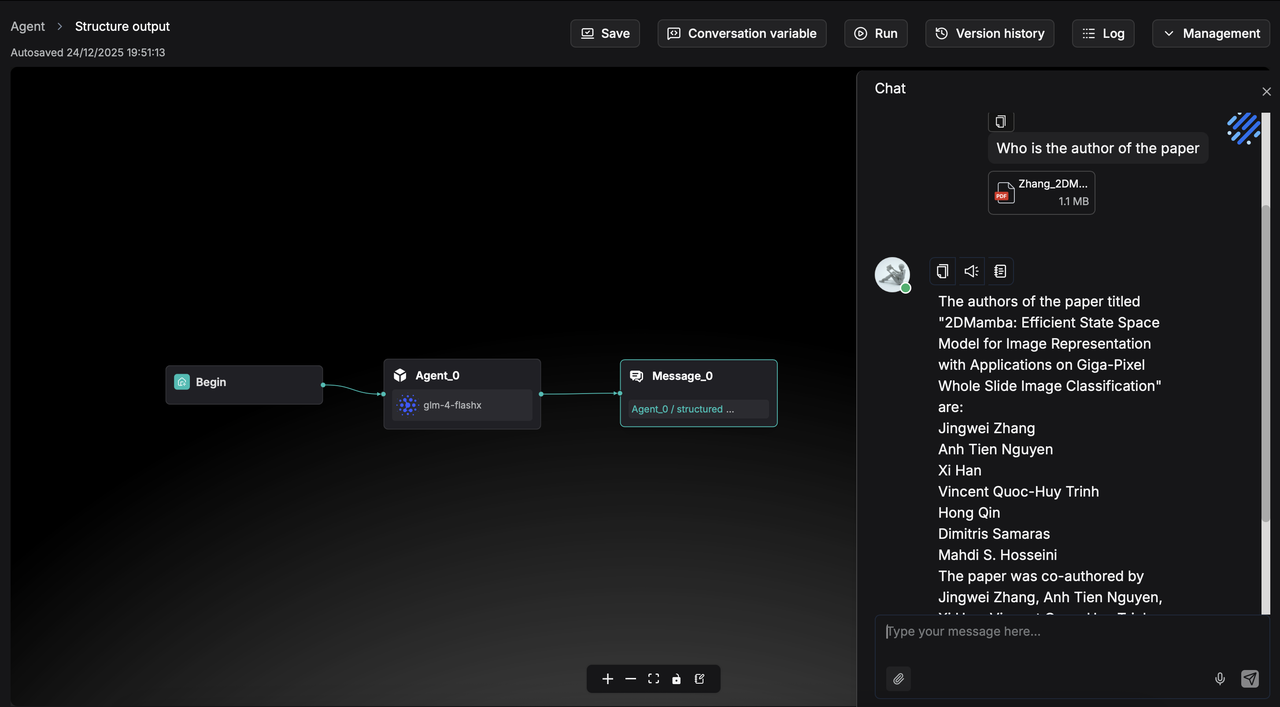
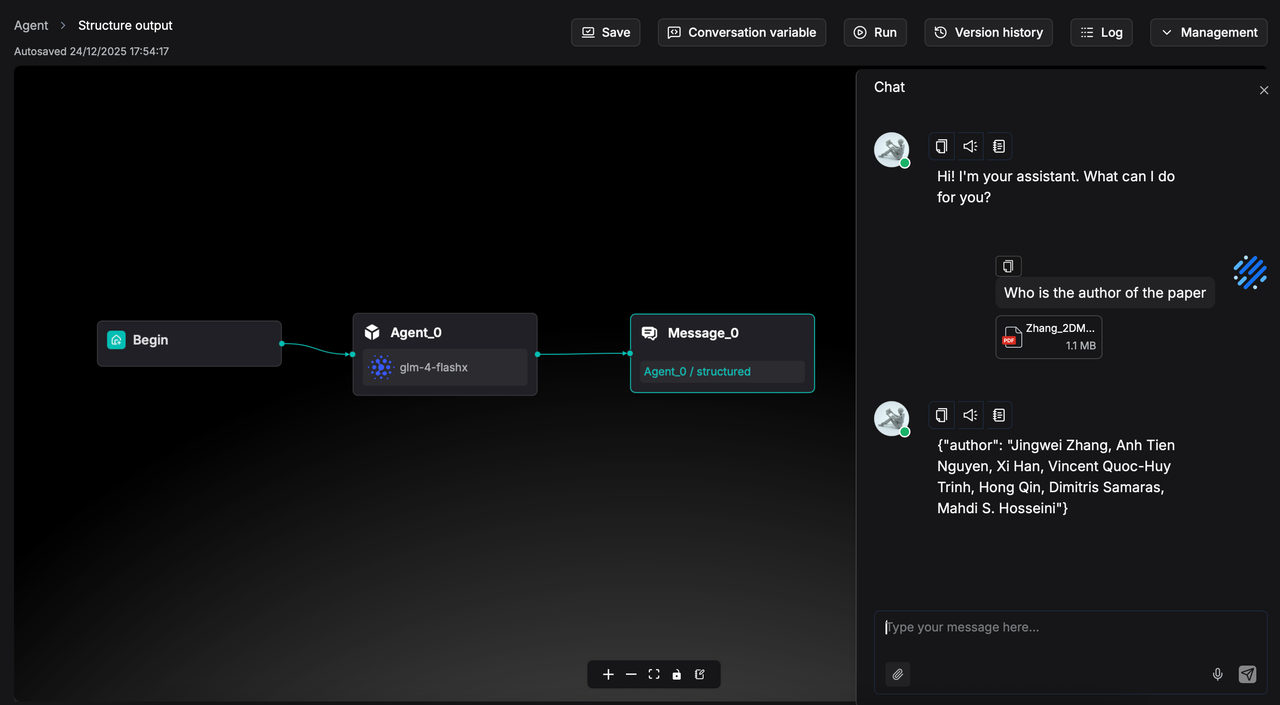
RAGFlow 0.23.0 introduces support for structured component output, enabling data to be passed in a standardized, formatted manner (such as JSON objects) that can be read and processed as variables by subsequent components.
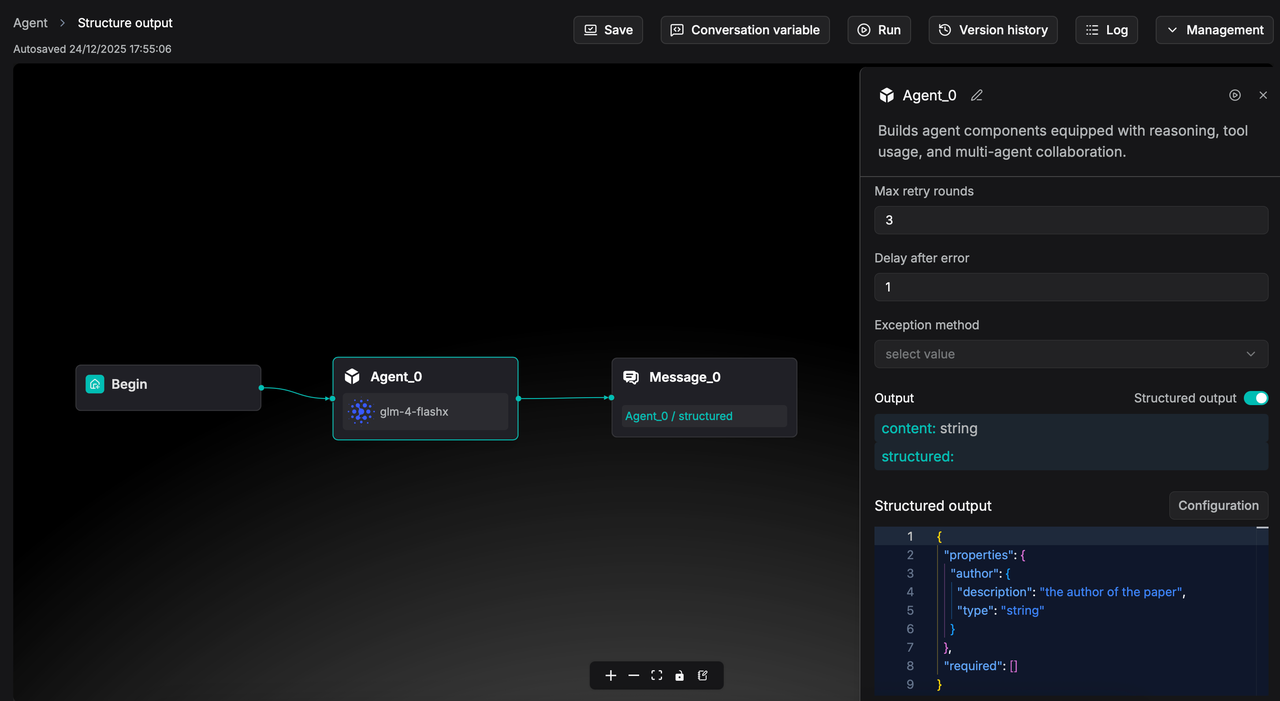
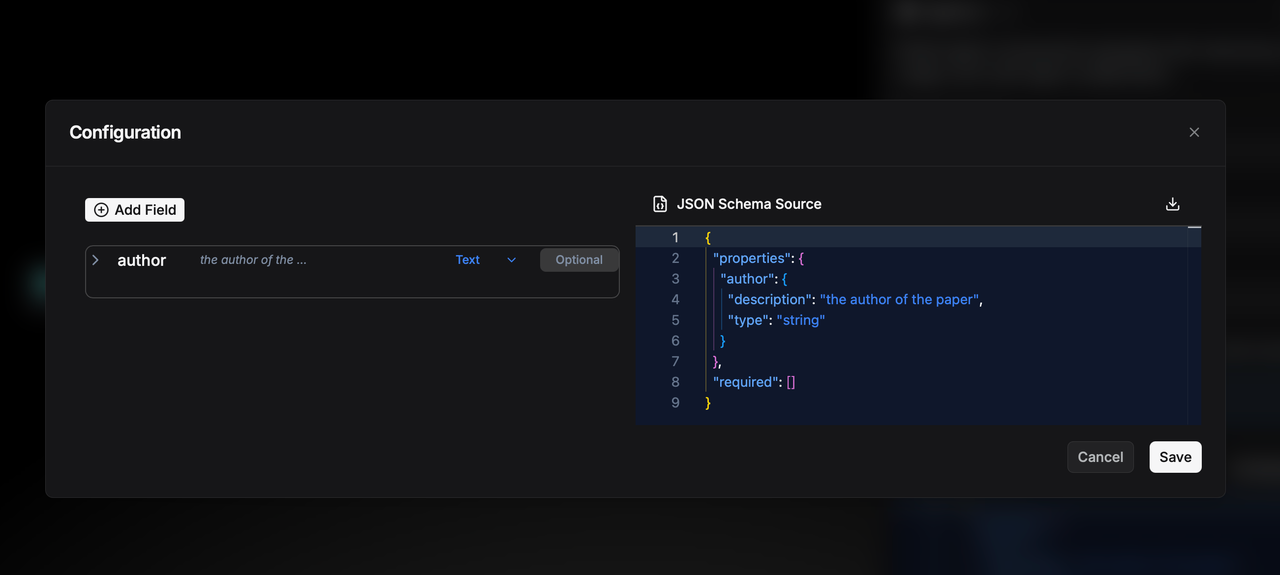
In the Agent component's structured output configuration, you can add field names, types, and descriptions, and the system will automatically generate the corresponding JSON Schema. For example, after adding an author field, the JSON Schema is as shown above.
When executed, the output will follow this structured format and be passed as a variable to downstream components, ensuring accurate reading and processing. A sample result is shown below:
Voice input and output
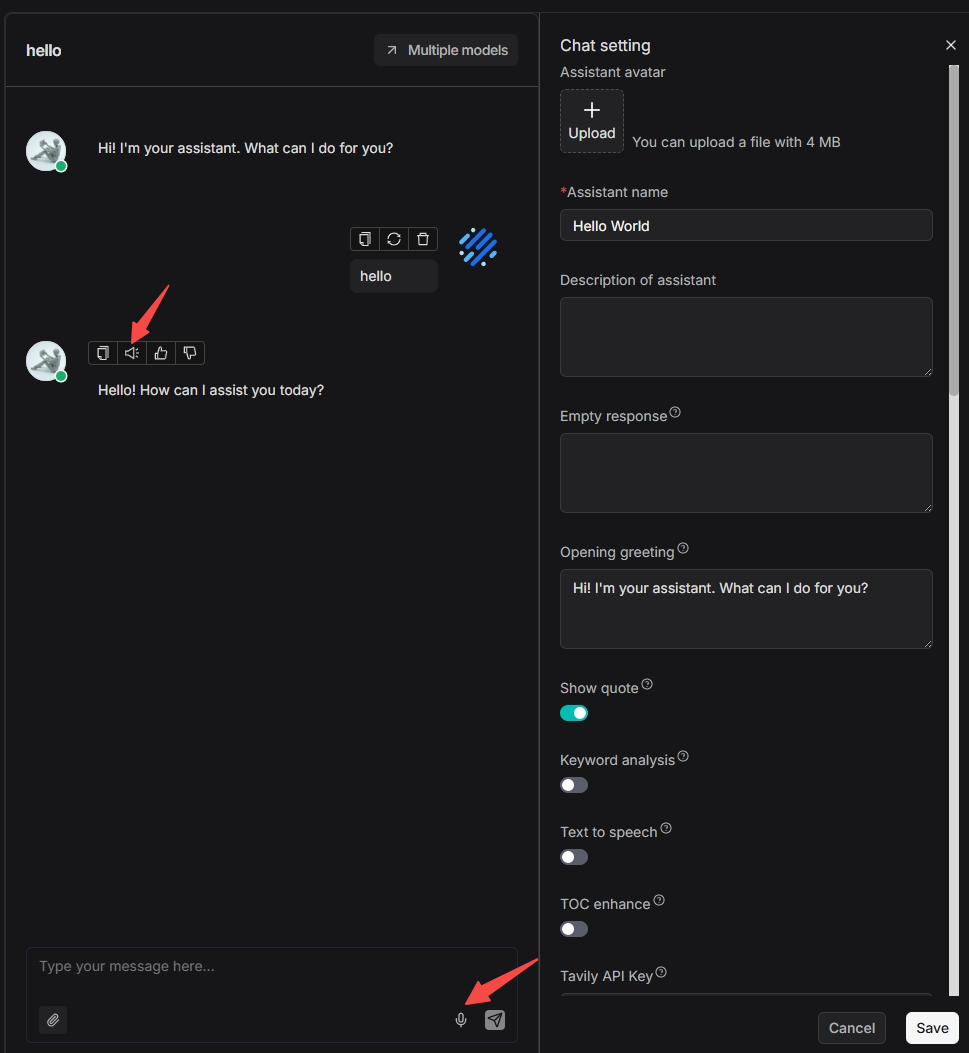
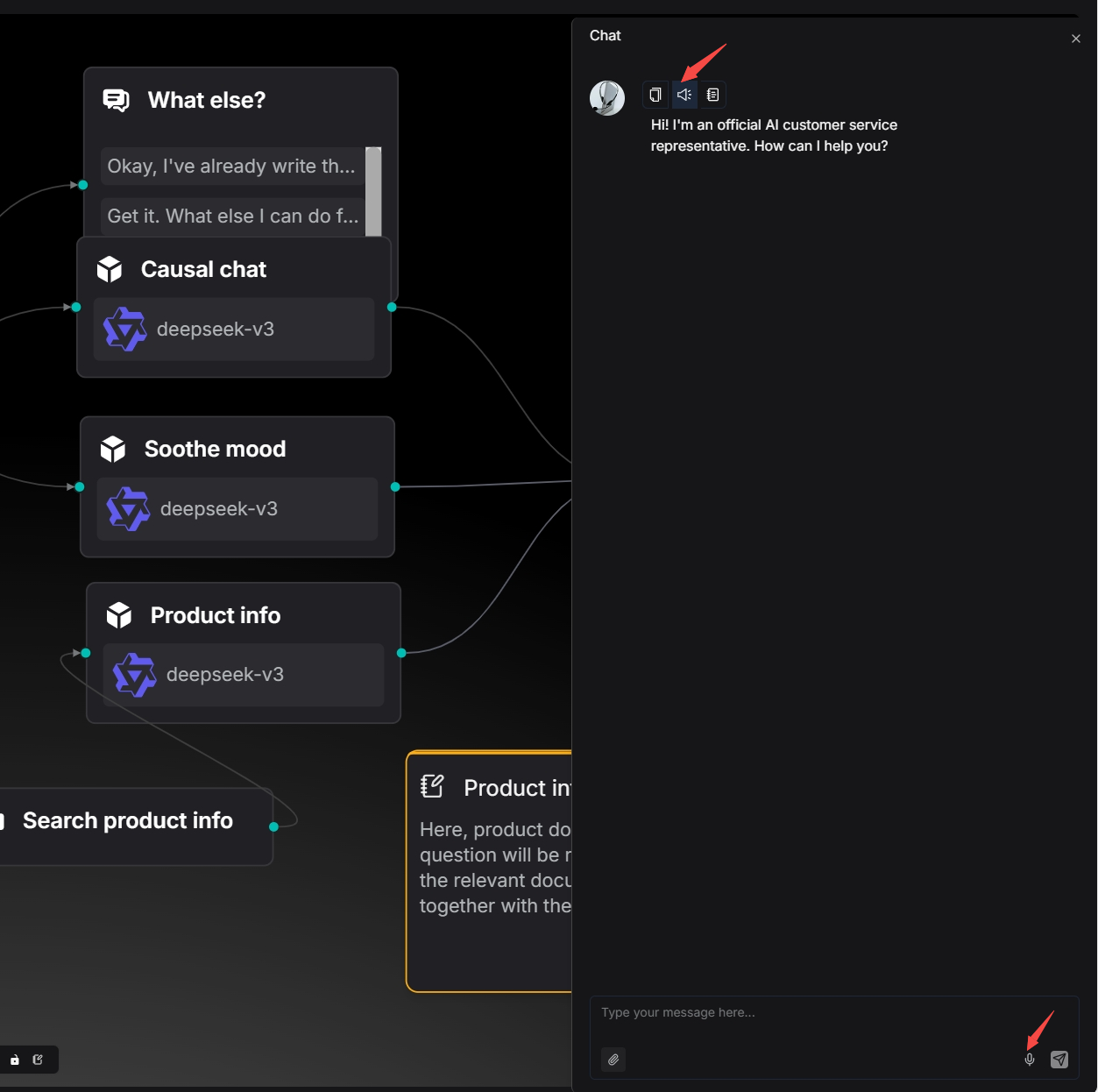
RAGFlow version 0.23.0 supports end-to-end voice input and output, enabling the development of voice-enabled Agent applications such as digital humans. Voice functionality is available in both the Chat and Agent modules.
The voice input and output operation entry points in the Chat module are as follows:
The operation entry points for voice input and output in the Agent module are as follows:
Enhanced RAG
Auto-metadata
In the past, RAGFlow’s support for metadata was relatively limited, offering only manual editing of metadata at the individual file level.
Therefore, RAGFlow has introduced the Auto-metadata feature. Compared to the previous method of manually adding metadata to each file, users can now leverage large language models to automatically extract and generate metadata for documents.
By utilizing metadata effectively, it plays a dual role in the RAG workflow:
- During retrieval: It filters out irrelevant files, narrowing the search scope to improve recall accuracy.
- During generation: If a chunk is recalled, its associated metadata is passed to the LLM along with the text, providing richer contextual information about the document and enabling more informed responses.
Configuring auto-metadata generation rules
On the Knowledge Base Configuration page, start by selecting the Indexing model. This model will be used to generate the current knowledge base’s Knowledge Graph, RAPTOR, Auto-Metadata, Auto-Keyword, and Auto-Question.
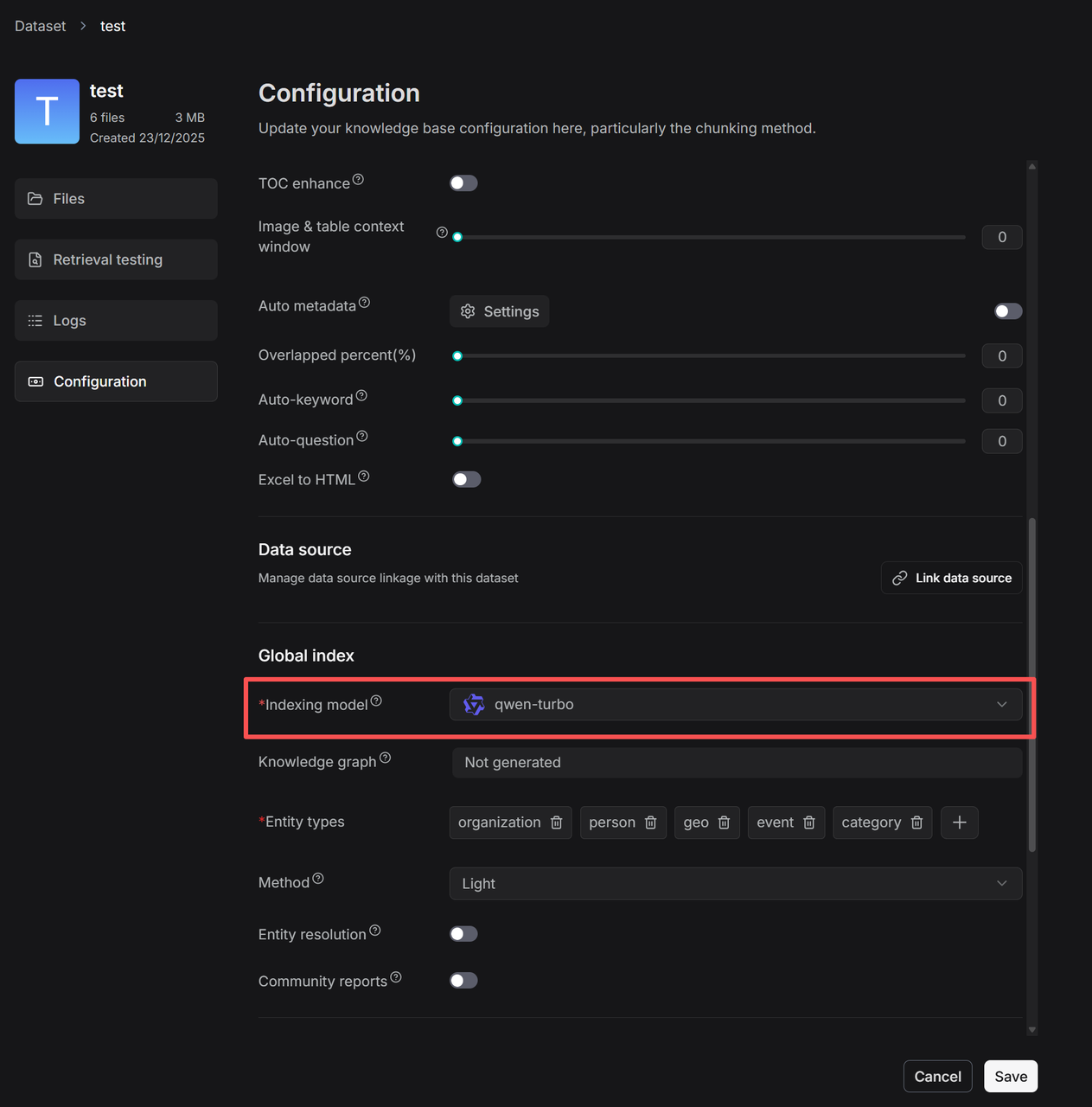
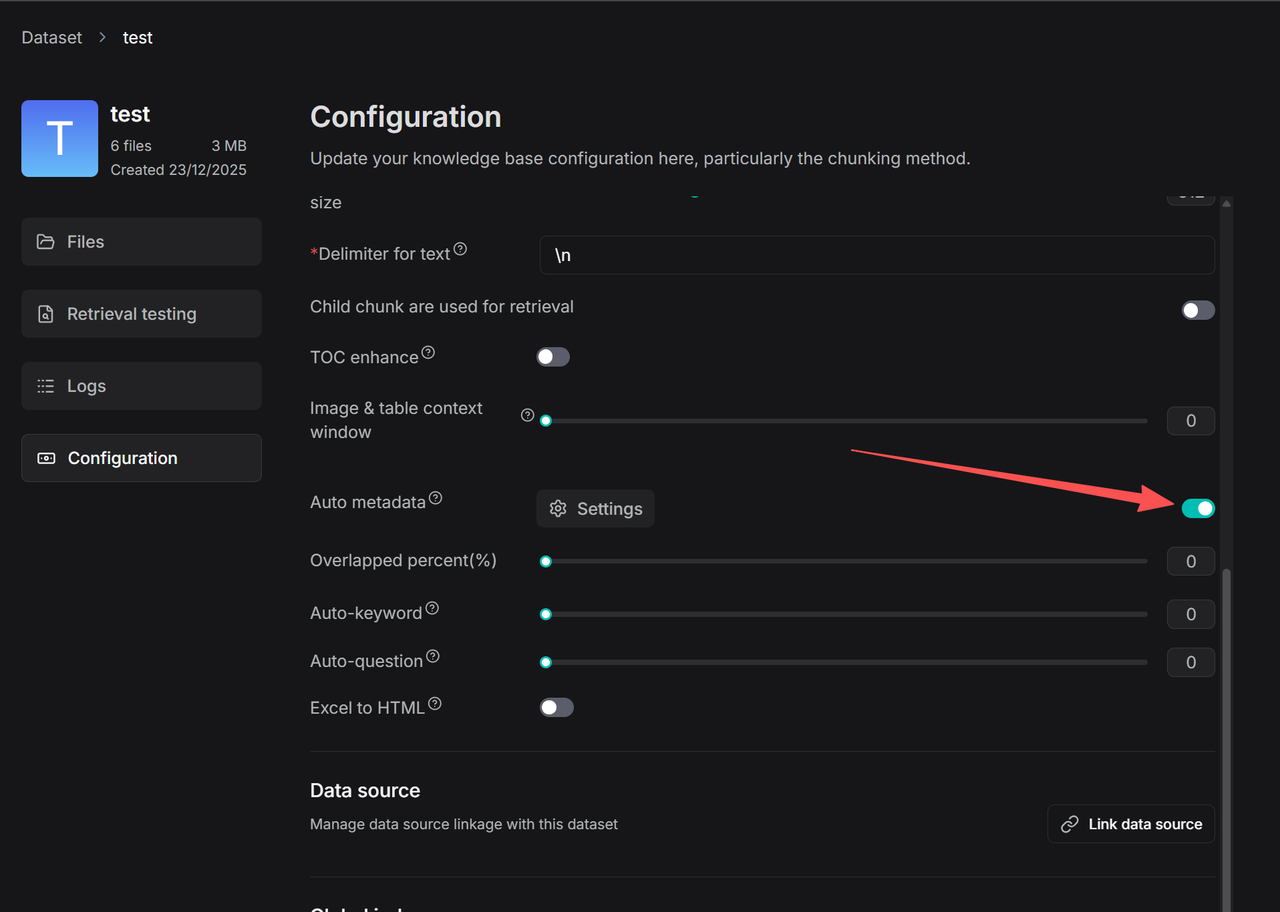
Click Auto-metadata → Settings to enter the rule configuration page for automatic metadata generation.
Click + to add new field to enter the configuration page for that field.
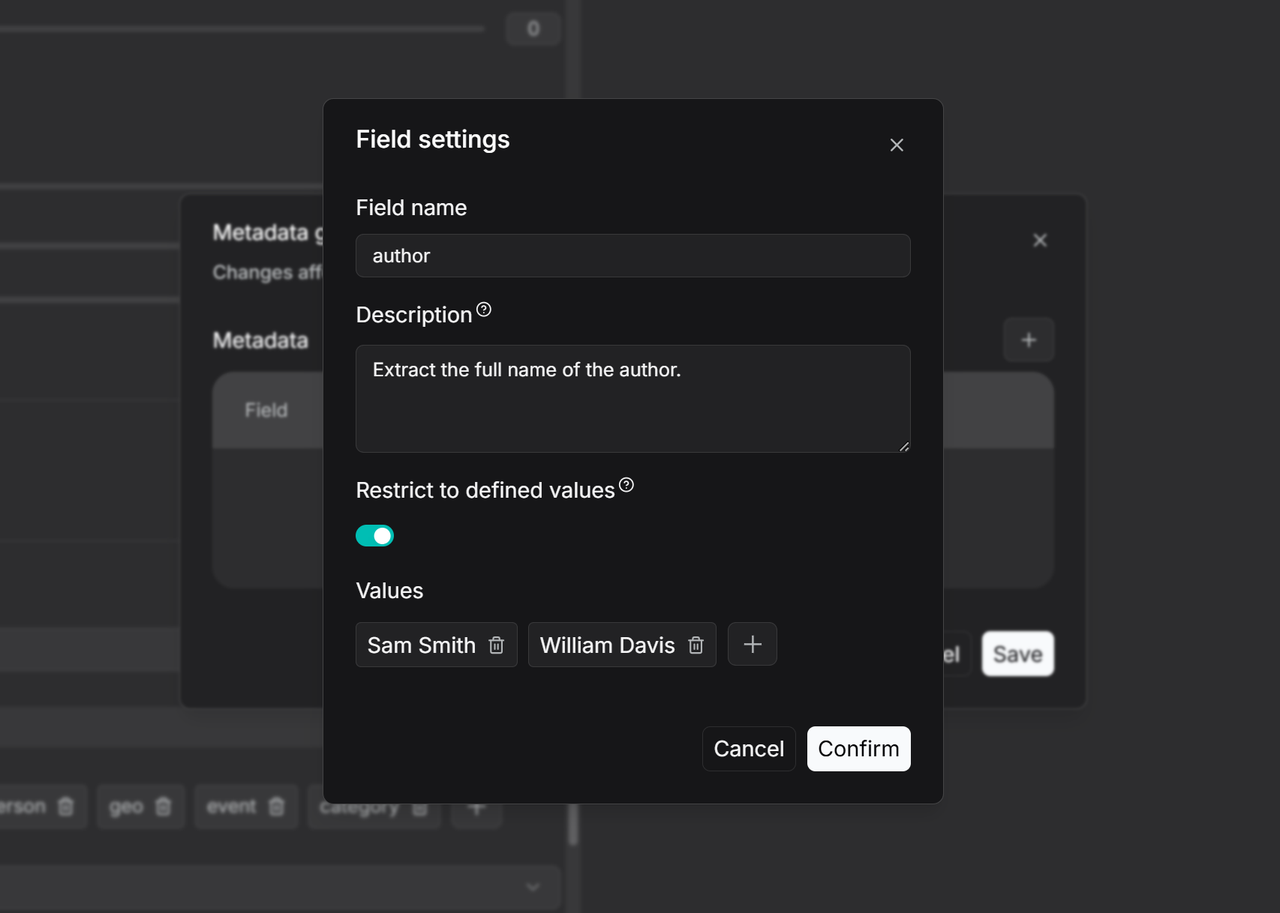
Enter the field name, such as Author, and provide a description and example in the Description field to guide the large language model in accurately extracting values for this field. If this field is left blank, the model will generate values based solely on the field name. If you need to restrict metadata generation to a predefined set of values, you can enable Restrict to defined values mode and manually specify the allowed values, as shown in the image. In this case, the model will only output results within the preset range. Once configured, turn on the Auto-metadata toggle on the Configuration page. All newly uploaded files will have metadata automatically generated according to this rule during parsing. For files that have already been parsed, you can trigger metadata generation by reprocessing them. Users can then use the filtering function to check the metadata generation status of each file.
Manage metadata
The system supports metadata management at both the overall knowledge base level and the individual file level.
To access the metadata management interface, click Metadata within the knowledge base and enter the Manage Metadata page.
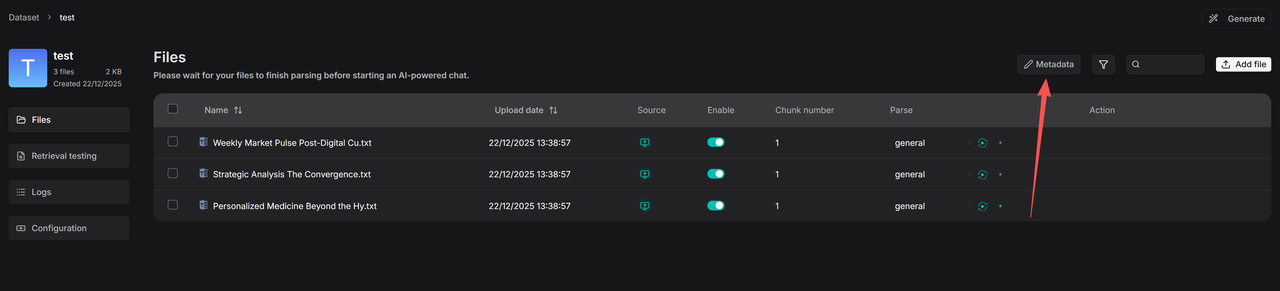
Here, you can centrally manage all generated metadata. You can modify existing values, and if you change two values to the same name, they will be automatically merged. You can also delete specific values or entire fields—all such operations will affect all associated files.
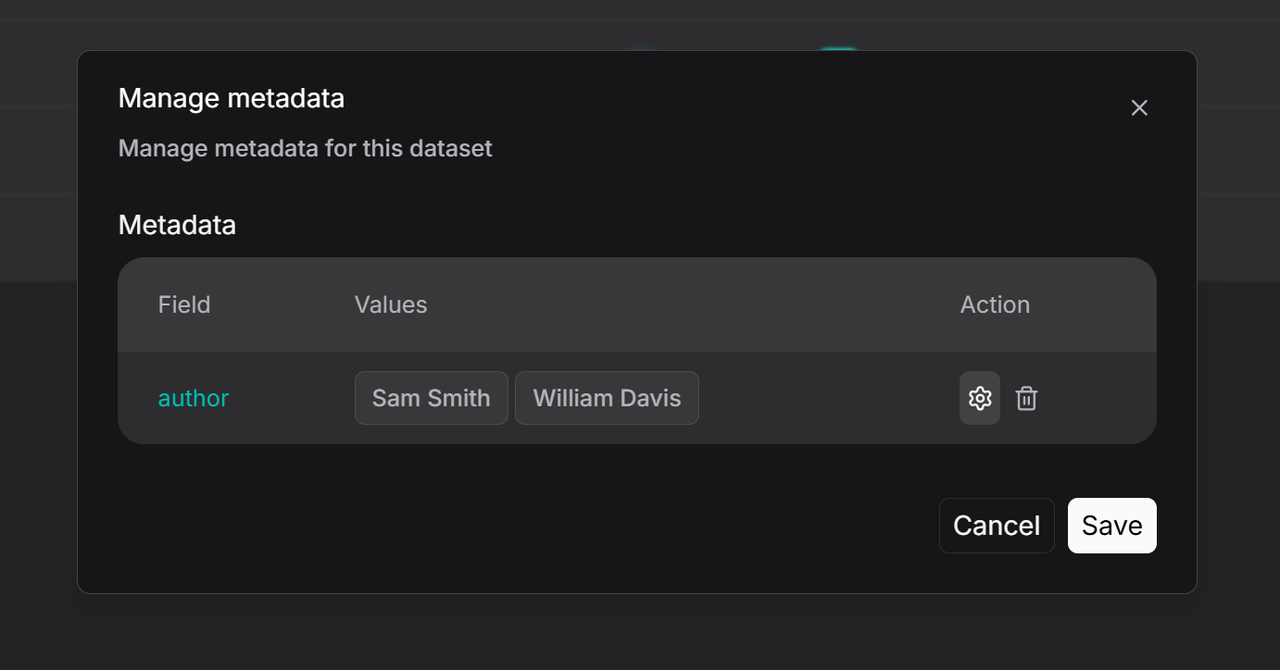
More refined management features will be rolled out in the future, such as setting specific generation rules for selected files, or manually adding metadata to files in batches.
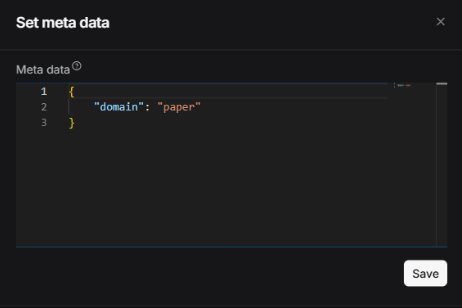
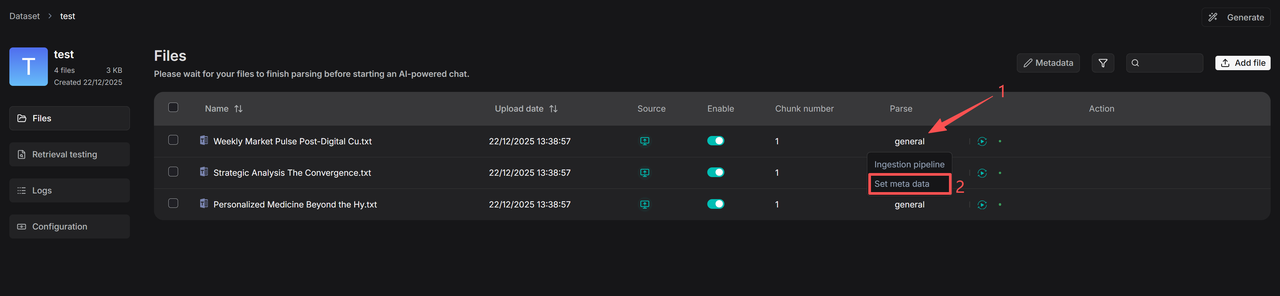
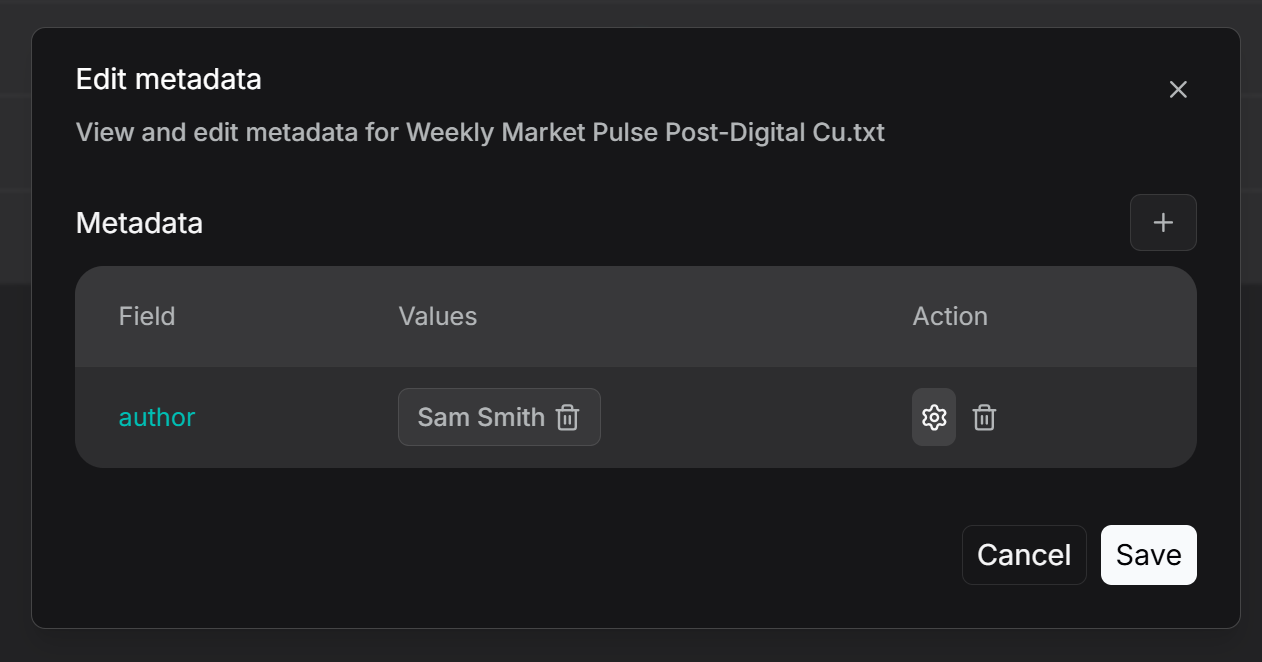
For individual file management, as shown in the figure below, first click the parsing method of the file (e.g., "General"), then enter Set Metadata to view and edit its metadata. Users can add, remove, or edit metadata fields for that specific file. Any edits made here will be reflected in the global statistics of the knowledge base metadata.
Filter metadata
The filtering functionality is divided into two types: filtering at the knowledge base management level and filtering during the retrieval phase. By clicking the filter button within a knowledge base, you can view the number of files associated with each existing metadata field value. Checking a specific value will then display all the corresponding linked files.
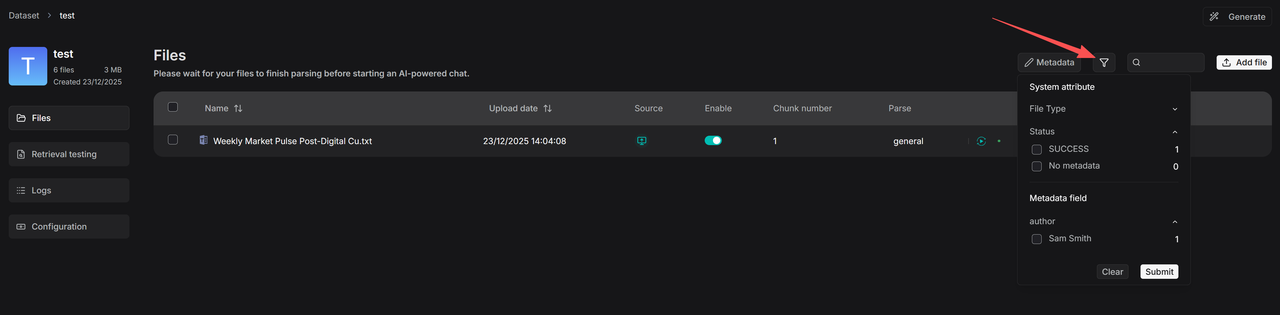
You can also use “No metadata” to filter out files that have not yet generated metadata, allowing you to trigger bulk re-parsing for automatic metadata generation.
Similarly, metadata filtering is supported during the retrieval phase. Taking Chat as an example, after configuring a knowledge base, you can set metadata filtering rules as follows:
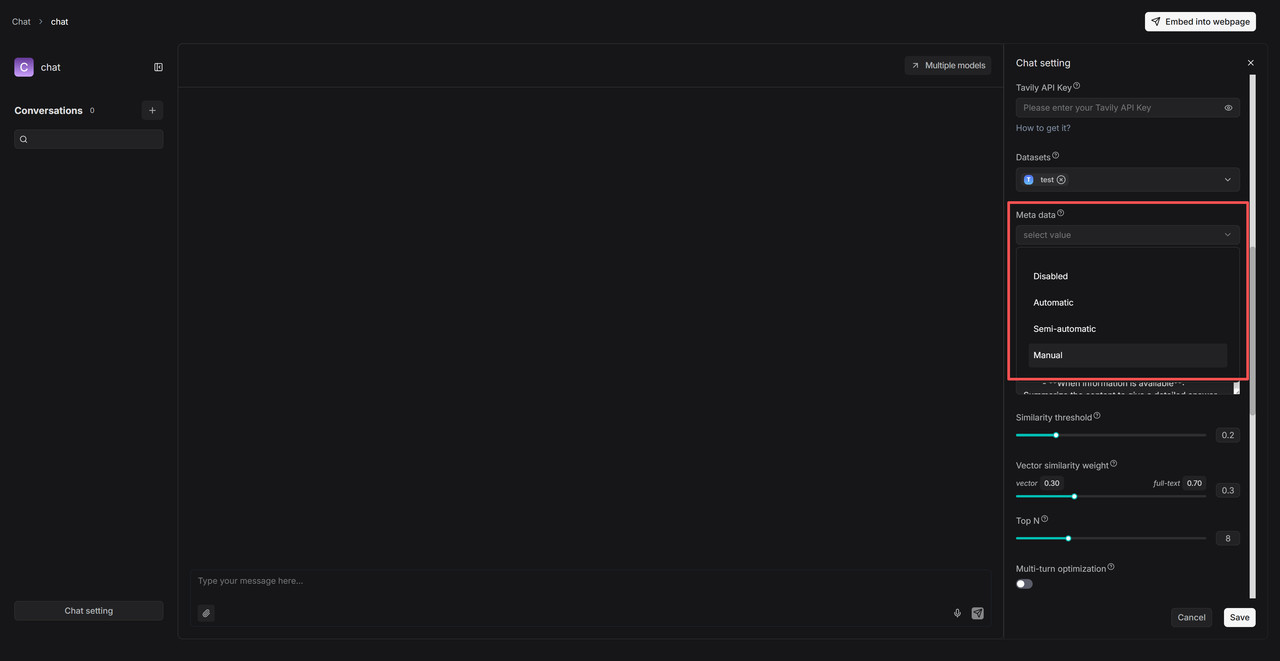
- Automatic mode filters results based on the user’s query and the existing metadata in the knowledge base.
- Semi-automatic mode allows users to first define the filtering scope at the field level (e.g., “Author”) before automatic filtering is applied within that range.
- Manual mode gives users full control to set precise, value-level filtering conditions and supports various operators such as: Equals, Not equals, In, Not in, and more.
Add context to images and tables
RAGFlow utilizes built-in DeepDoc and external document models such as MinerU and Docling to parse document layouts.
In previous versions, images and tables identified via document layout analysis existed as independent Chunks. If retrieval did not match the content of the image or table itself, these elements would not be recalled. However, in real documents, charts and surrounding text are often arranged together, with the text providing descriptions or explanations of the chart content. Therefore, the ability to recall charts based on this contextual text is essential.
To address this, RAGFlow 0.23.0 introduces the Image & Table Context Window feature. Drawing inspiration from the research-oriented open-source project RAG-Anything, which specializes in multimodal RAG, this function allows text and its associated chart to be placed within the same Chunk—based on a user-configurable context window size—so they can be retrieved together. This enhancement significantly improves the accuracy of chart retrieval in practice.
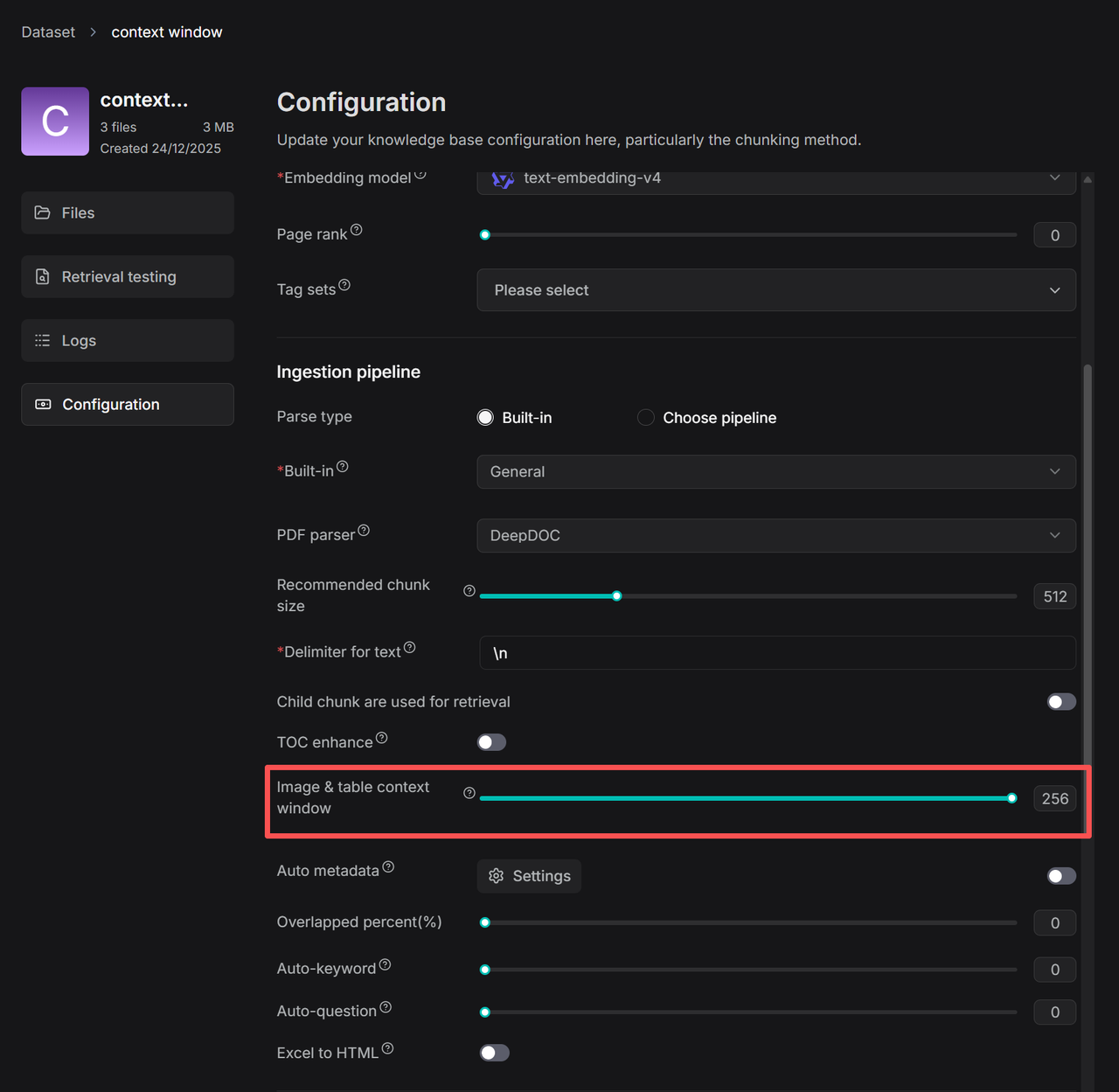
As illustrated above, the value in the red box indicates that approximately N tokens of text above and below the chart will be extracted and inserted into the Chunk of type image/table as contextual supplementation for the chart.
During extraction, boundaries are optimized based on punctuation to preserve semantic coherence.
Users can adjust the number of contextual tokens according to their needs.
Child chunking
In practical applications of RAG, a long-standing challenge has been the structural contradiction in the traditional “chunk-embed-retrieve” pipeline: a single text chunk is tasked with both semantic matching (recall) and contextual understanding (utilization), two inherently conflicting objectives—recall demands fine-grained, precise positioning, while answer generation requires coherent and complete contextual information.
To resolve this tension, RAGFlow previously introduced the Table of Contents (TOC) enhancement, which leverages a large language model to generate a document's table of contents. During retrieval, the TOC helps automatically supplement missing context caused by chunk segmentation.
In version 0.23.0, this capability has been systematically integrated into the ingestion pipeline. Additionally, the release introduces a Parent-Child Chunking mechanism, which also addresses this contradiction in part: under this mechanism, a document is first divided into larger parent chunks, each preserving a relatively complete semantic unit to ensure logical and contextual integrity. Each parent chunk can then be further subdivided into multiple child chunks, designed for precise recall.
During retrieval, the system first locates the most relevant text segment based on child chunks, while automatically associating and retrieving its corresponding parent chunk. This approach maintains high recall relevance while providing sufficient semantic context for the generation phase.
For example, when processing a Compliance Handbook, if a user asks about "liability for breach of contract," the system might accurately retrieve a child chunk stating "the penalty for breach is 20% of the total contract value," but lack the context to clarify whether this applies to "general breach" or "material breach."
With the parent-child chunk mechanism, while returning that child chunk, the system also brings back the parent chunk containing the complete section of that clause, enabling the LLM to make accurate judgments based on fuller context and avoid misinterpretation.
Through this dual-layer structure of “precise positioning + contextual supplementation,” RAGFlow significantly enhances the reliability and completeness of generated answers while ensuring retrieval accuracy.
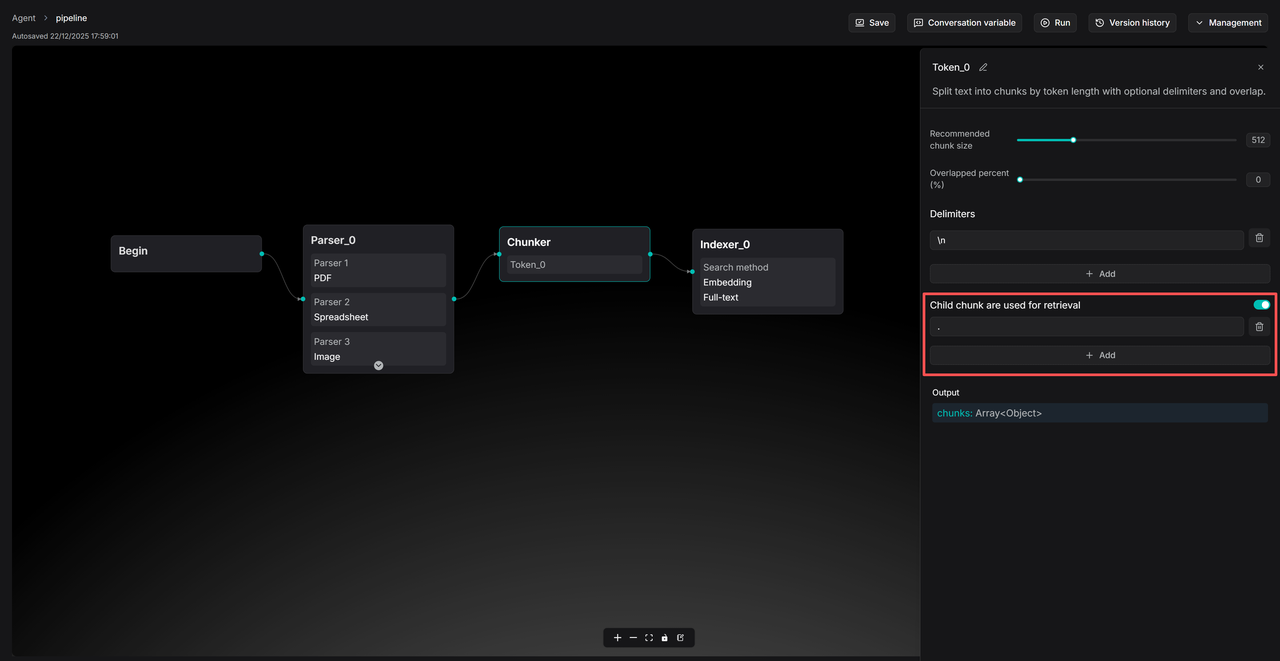
To use parent-child chunking, enable the “Child chunks are used for retrieval” toggle on the Knowledge Base Configuration page and set the delimiter for child chunks.
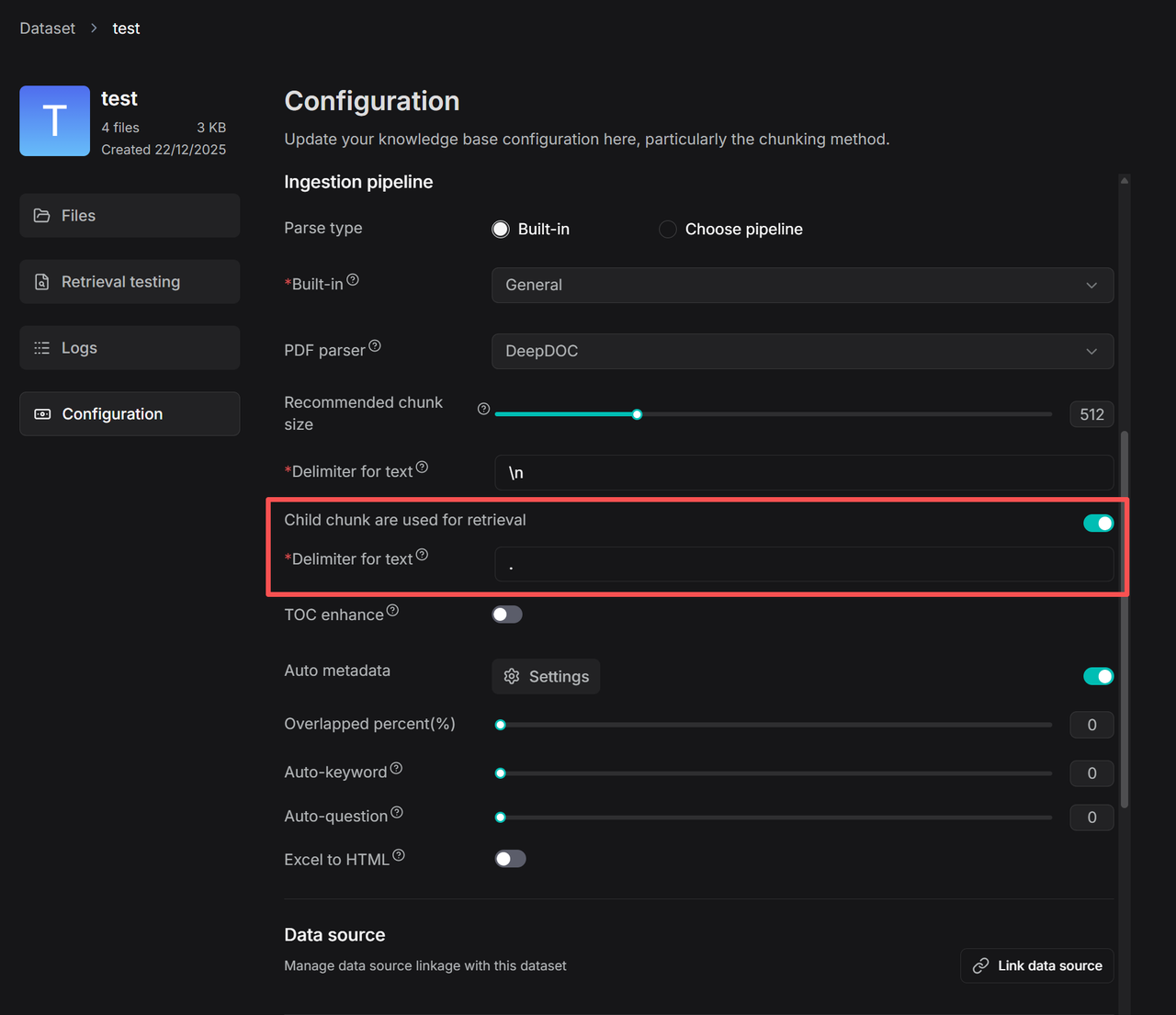
When child chunking is enabled, the logic for Recommended chunk size switches to the size of the parent chunk. You may appropriately increase this setting (e.g., to 1000–2000 tokens) to allow the LLM to retrieve more context when generating responses. The same applies to configurations within the ingestion pipeline.
Please note that the parent-child chunking feature and the TOC enhancement address the structural tension between “recall accuracy” and “context completeness” in RAG—from the perspectives of rule-based and model-based approaches, respectively. Both are transitional solutions designed to provide developers with ready-to-use optimization tools.
In future versions, RAGFlow will continue to advance its underlying capabilities, striving to resolve this challenge in a more systematic and fundamental manner at the architectural level.
API updates
Agent API returns trace logs
The RAGFlow Agent API now supports returning detailed execution trace logs, helping developers debug and analyze the execution flow of Agents.
Supported API
POST /api/v1/agents/{agent_id}/completions
Considerations
- Enable trace logs by setting
return_trace: true. - Trace logs include the execution time, inputs and outputs, and error messages for each component.
- In streaming responses, trace information is returned via the
component_finishedevent. - In non‑streaming responses, trace information is available in
data.data.trace.
Curl example
Converse with Agent (with Trace logs)
curl --request POST \
     --url http://{address}/api/v1/agents/{agent_id}/completions \
     --header 'Content-Type: application/json' \
     --header 'Authorization: Bearer <YOUR_API_KEY>' \
     --data '{
        "question": "How to install neovim?",
        "stream": true,
        "session_id": "cb2f385cb86211efa36e0242ac120005",
        "return_trace": true
     }'
Chat API supports metadata filtering
Supported APIs
POST /api/v1/chats/{chat_id}/completionsPOST /api/v1/chats_openai/{chat_id}/chat/completions
Curl example
Chat with a chat assisant (with metadata filtering):
curl --request POST \
     --url http://{address}/api/v1/chats/{chat_id}/completions \
     --header 'Content-Type: application/json' \
     --header 'Authorization: Bearer <YOUR_API_KEY>' \
     --data '{
          "question": "Who are you",
          "stream": true,
          "session_id":"9fa7691cb85c11ef9c5f0242ac120005",
          "metadata_condition": {
            "logic": "and",
            "conditions": [
              {
                "name": "author",
                "comparison_operator": "is",
                "value": "bob"
              }
            ]
          }
     }'
OpenAI-compatible API (with metadata filtering)
curl --request POST \
     --url http://{address}/api/v1/chats_openai/{chat_id}/chat/completions \
     --header 'Content-Type: application/json' \
     --header 'Authorization: Bearer <YOUR_API_KEY>' \
     --data '{
        "model": "model",
        "messages": [{"role": "user", "content": "Say this is a test!"}],
        "stream": true,
        "extra_body": {
          "reference": true,
          "metadata_condition": {
            "logic": "and",
            "conditions": [
              {
                "name": "author",
                "comparison_operator": "is",
                "value": "bob"
              }
            ]
          }
        }
      }'
See the corresponding API reference for details.
Finale
As the final update of RAGFlow in 2025, version 0.23.0 stands as a significant milestone that bridges past accomplishments with future ambitions. It marks the evolution of RAGFlow from a RAG engine focused primarily on knowledge-base scenarios into a contextual engine designed to support the construction of diverse AI Agents.
This release not only continues to strengthen core RAG capabilities but also introduces the all-new Memory module—designed to store and retrieve data generated during Agent interactions, seamlessly integrating it into ongoing contexts. The data preserved in Memory enables conversational systems to accumulate experience, gradually forming a self-reinforcing cycle of continuous improvement.
In the Agent architecture, if models are responsible for reasoning, and RAG and tools represent action, then Memory serves as the soul—carrying personalization and historical continuity. Our exploration of Memory is just beginning. Moving forward, we will advance towards more granular memory management and build effective mechanisms for Skills and Guidelines centered around tool usage.
As the foundational data platform for large language models, RAGFlow remains committed to its original vision: not only providing a complete no-code platform for Agent development but also striving to become the essential data cornerstone for all Agent systems—regardless of the tools used to build them.
We invite you to continue following our progress and to star our project, as we grow and evolve together. https://github.com/infiniflow/ragflow